> ## Documentation Index
> Fetch the complete documentation index at: https://docs.chief.bot/llms.txt
> Use this file to discover all available pages before exploring further.
# Changing your email · Signing out
> Sign out from the account menu.
## Sign out of Chief
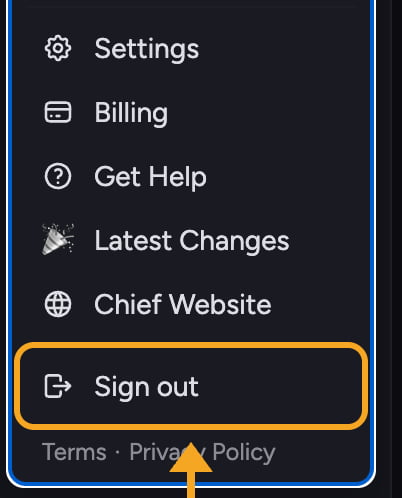 Sign out from the [account menu](/help/account-settings/managing-your-profile). This ends your session in the current browser.
1. Click your **avatar** in the top corner of Chief to open the account menu.
2. Scroll to the bottom of the menu.
3. Click **Sign out** (the row with the log-out icon).
You are returned to the signed-out view. To get back in, click **Log in** and [request a Magic Link](/help/getting-started/creating-your-account-signing-in) by email.
ℹ️ **Good to Know:** Signing out only affects the browser you are using. If you are signed in on another device or browser, you stay signed in there. To unlink a [paired device](/help/meetings-live-sessions/pairing-managing-devices-updating-the-app), use **Settings → Devices** and revoke it.
## Change the email on your account
Your email address is shown at the top of the account menu, under your name. It is read-only in the app, so there is no field to edit it yourself.
To change the email on your account, email Chief support at **[support@chief.bot](mailto:support@chief.bot)** from your current address and tell them the new address you want to use. The team will move your account over.
## FAQ
Try refreshing the page. If you remain signed in, clear the site cookies for Chief in your browser and reload. A second tab that was already open can also keep a stale session until it is refreshed.
You can, but your [projects](/help/projects-sharing-teams/what-is-a-project), Library, and history stay with the original account. To keep your data, ask support to change the email instead of starting over.
Check your spam folder and confirm you entered the same email you registered with. You can request a new link from the login screen. If it still does not arrive, [contact support](/help/help-feedback-whats-new/getting-help-in-chief).
Sign out from the [account menu](/help/account-settings/managing-your-profile). This ends your session in the current browser.
1. Click your **avatar** in the top corner of Chief to open the account menu.
2. Scroll to the bottom of the menu.
3. Click **Sign out** (the row with the log-out icon).
You are returned to the signed-out view. To get back in, click **Log in** and [request a Magic Link](/help/getting-started/creating-your-account-signing-in) by email.
ℹ️ **Good to Know:** Signing out only affects the browser you are using. If you are signed in on another device or browser, you stay signed in there. To unlink a [paired device](/help/meetings-live-sessions/pairing-managing-devices-updating-the-app), use **Settings → Devices** and revoke it.
## Change the email on your account
Your email address is shown at the top of the account menu, under your name. It is read-only in the app, so there is no field to edit it yourself.
To change the email on your account, email Chief support at **[support@chief.bot](mailto:support@chief.bot)** from your current address and tell them the new address you want to use. The team will move your account over.
## FAQ
Try refreshing the page. If you remain signed in, clear the site cookies for Chief in your browser and reload. A second tab that was already open can also keep a stale session until it is refreshed.
You can, but your [projects](/help/projects-sharing-teams/what-is-a-project), Library, and history stay with the original account. To keep your data, ask support to change the email instead of starting over.
Check your spam folder and confirm you entered the same email you registered with. You can request a new link from the login screen. If it still does not arrive, [contact support](/help/help-feedback-whats-new/getting-help-in-chief).