> ## Documentation Index
> Fetch the complete documentation index at: https://docs.chief.bot/llms.txt
> Use this file to discover all available pages before exploring further.
# Managing your profile
> Your profile details appear in the account menu.
## Where your profile lives
Your profile details appear in the account menu. Click your **avatar** in the top corner of Chief to open the account menu. At the top you will see your **name**, your **email address**, and your current [**plan**](/help/plans-credits-billing/plans-overview-explore-pro-power-user-enterprise).
These details are read-only in the app today. There is no separate profile-editing page, so you cannot change your name or photo from a settings form.
## What you can do from the account menu
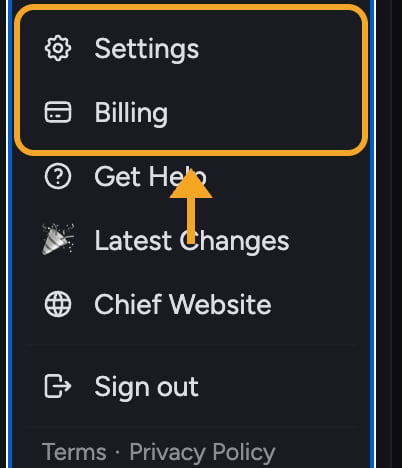 1. Click your **avatar** (top corner) to open the account menu.
2. Review your **name**, **email**, and **plan** at the top of the menu.
3. Click **Settings** to open General settings, where you can change your [language](/help/account-settings/language-locale-17-languages), [User Mode](/help/account-settings/regular-vs-advanced-mode), and [other preferences](/help/account-settings/interface-preferences-enter-key-sidebar-advanced-mode).
4. Click **Billing** to [view or change your plan](/help/plans-credits-billing/checking-your-credit-balance-usage).
ℹ️ **Good to Know:** If your account belongs to [an organization](/help/organization-administration/organization-settings-overview), your name and email may be managed by your workspace. Reach out to your workspace owner or to Chief support if a detail looks wrong.
## Changing your name or profile details
Because profile fields are read-only in the app, [contact Chief support](/help/help-feedback-whats-new/getting-help-in-chief) to update your display name. Email support at **[support@chief.bot](mailto:support@chief.bot)** with the change you want, and the team will update it for you.
## FAQ
You must be signed in to see your profile. If you only see **Log in** and **Sign up** buttons in the menu, sign in first, then reopen the menu by clicking your avatar.
Profile fields cannot be edited in the app. Email [support@chief.bot](mailto:support@chief.bot) with the correct name and they will update your account.
There is no photo upload in the app today. Chief shows your initials or a default avatar.
1. Click your **avatar** (top corner) to open the account menu.
2. Review your **name**, **email**, and **plan** at the top of the menu.
3. Click **Settings** to open General settings, where you can change your [language](/help/account-settings/language-locale-17-languages), [User Mode](/help/account-settings/regular-vs-advanced-mode), and [other preferences](/help/account-settings/interface-preferences-enter-key-sidebar-advanced-mode).
4. Click **Billing** to [view or change your plan](/help/plans-credits-billing/checking-your-credit-balance-usage).
ℹ️ **Good to Know:** If your account belongs to [an organization](/help/organization-administration/organization-settings-overview), your name and email may be managed by your workspace. Reach out to your workspace owner or to Chief support if a detail looks wrong.
## Changing your name or profile details
Because profile fields are read-only in the app, [contact Chief support](/help/help-feedback-whats-new/getting-help-in-chief) to update your display name. Email support at **[support@chief.bot](mailto:support@chief.bot)** with the change you want, and the team will update it for you.
## FAQ
You must be signed in to see your profile. If you only see **Log in** and **Sign up** buttons in the menu, sign in first, then reopen the menu by clicking your avatar.
Profile fields cannot be edited in the app. Email [support@chief.bot](mailto:support@chief.bot) with the correct name and they will update your account.
There is no photo upload in the app today. Chief shows your initials or a default avatar.