> ## Documentation Index
> Fetch the complete documentation index at: https://docs.chief.bot/llms.txt
> Use this file to discover all available pages before exploring further.
# Connecting a custom MCP server
> Out of the box, an Action can deliver results by email and save them to your Library.
## Extend Actions with your own tools
Out of the box, an Action can [deliver results by email](/help/actions-automation/sending-results-by-email) and [save them to your **Library**](/help/actions-automation/saving-action-output-to-your-library). To reach beyond that — for example to push a result into a tool your team already uses — Chief supports connecting a custom [**MCP server**](/help/integrations/mcp-servers-connecting-custom-tools) (Model Context Protocol). This lets you define a destination or capability that isn't built in.
## How to connect
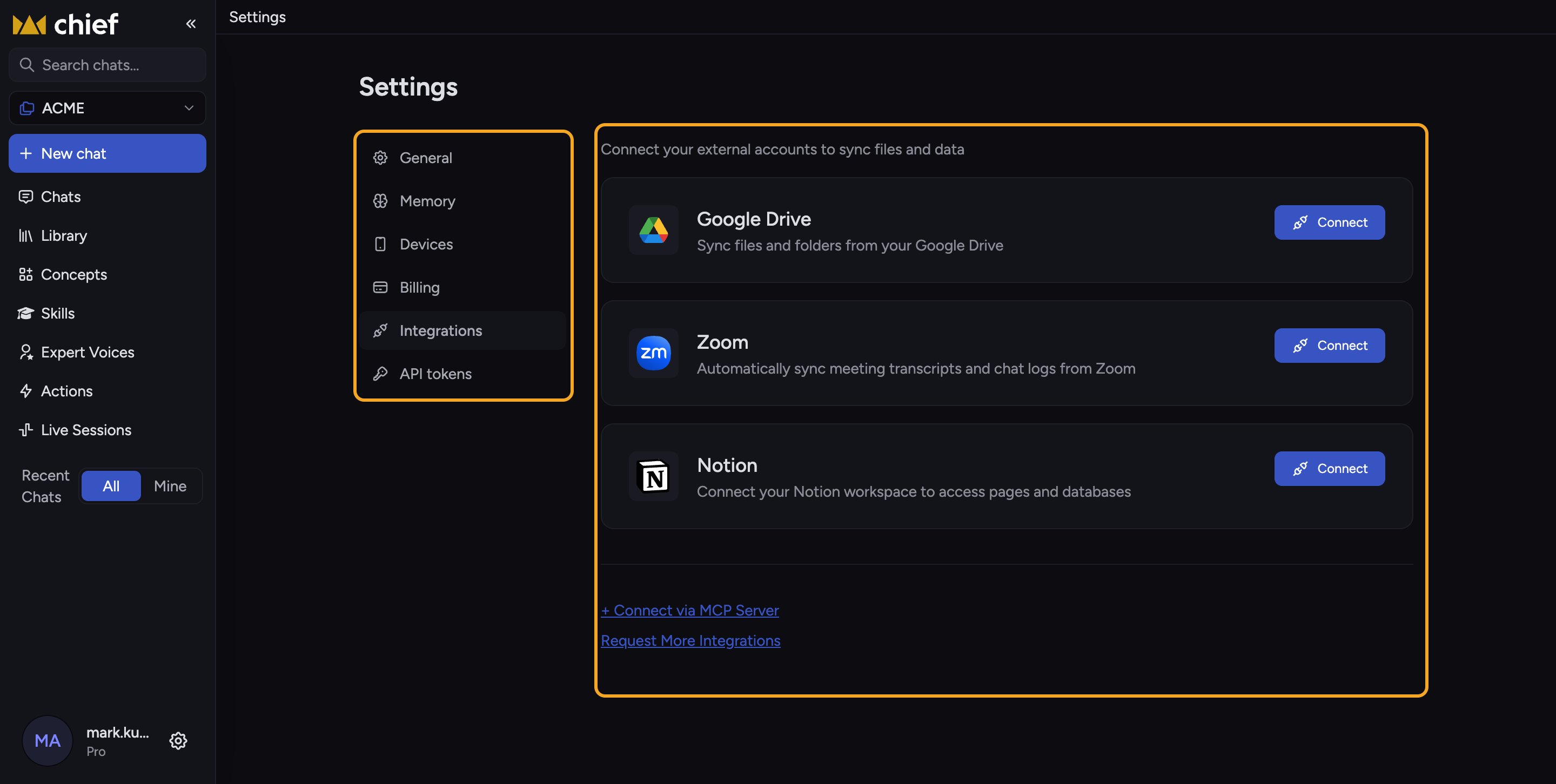 Where Chief offers [additional destinations](/help/integrations/integrations-overview), you'll see a **+ Connect via MCP Server** link. Click it to open the MCP setup guide, which walks through registering your server so Chief can use it.
ℹ️ **Good to know:** MCP is an advanced, developer-oriented capability. If you only need email or Library output, you don't need an MCP server at all. (Availability and the exact entry point are evolving — verify in your workspace.)
⚠️ **Important:** Connecting an MCP server lets Chief send data to an external system you control. Only connect servers you trust, and review what data each Action will pass to them.
## FAQ
No. Email delivery and Save to Library cover most needs. MCP is only for connecting custom tools or destinations.
The MCP entry point appears alongside additional destination options and may not be present in every surface or plan. If you need it and can't find it, check with your workspace admin or [Chief support](/help/help-feedback-whats-new/getting-help-in-chief).
The **+ Connect via MCP Server** link opens Chief's MCP guide with the current setup steps. Follow it there, since the configuration specifics change as the feature evolves.
Where Chief offers [additional destinations](/help/integrations/integrations-overview), you'll see a **+ Connect via MCP Server** link. Click it to open the MCP setup guide, which walks through registering your server so Chief can use it.
ℹ️ **Good to know:** MCP is an advanced, developer-oriented capability. If you only need email or Library output, you don't need an MCP server at all. (Availability and the exact entry point are evolving — verify in your workspace.)
⚠️ **Important:** Connecting an MCP server lets Chief send data to an external system you control. Only connect servers you trust, and review what data each Action will pass to them.
## FAQ
No. Email delivery and Save to Library cover most needs. MCP is only for connecting custom tools or destinations.
The MCP entry point appears alongside additional destination options and may not be present in every surface or plan. If you need it and can't find it, check with your workspace admin or [Chief support](/help/help-feedback-whats-new/getting-help-in-chief).
The **+ Connect via MCP Server** link opens Chief's MCP guide with the current setup steps. Follow it there, since the configuration specifics change as the feature evolves.