> ## Documentation Index
> Fetch the complete documentation index at: https://docs.chief.bot/llms.txt
> Use this file to discover all available pages before exploring further.
# Deduplication — avoiding repeat reports
> A recurring Action can drift into repeating the same findings week after week.
## Report only what's new
A recurring [Action](/help/actions-automation/what-are-actions) can drift into repeating the same findings week after week. Deduplication fixes that: Chief reviews the Action's previous results before writing the next one, so each run delivers genuinely new information.
## How it turns on
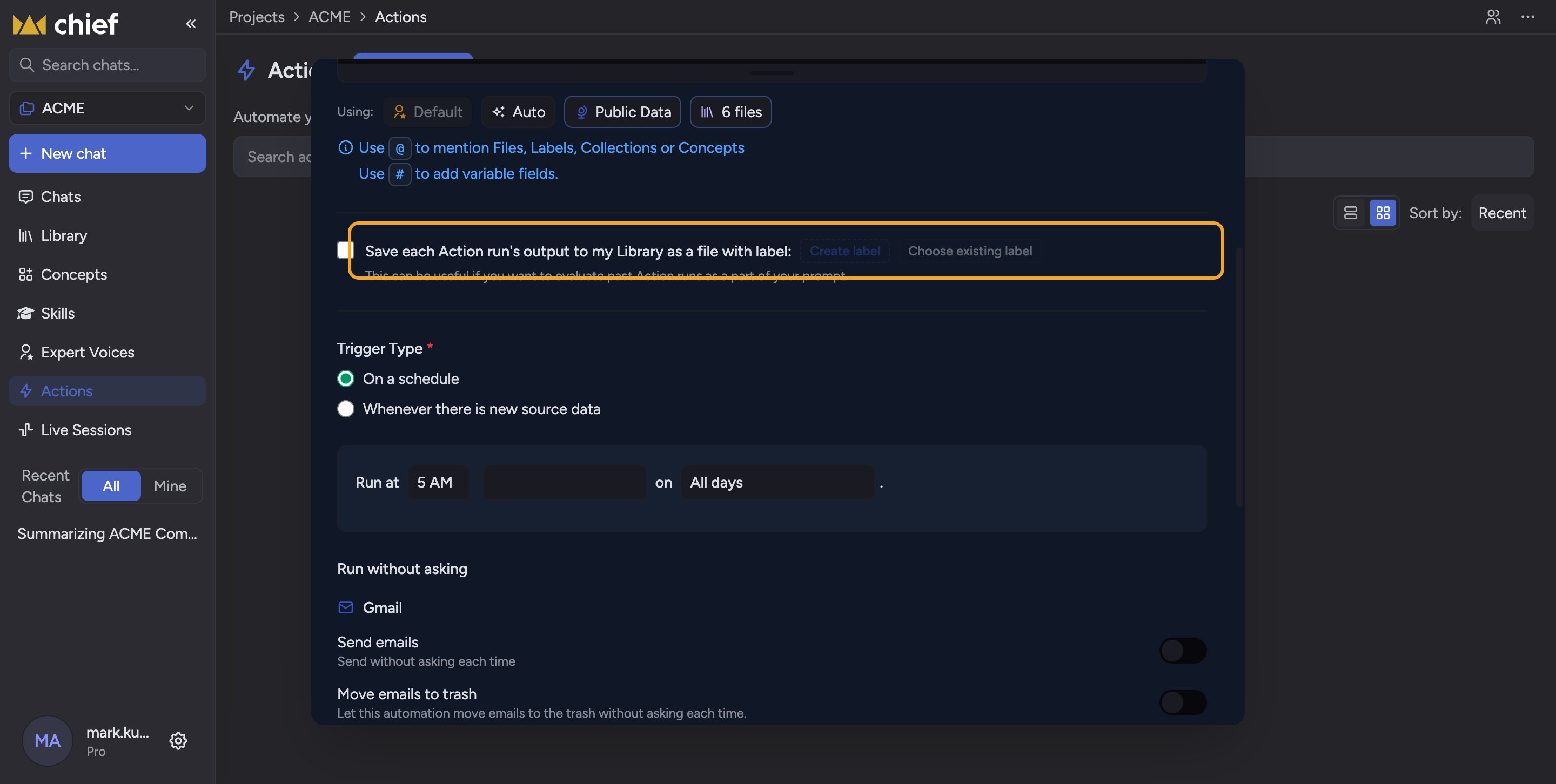 Deduplication is wired to [**Save to Library**](/help/actions-automation/saving-action-output-to-your-library). When you check **Save each Action run's output to my Library as a file with label** and pick [a Label](/help/labels/creating-customizing-labels-colors-icons), Chief automatically adds a line to the top of your prompt — something like "First, check the previous Action results in my Library regarding \[your Label]… provide net new information without duplicating past results." Because past runs are saved under that Label [in your Library](/help/your-knowledge-library/what-is-the-library), each new run can read them and skip what it already covered.
When this happens you'll see a green notice in the dialog: *"I've updated your prompt to use this label to check for past results before running."*
## Turning it off
If you'd rather not deduplicate, click **Undo** in that green notice. Chief removes the auto-added line from your prompt, and runs will no longer compare against past results.
ℹ️ **Good to know:** The dedup line is just text inserted into your prompt — you can see it, edit it, or delete it like anything else you typed. If you delete it manually, Chief respects that and won't re-add it.
## FAQ
It only kicks in when Save to Library is on and at least one Label is selected — that Label is what Chief uses to find past results. Turn on Save to Library and pick a Label.
Yes. If there genuinely isn't much new since the last run, a deduplicating Action will say so rather than repeat old findings. To get a full re-summary, click Undo on the dedup notice or [run the Action](/help/actions-automation/viewing-run-history-running-manually) without the dedup line.
No. Chief compares against the saved, Labeled runs in your Library, so Save to Library with a Label is required.
Deduplication is wired to [**Save to Library**](/help/actions-automation/saving-action-output-to-your-library). When you check **Save each Action run's output to my Library as a file with label** and pick [a Label](/help/labels/creating-customizing-labels-colors-icons), Chief automatically adds a line to the top of your prompt — something like "First, check the previous Action results in my Library regarding \[your Label]… provide net new information without duplicating past results." Because past runs are saved under that Label [in your Library](/help/your-knowledge-library/what-is-the-library), each new run can read them and skip what it already covered.
When this happens you'll see a green notice in the dialog: *"I've updated your prompt to use this label to check for past results before running."*
## Turning it off
If you'd rather not deduplicate, click **Undo** in that green notice. Chief removes the auto-added line from your prompt, and runs will no longer compare against past results.
ℹ️ **Good to know:** The dedup line is just text inserted into your prompt — you can see it, edit it, or delete it like anything else you typed. If you delete it manually, Chief respects that and won't re-add it.
## FAQ
It only kicks in when Save to Library is on and at least one Label is selected — that Label is what Chief uses to find past results. Turn on Save to Library and pick a Label.
Yes. If there genuinely isn't much new since the last run, a deduplicating Action will say so rather than repeat old findings. To get a full re-summary, click Undo on the dedup notice or [run the Action](/help/actions-automation/viewing-run-history-running-manually) without the dedup line.
No. Chief compares against the saved, Labeled runs in your Library, so Save to Library with a Label is required.