> ## Documentation Index
> Fetch the complete documentation index at: https://docs.chief.bot/llms.txt
> Use this file to discover all available pages before exploring further.
# Managing email notifications
> Once an Action emails its results, you can manage who's on the list and whether each person is still subscribed — all from the Action's editor.
## Stay in control of Action emails
 Once an Action [emails its results](/help/actions-automation/sending-results-by-email), you can manage who's on the list and whether each person is still subscribed — all from the Action's editor.
## Add, remove, and bulk-edit recipients
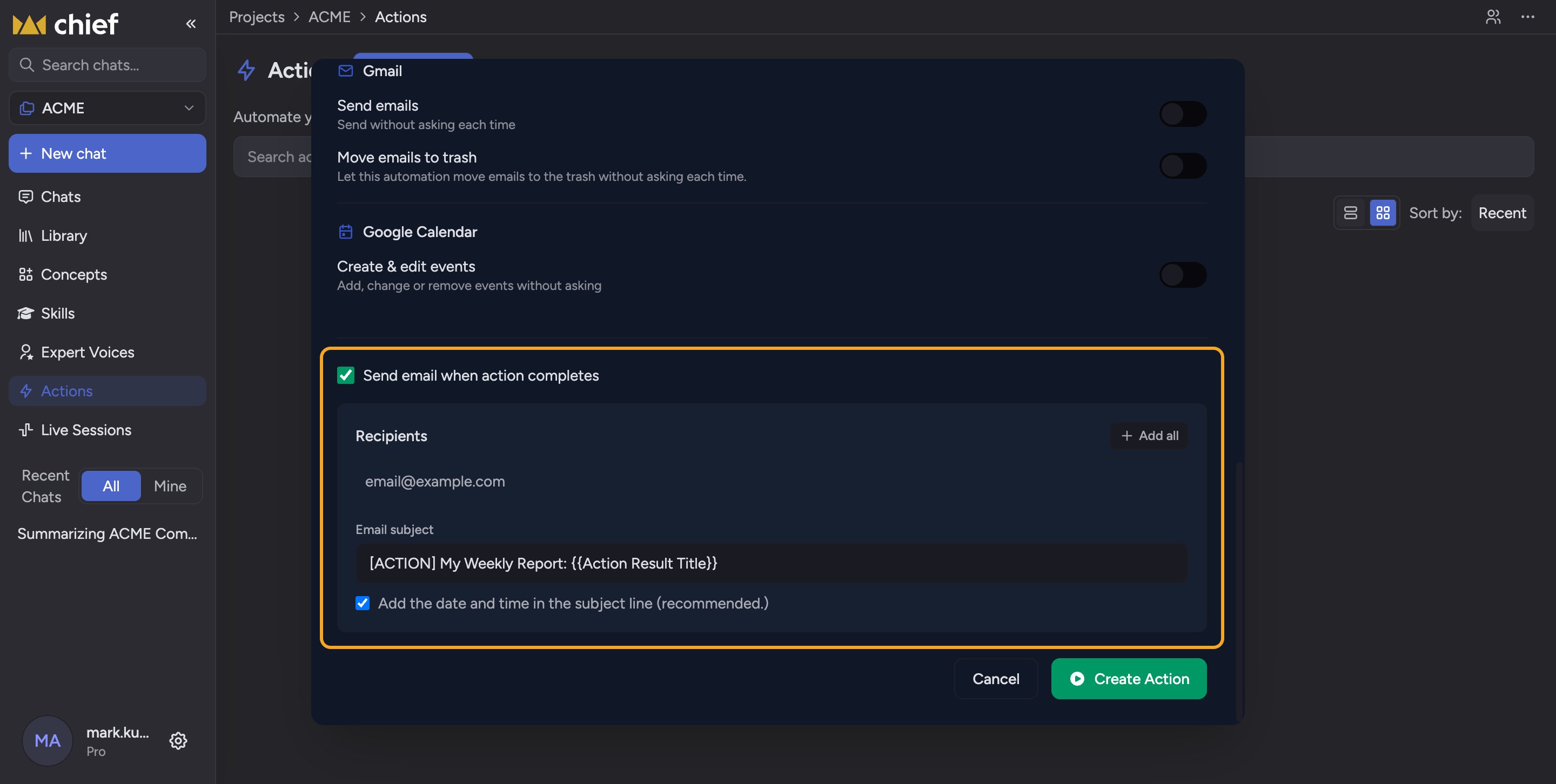
Open the Action and find the email settings under **Send email when action completes**. In the **Recipients** box you can type addresses, use **Add all** to add [everyone in the Project](/help/projects-sharing-teams/what-is-a-project), or **Remove all** to clear the list (up to 10 recipients).
## Check subscription status
When editing an Action that already has recipients, a **Recipient status** list appears. Each address is marked **Subscribed** (green dot) or **Unsubscribed** (amber warning). Unsubscribed recipients won't get the emails even though they're on the list.
## Resubscribe yourself
If your own address shows **Unsubscribed**, click the **Resubscribe** link next to it to start receiving the Action's emails again.
ℹ️ **Good to know:** People unsubscribe using the link in the Action's emails. That's why an address can stay in the recipients list yet still show as Unsubscribed — they opted out on their end.
⚠️ **Important:** You can only resubscribe your own address. If a teammate unsubscribed, they need to resubscribe themselves — you can't do it for them.
## FAQ
Check their Recipient status. If it reads **Unsubscribed**, they previously opted out and must resubscribe themselves. Being in the list isn't enough.
Remove your address from the recipients in [the Action's editor](/help/actions-automation/creating-your-first-action), or use the unsubscribe link in one of its emails.
It only shows when editing an existing Action that already has at least one recipient — not while creating a brand-new Action.
Once an Action [emails its results](/help/actions-automation/sending-results-by-email), you can manage who's on the list and whether each person is still subscribed — all from the Action's editor.
## Add, remove, and bulk-edit recipients
Open the Action and find the email settings under **Send email when action completes**. In the **Recipients** box you can type addresses, use **Add all** to add [everyone in the Project](/help/projects-sharing-teams/what-is-a-project), or **Remove all** to clear the list (up to 10 recipients).
## Check subscription status
When editing an Action that already has recipients, a **Recipient status** list appears. Each address is marked **Subscribed** (green dot) or **Unsubscribed** (amber warning). Unsubscribed recipients won't get the emails even though they're on the list.
## Resubscribe yourself
If your own address shows **Unsubscribed**, click the **Resubscribe** link next to it to start receiving the Action's emails again.
ℹ️ **Good to know:** People unsubscribe using the link in the Action's emails. That's why an address can stay in the recipients list yet still show as Unsubscribed — they opted out on their end.
⚠️ **Important:** You can only resubscribe your own address. If a teammate unsubscribed, they need to resubscribe themselves — you can't do it for them.
## FAQ
Check their Recipient status. If it reads **Unsubscribed**, they previously opted out and must resubscribe themselves. Being in the list isn't enough.
Remove your address from the recipients in [the Action's editor](/help/actions-automation/creating-your-first-action), or use the unsubscribe link in one of its emails.
It only shows when editing an existing Action that already has at least one recipient — not while creating a brand-new Action.