> ## Documentation Index
> Fetch the complete documentation index at: https://docs.chief.bot/llms.txt
> Use this file to discover all available pages before exploring further.
# Pausing, resuming & deleting Actions
> Every Action shows as a card on the Actions page inside a Project.
## Manage an Action's lifecycle
Every [Action](/help/actions-automation/what-are-actions) shows as a card on the **Actions** page inside [a Project](/help/projects-sharing-teams/what-is-a-project). Hover over a card to reveal its controls.
## Pause and resume
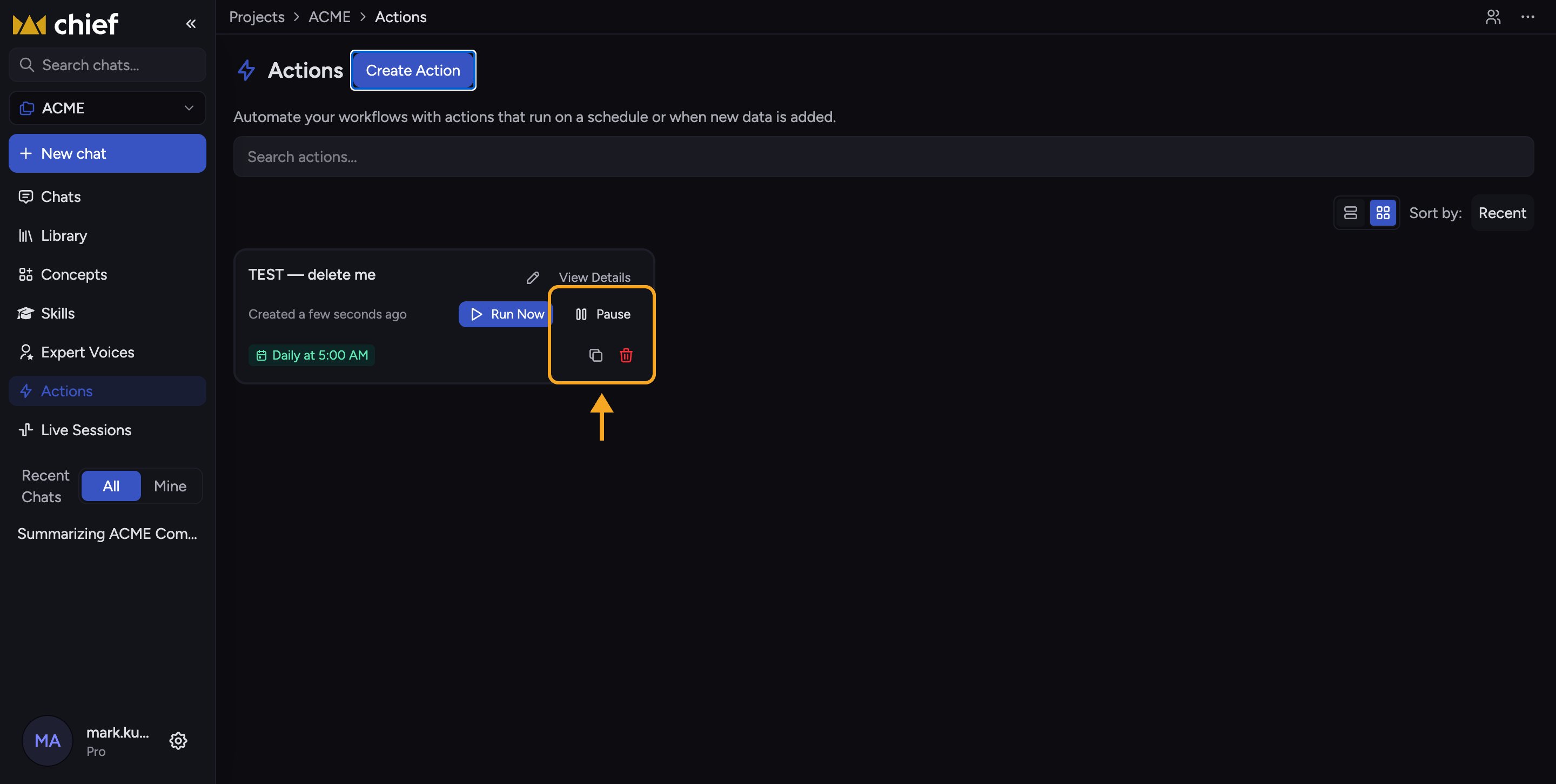 Click **Pause** on an active Action to stop it from running. Its status badge changes to **Paused** (amber). A paused Action keeps all its settings but never fires until you bring it back. Click **Resume** to make it active again.
## Duplicate
Click the **Duplicate** (copy) icon to create a near-identical Action named "\[name] (copy)". The duplicate is created **paused** so it won't run until you review it and resume it.
## Delete
Click the **Delete** (trash) icon. A confirmation dialog asks "Delete \[name]?" — click **Delete** to confirm. This cannot be undone.
⚠️ **Important:** Deleting an Action is permanent and removes its schedule and settings. [Past runs already saved to your Library](/help/actions-automation/saving-action-output-to-your-library) are not deleted, but the Action itself — and its [run history](/help/actions-automation/viewing-run-history-running-manually) — is gone. Pause instead if you only need to stop it temporarily.
ℹ️ **Good to know:** If an Action shows an "Owner unavailable" banner with a **Take ownership** button, its creator [left the Project](/help/projects-sharing-teams/removing-members-managing-access). Click **Take ownership** to transfer it to yourself so it can run again.
## FAQ
No. Pausing only stops runs. All your prompt, schedule, recipients, and output settings stay intact and return exactly as they were when you resume.
It may have been paused by [another Project member](/help/projects-sharing-teams/roles-access-levels-owner-collaborator-reader), or its owner left the Project (look for the "Owner unavailable" banner). Take ownership and resume it, or ask a teammate.
No. Deletion is permanent. If you might need it again, duplicate it before deleting, or just pause it.
Click **Pause** on an active Action to stop it from running. Its status badge changes to **Paused** (amber). A paused Action keeps all its settings but never fires until you bring it back. Click **Resume** to make it active again.
## Duplicate
Click the **Duplicate** (copy) icon to create a near-identical Action named "\[name] (copy)". The duplicate is created **paused** so it won't run until you review it and resume it.
## Delete
Click the **Delete** (trash) icon. A confirmation dialog asks "Delete \[name]?" — click **Delete** to confirm. This cannot be undone.
⚠️ **Important:** Deleting an Action is permanent and removes its schedule and settings. [Past runs already saved to your Library](/help/actions-automation/saving-action-output-to-your-library) are not deleted, but the Action itself — and its [run history](/help/actions-automation/viewing-run-history-running-manually) — is gone. Pause instead if you only need to stop it temporarily.
ℹ️ **Good to know:** If an Action shows an "Owner unavailable" banner with a **Take ownership** button, its creator [left the Project](/help/projects-sharing-teams/removing-members-managing-access). Click **Take ownership** to transfer it to yourself so it can run again.
## FAQ
No. Pausing only stops runs. All your prompt, schedule, recipients, and output settings stay intact and return exactly as they were when you resume.
It may have been paused by [another Project member](/help/projects-sharing-teams/roles-access-levels-owner-collaborator-reader), or its owner left the Project (look for the "Owner unavailable" banner). Take ownership and resume it, or ask a teammate.
No. Deletion is permanent. If you might need it again, duplicate it before deleting, or just pause it.