> ## Documentation Index
> Fetch the complete documentation index at: https://docs.chief.bot/llms.txt
> Use this file to discover all available pages before exploring further.
# How modes affect credit usage
> Chief runs on credits, and your response mode is the biggest lever on how many a prompt uses.
## More thinking costs more credits
Chief runs on [**credits**](/help/plans-credits-billing/how-credits-work), and your [response mode](/help/answer-depth-chiefs-agents/response-modes-automatic-fast-expert) is the biggest lever on how many a prompt uses. The deeper the mode, the more work Chief does — and the more credits that prompt consumes. Picking the right mode for the job keeps your credits going further.
## How each mode compares
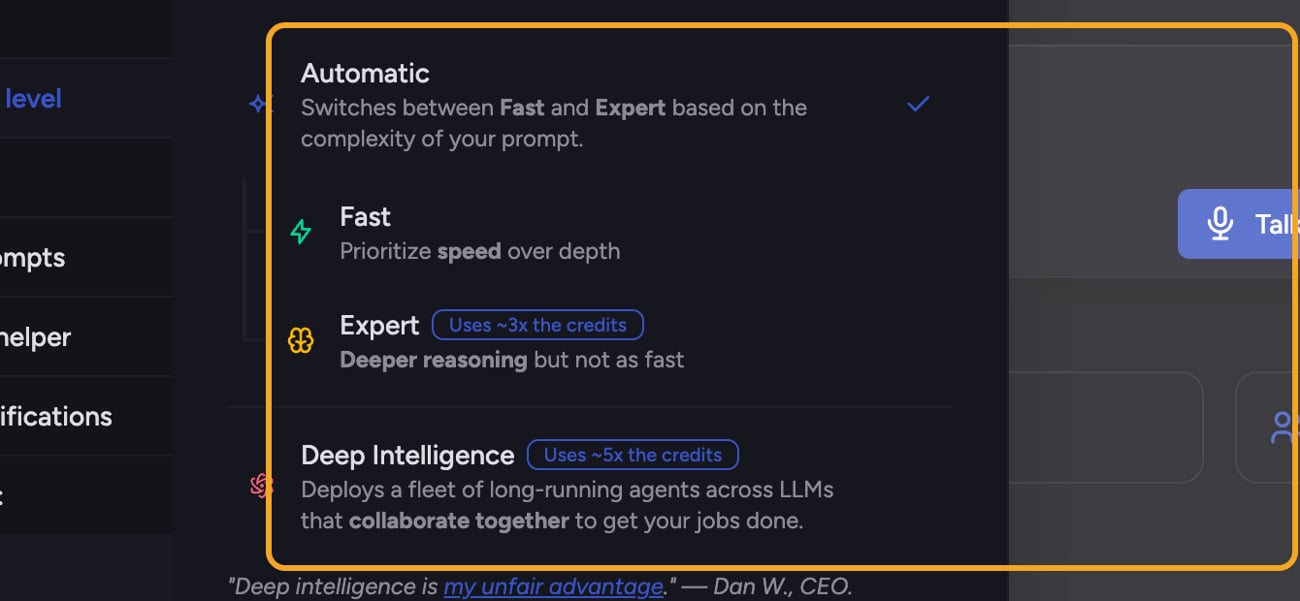 * **Fast** — the lightest mode. Standard credit usage for a quick answer.
* **Automatic** — switches between Fast and Expert per prompt, so cost depends on which one it lands on for that request.
* **Expert** — deeper reasoning, so it uses roughly **3x** the credits of a standard response.
* **[Deep Intelligence](/help/answer-depth-chiefs-agents/deep-intelligence-research-mode)** — runs a fleet of agents in parallel, so it uses roughly **5x** the credits. It's also a paid-plan feature.
You'll see the multiplier noted on the heavier modes in the mode selector — for example, "Uses \~3x the credits" on Expert and "\~5x" on Deep Intelligence.
🚀 **Pro-Tip:** Leave the mode on Automatic for everyday work. Chief uses Fast for simple prompts and only spends Expert-level credits when the prompt actually needs deeper reasoning — so you're not paying for depth you don't need.
## Keep an eye on your balance
* **Fast** — the lightest mode. Standard credit usage for a quick answer.
* **Automatic** — switches between Fast and Expert per prompt, so cost depends on which one it lands on for that request.
* **Expert** — deeper reasoning, so it uses roughly **3x** the credits of a standard response.
* **[Deep Intelligence](/help/answer-depth-chiefs-agents/deep-intelligence-research-mode)** — runs a fleet of agents in parallel, so it uses roughly **5x** the credits. It's also a paid-plan feature.
You'll see the multiplier noted on the heavier modes in the mode selector — for example, "Uses \~3x the credits" on Expert and "\~5x" on Deep Intelligence.
🚀 **Pro-Tip:** Leave the mode on Automatic for everyday work. Chief uses Fast for simple prompts and only spends Expert-level credits when the prompt actually needs deeper reasoning — so you're not paying for depth you don't need.
## Keep an eye on your balance
 Heavier modes draw down credits faster. You can [see your **Credits Balance** and **Usage This Month**](/help/plans-credits-billing/checking-your-credit-balance-usage) in your account, and [refill](/help/plans-credits-billing/refilling-credits) or upgrade when you're running low. Each completed response also shows the total credits it used.
⚠️ **Important:** If a project runs out of credits, prompts in that project can't run until someone tops it up — even if your personal balance still has credits. [Project credits and personal credits are separate](/help/plans-credits-billing/personal-vs-organization-billing).
## FAQ
The mode is usually the reason. A Deep Intelligence prompt (\~5x) or an Expert prompt (\~3x) costs more than a Fast one. [Adding an agent mention](/help/answer-depth-chiefs-agents/calling-on-a-specific-agent-in-your-prompt) also pushes a prompt into Deep Intelligence, which raises its cost.
They're approximate — the selector shows "\~3x" and "\~5x." Actual usage varies with the size and complexity of the work, so treat the multipliers as a guide, not a fixed price.
[Chief stops processing](/help/plans-credits-billing/what-happens-when-you-run-out-of-credits) until credits are topped up. Refill your personal credits, or — for a shared project — have the project owner top up the project's credits, since personal balance doesn't apply to project work.
Heavier modes draw down credits faster. You can [see your **Credits Balance** and **Usage This Month**](/help/plans-credits-billing/checking-your-credit-balance-usage) in your account, and [refill](/help/plans-credits-billing/refilling-credits) or upgrade when you're running low. Each completed response also shows the total credits it used.
⚠️ **Important:** If a project runs out of credits, prompts in that project can't run until someone tops it up — even if your personal balance still has credits. [Project credits and personal credits are separate](/help/plans-credits-billing/personal-vs-organization-billing).
## FAQ
The mode is usually the reason. A Deep Intelligence prompt (\~5x) or an Expert prompt (\~3x) costs more than a Fast one. [Adding an agent mention](/help/answer-depth-chiefs-agents/calling-on-a-specific-agent-in-your-prompt) also pushes a prompt into Deep Intelligence, which raises its cost.
They're approximate — the selector shows "\~3x" and "\~5x." Actual usage varies with the size and complexity of the work, so treat the multipliers as a guide, not a fixed price.
[Chief stops processing](/help/plans-credits-billing/what-happens-when-you-run-out-of-credits) until credits are topped up. Refill your personal credits, or — for a shared project — have the project owner top up the project's credits, since personal balance doesn't apply to project work.