> ## Documentation Index
> Fetch the complete documentation index at: https://docs.chief.bot/llms.txt
> Use this file to discover all available pages before exploring further.
# Meet Chief's agents: Explorer, Librarian, Researcher, Planner
> When a request is complex, Chief doesn't reason in one straight line.
## A team of specialists, not a single answer
 When a request is complex, Chief doesn't reason in one straight line. It deploys a team of specialized **agents** that work in parallel — each one good at a different kind of job — and synthesizes their findings into a single, [cited answer](/help/chatting-with-chief/understanding-sources-citations-in-answers). You don't manage the team; Chief calibrates it to your request automatically. These agents work within [**Deep Intelligence**](/help/answer-depth-chiefs-agents/deep-intelligence-research-mode) mode (a paid-plan feature).
Here are the four agents worth knowing, and what each one actually does.
## Explorer — your external intelligence operative
When a request is complex, Chief doesn't reason in one straight line. It deploys a team of specialized **agents** that work in parallel — each one good at a different kind of job — and synthesizes their findings into a single, [cited answer](/help/chatting-with-chief/understanding-sources-citations-in-answers). You don't manage the team; Chief calibrates it to your request automatically. These agents work within [**Deep Intelligence**](/help/answer-depth-chiefs-agents/deep-intelligence-research-mode) mode (a paid-plan feature).
Here are the four agents worth knowing, and what each one actually does.
## Explorer — your external intelligence operative
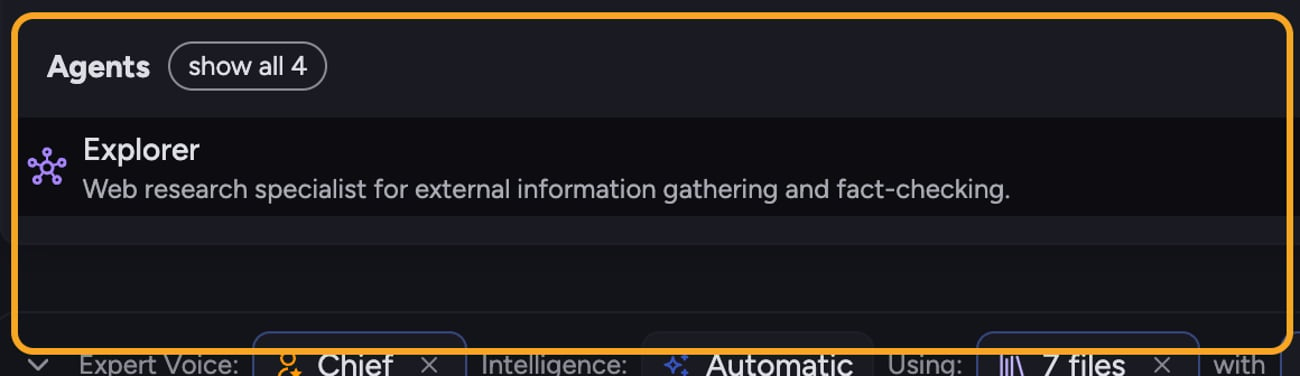 The **Explorer** agent researches [the open web](/help/the-prompt-bar-scope/including-public-web-data-public-data): news, academic databases, GitHub, social media, financial filings, and company sites. Use it for competitive intelligence, market context, and current events — anything outside your own documents.
**Example:** "How are our three top competitors positioning their pricing this quarter?" Explorer scans recent announcements, pricing pages, and press coverage and reports back what's changed.
You can [call it directly](/help/answer-depth-chiefs-agents/calling-on-a-specific-agent-in-your-prompt) by typing **@explorer** in your prompt.
## Librarian — your institutional memory, made searchable
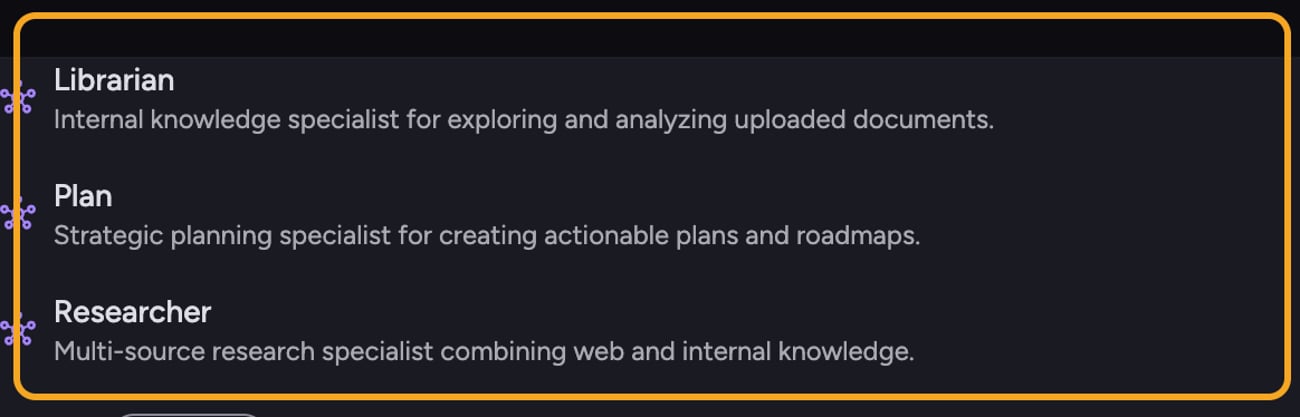
The **Librarian** agent works exclusively inside your own content: uploaded documents, [knowledge base](/help/your-knowledge-library/what-is-the-library), project files, and [call transcripts](/help/meetings-live-sessions/searching-a-transcript). It surfaces the exact passage or data point you need, with citations back to the source document.
**Example:** "What did we promise this customer about the renewal in our last QBR?" Librarian reads across your transcripts and notes and pulls the specific commitment, with a citation.
You can call it directly by typing **@librarian** in your prompt.
## Researcher — the synthesis engine
The **Researcher** agent combines both worlds. It draws from your internal knowledge base and the open web at the same time, and is the agent Chief reaches for when a complete answer needs both what your organization knows and what the world knows.
**Example:** "How do our retention numbers compare to industry benchmarks, and what should we change?" Researcher pulls your internal metrics (via the Librarian) and external benchmarks (via the Explorer) and delivers a unified, comparative answer.
Chief invokes the Researcher automatically when a task calls for it.
## Planner — the architect of complex work
The **Planner** agent is the strategist. When a task is too big for one agent, [the Planner breaks it into optimally sized subtasks](/help/how-chief-works-magic-under-the-hood/how-chief-thinks-the-multi-agent-agentic-process), decides how many agents to deploy, and assigns each one its focus before work begins.
**Example:** "Produce a full go-to-market plan for our new product." The Planner decomposes that into market research, internal-data review, positioning, and roadmap subtasks, then dispatches the right agents to each.
Chief invokes the Planner automatically for complex, multi-step requests.
*In the prompt bar's @-mention picker, this agent is labeled **Plan**.*
💡 **Good to Know:** Explorer and Librarian are the two agents you can summon by name with @explorer and @librarian. Researcher and Planner run automatically when Chief decides a job needs them — you don't have to call them.
## FAQ
Those two are invoked automatically when Chief decides a task needs synthesis (Researcher) or decomposition (Planner). The agents you summon by name are @explorer and @librarian.
No. For most requests, Chief picks and coordinates the agents for you. Mentioning @explorer or @librarian is an option when you want to steer the work toward external or internal sources specifically.
Agents run in Deep Intelligence mode, which is a paid-plan feature. On a free plan, agent mentions can't run. [Upgrade to Pro](/help/plans-credits-billing/plans-overview-explore-pro-power-user-enterprise), or remove the mention to send a standard prompt.
The **Explorer** agent researches [the open web](/help/the-prompt-bar-scope/including-public-web-data-public-data): news, academic databases, GitHub, social media, financial filings, and company sites. Use it for competitive intelligence, market context, and current events — anything outside your own documents.
**Example:** "How are our three top competitors positioning their pricing this quarter?" Explorer scans recent announcements, pricing pages, and press coverage and reports back what's changed.
You can [call it directly](/help/answer-depth-chiefs-agents/calling-on-a-specific-agent-in-your-prompt) by typing **@explorer** in your prompt.
## Librarian — your institutional memory, made searchable
The **Librarian** agent works exclusively inside your own content: uploaded documents, [knowledge base](/help/your-knowledge-library/what-is-the-library), project files, and [call transcripts](/help/meetings-live-sessions/searching-a-transcript). It surfaces the exact passage or data point you need, with citations back to the source document.
**Example:** "What did we promise this customer about the renewal in our last QBR?" Librarian reads across your transcripts and notes and pulls the specific commitment, with a citation.
You can call it directly by typing **@librarian** in your prompt.
## Researcher — the synthesis engine
The **Researcher** agent combines both worlds. It draws from your internal knowledge base and the open web at the same time, and is the agent Chief reaches for when a complete answer needs both what your organization knows and what the world knows.
**Example:** "How do our retention numbers compare to industry benchmarks, and what should we change?" Researcher pulls your internal metrics (via the Librarian) and external benchmarks (via the Explorer) and delivers a unified, comparative answer.
Chief invokes the Researcher automatically when a task calls for it.
## Planner — the architect of complex work
The **Planner** agent is the strategist. When a task is too big for one agent, [the Planner breaks it into optimally sized subtasks](/help/how-chief-works-magic-under-the-hood/how-chief-thinks-the-multi-agent-agentic-process), decides how many agents to deploy, and assigns each one its focus before work begins.
**Example:** "Produce a full go-to-market plan for our new product." The Planner decomposes that into market research, internal-data review, positioning, and roadmap subtasks, then dispatches the right agents to each.
Chief invokes the Planner automatically for complex, multi-step requests.
*In the prompt bar's @-mention picker, this agent is labeled **Plan**.*
💡 **Good to Know:** Explorer and Librarian are the two agents you can summon by name with @explorer and @librarian. Researcher and Planner run automatically when Chief decides a job needs them — you don't have to call them.
## FAQ
Those two are invoked automatically when Chief decides a task needs synthesis (Researcher) or decomposition (Planner). The agents you summon by name are @explorer and @librarian.
No. For most requests, Chief picks and coordinates the agents for you. Mentioning @explorer or @librarian is an option when you want to steer the work toward external or internal sources specifically.
Agents run in Deep Intelligence mode, which is a paid-plan feature. On a free plan, agent mentions can't run. [Upgrade to Pro](/help/plans-credits-billing/plans-overview-explore-pro-power-user-enterprise), or remove the mention to send a standard prompt.