> ## Documentation Index
> Fetch the complete documentation index at: https://docs.chief.bot/llms.txt
> Use this file to discover all available pages before exploring further.
# Asking good questions: prompting best practices
> Chief answers the question you actually asked.
 ## Why phrasing matters
Chief answers the question you actually asked. A vague prompt gets a vague answer; a specific one gets a focused, well-sourced reply you can act on right away. You do not need special syntax — you just need to say what you want, what to use, and what the answer should look like.
## Be specific about the task
State the outcome you want, not just the topic. Chief can also [suggest a sharper version of your prompt](/help/chatting-with-chief/improving-your-prompt-with-chiefs-suggestions) as you type. "Summarize the Q3 board deck in five bullet points for an exec audience" beats "tell me about Q3." Name the format (bullets, table, short paragraph), the length, and the audience when they matter.
## Point Chief at the right sources
## Why phrasing matters
Chief answers the question you actually asked. A vague prompt gets a vague answer; a specific one gets a focused, well-sourced reply you can act on right away. You do not need special syntax — you just need to say what you want, what to use, and what the answer should look like.
## Be specific about the task
State the outcome you want, not just the topic. Chief can also [suggest a sharper version of your prompt](/help/chatting-with-chief/improving-your-prompt-with-chiefs-suggestions) as you type. "Summarize the Q3 board deck in five bullet points for an exec audience" beats "tell me about Q3." Name the format (bullets, table, short paragraph), the length, and the audience when they matter.
## Point Chief at the right sources
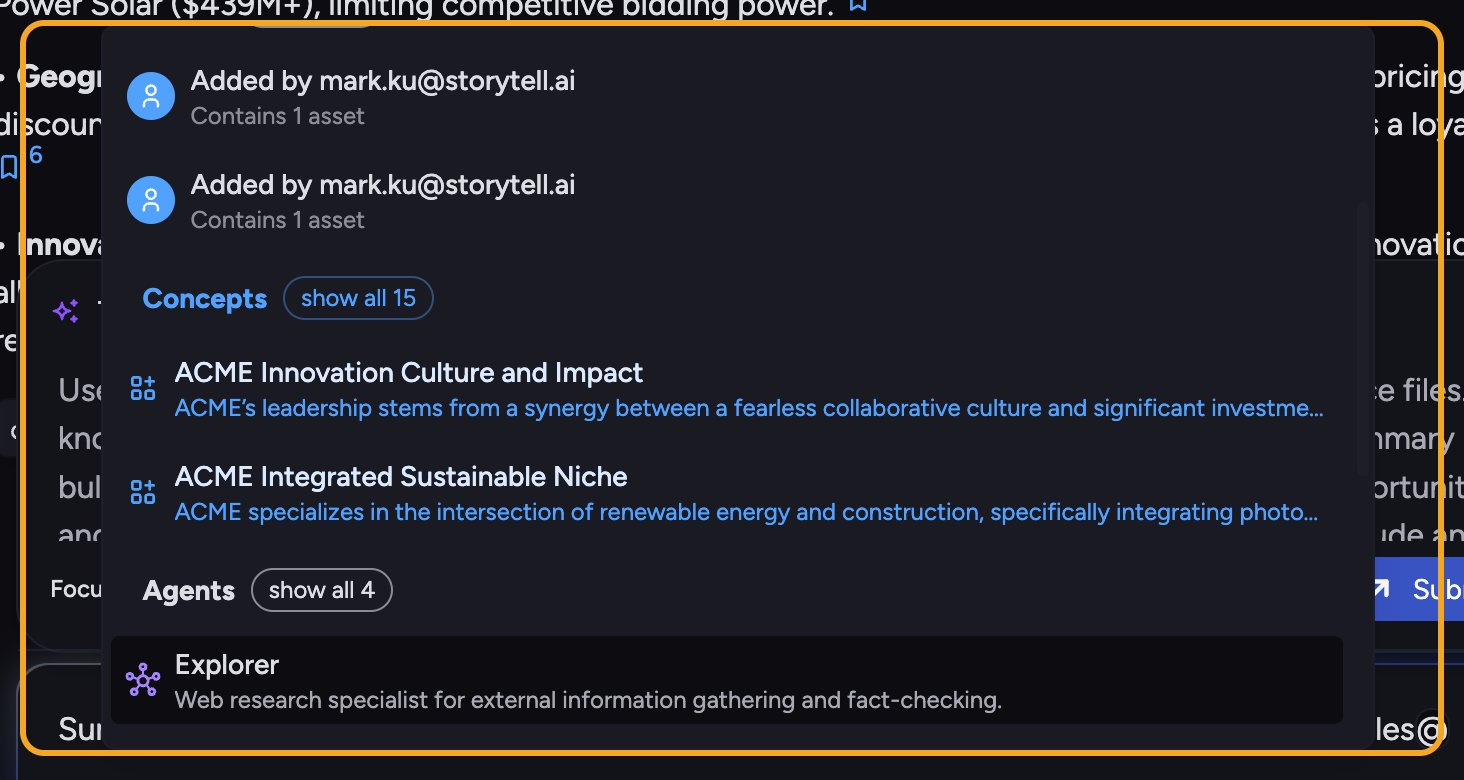 You are in a [Project](/help/projects-sharing-teams/what-is-a-project), so Chief already searches that Project's [Library](/help/your-knowledge-library/what-is-the-library). If you want a specific file, [Concept](/help/concepts/what-are-concepts), or [Skill](/help/skills/what-are-skills), [mention it with the **@** menu](/help/the-prompt-bar-scope/mentioning-files-labels-collections-concepts) in the prompt bar to pull it directly into the prompt. If you want [web results](/help/the-prompt-bar-scope/including-public-web-data-public-data), say so — "search the web and cite your sources."
## Give context, then ask
One strong message often works better than a stack of fragments. Tell Chief the situation, the constraint, and the goal in the same prompt: who it is for, what decision it supports, and what to leave out.
🚀 **Pro-Tip:** Ask for sources up front. Adding "tell me exactly where you got this" or using the [**Cite Sources** action](/help/chatting-with-chief/understanding-sources-citations-in-answers) makes Chief show the file, passage, and page behind each claim — so you can verify before you share.
## Iterate instead of restarting
If the first answer is close but not right, [refine it in a follow-up](/help/chatting-with-chief/following-up-continuing-the-conversation) rather than retyping the whole question. "Make it shorter," "focus on the risks," or "rewrite for a non-technical reader" all build on the answer you already have, because the chat keeps its context.
## FAQ
Long enough to be unambiguous. Include the task, the audience, the format, and any must-use sources. If a detail would change the answer, put it in the prompt.
No. Plain language works. The only optional helper is the **@** menu in the prompt bar, which lets you attach a specific file, Concept, Skill, or [Expert Voice](/help/the-prompt-bar-scope/responding-in-an-expert-voice-respond-as) to the prompt.
Reply in the same chat to correct course — "that is not what I meant; I am asking about X." You can also [edit your original message](/help/chatting-with-chief/editing-copying-downloading-messages) to rephrase it, which keeps the thread focused instead of starting over.
You are in a [Project](/help/projects-sharing-teams/what-is-a-project), so Chief already searches that Project's [Library](/help/your-knowledge-library/what-is-the-library). If you want a specific file, [Concept](/help/concepts/what-are-concepts), or [Skill](/help/skills/what-are-skills), [mention it with the **@** menu](/help/the-prompt-bar-scope/mentioning-files-labels-collections-concepts) in the prompt bar to pull it directly into the prompt. If you want [web results](/help/the-prompt-bar-scope/including-public-web-data-public-data), say so — "search the web and cite your sources."
## Give context, then ask
One strong message often works better than a stack of fragments. Tell Chief the situation, the constraint, and the goal in the same prompt: who it is for, what decision it supports, and what to leave out.
🚀 **Pro-Tip:** Ask for sources up front. Adding "tell me exactly where you got this" or using the [**Cite Sources** action](/help/chatting-with-chief/understanding-sources-citations-in-answers) makes Chief show the file, passage, and page behind each claim — so you can verify before you share.
## Iterate instead of restarting
If the first answer is close but not right, [refine it in a follow-up](/help/chatting-with-chief/following-up-continuing-the-conversation) rather than retyping the whole question. "Make it shorter," "focus on the risks," or "rewrite for a non-technical reader" all build on the answer you already have, because the chat keeps its context.
## FAQ
Long enough to be unambiguous. Include the task, the audience, the format, and any must-use sources. If a detail would change the answer, put it in the prompt.
No. Plain language works. The only optional helper is the **@** menu in the prompt bar, which lets you attach a specific file, Concept, Skill, or [Expert Voice](/help/the-prompt-bar-scope/responding-in-an-expert-voice-respond-as) to the prompt.
Reply in the same chat to correct course — "that is not what I meant; I am asking about X." You can also [edit your original message](/help/chatting-with-chief/editing-copying-downloading-messages) to rephrase it, which keeps the thread focused instead of starting over.