> ## Documentation Index
> Fetch the complete documentation index at: https://docs.chief.bot/llms.txt
> Use this file to discover all available pages before exploring further.
# Deleting a chat
> Deleting a chat thread removes it permanently.
Deleting a [chat thread](/help/chatting-with-chief/how-chats-work) removes it permanently. This can't be undone, so Chief always asks you to confirm first.
## Delete a chat thread
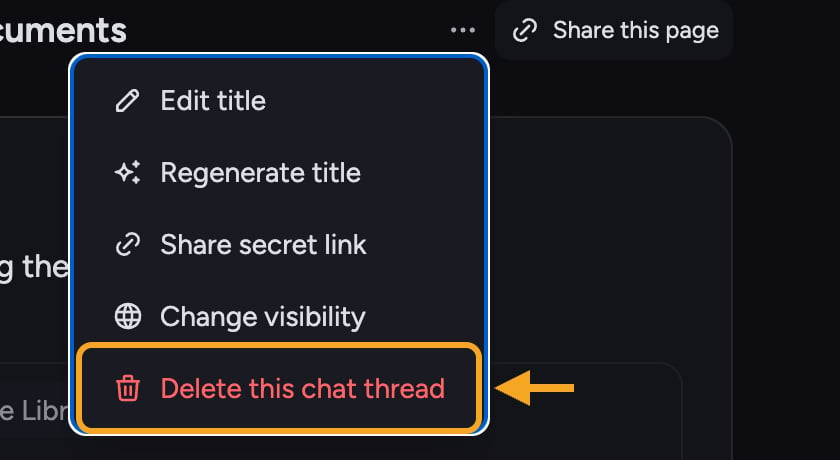 1. Open the chat. In the thread header, click the **⋯** (three-dot) **Chat actions menu**.
2. Choose **Delete this chat thread** (the red trash item at the bottom of the menu).
3. A confirmation dialog opens, titled **Delete "\[chat name]"?**
4. Read the warning, then click **Yes, Delete Chat Thread**. To back out, click **Cancel** or the X.
1. Open the chat. In the thread header, click the **⋯** (three-dot) **Chat actions menu**.
2. Choose **Delete this chat thread** (the red trash item at the bottom of the menu).
3. A confirmation dialog opens, titled **Delete "\[chat name]"?**
4. Read the warning, then click **Yes, Delete Chat Thread**. To back out, click **Cancel** or the X.
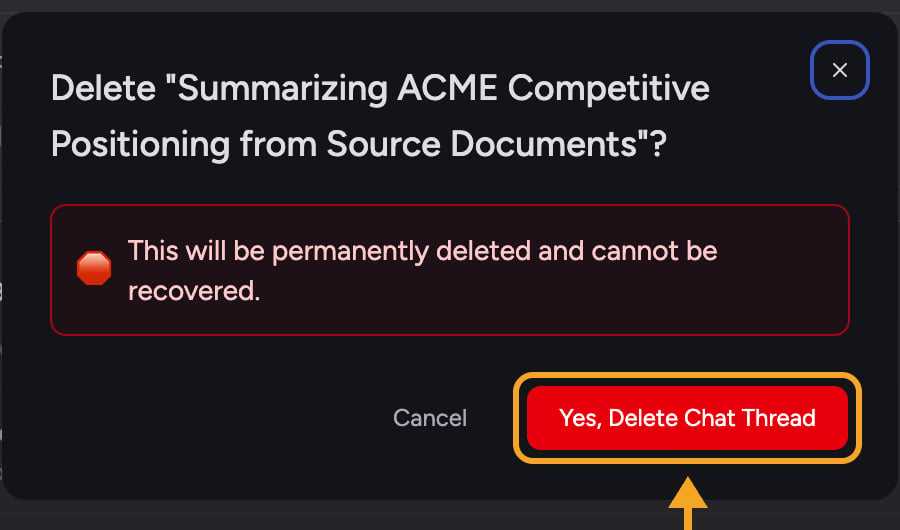 ⚠️ **Important:** If [the chat is shared](/help/sharing-visibility/chat-visibility-private-project-restricted), deleting it removes it permanently for **all users** with access to the project — not just you. The dialog spells this out before you confirm.
## Deleting a single prompt instead of the whole chat
⚠️ **Important:** If [the chat is shared](/help/sharing-visibility/chat-visibility-private-project-restricted), deleting it removes it permanently for **all users** with access to the project — not just you. The dialog spells this out before you confirm.
## Deleting a single prompt instead of the whole chat
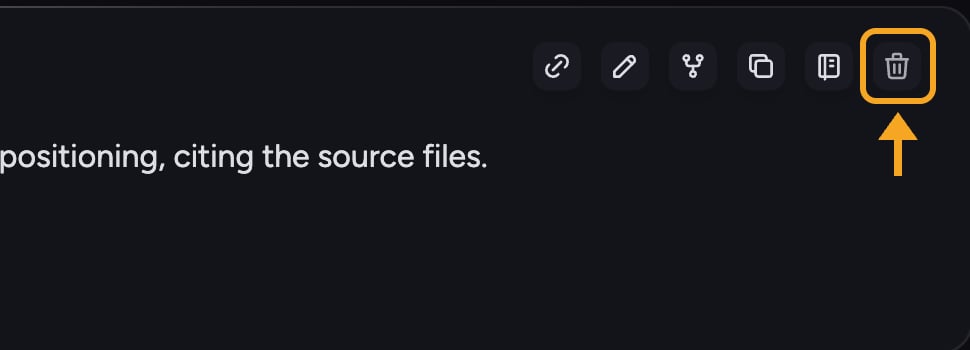 If you only want to remove one prompt-and-answer pair (available in [Advanced Mode](/help/account-settings/regular-vs-advanced-mode)), hover over the prompt and use its **delete** button instead. Its tooltip explains: "Remove this prompt + response from chat thread view. (The LLM will still remember it.)" — so Chief keeps the context even though it leaves your view.
## FAQ
You can't delete a chat while it's still generating a response. The dialog shows: "Cannot delete this chat thread while a response is being generated. Please wait for the response to complete." Wait for the answer to finish (or click [**Stop Generating**](/help/chatting-with-chief/regenerating-or-stopping-a-response)), then delete — you'll see a **Delete later** button in the meantime.
No. Deletion is permanent and can't be recovered. If you're unsure, [rename](/help/chatting-with-chief/renaming-chats-auto-generated-titles) or keep the chat rather than deleting it.
If you see "Failed to delete chat thread. Please try again," it's usually a temporary connection issue. Check [the offline banner](/help/chatting-with-chief/working-offline-draft-preservation) at the top of the screen, then try again.
If you only want to remove one prompt-and-answer pair (available in [Advanced Mode](/help/account-settings/regular-vs-advanced-mode)), hover over the prompt and use its **delete** button instead. Its tooltip explains: "Remove this prompt + response from chat thread view. (The LLM will still remember it.)" — so Chief keeps the context even though it leaves your view.
## FAQ
You can't delete a chat while it's still generating a response. The dialog shows: "Cannot delete this chat thread while a response is being generated. Please wait for the response to complete." Wait for the answer to finish (or click [**Stop Generating**](/help/chatting-with-chief/regenerating-or-stopping-a-response)), then delete — you'll see a **Delete later** button in the meantime.
No. Deletion is permanent and can't be recovered. If you're unsure, [rename](/help/chatting-with-chief/renaming-chats-auto-generated-titles) or keep the chat rather than deleting it.
If you see "Failed to delete chat thread. Please try again," it's usually a temporary connection issue. Check [the offline banner](/help/chatting-with-chief/working-offline-draft-preservation) at the top of the screen, then try again.