> ## Documentation Index
> Fetch the complete documentation index at: https://docs.chief.bot/llms.txt
> Use this file to discover all available pages before exploring further.
# Improving your prompt with Chief's suggestions
> As you type a prompt, Chief can suggest a sharper, more complete version — a card titled Try this improved prompt appears above the prompt bar.
As you type a prompt, Chief can suggest a sharper, more complete version — a card titled **Try this improved prompt** appears above the [prompt bar](/help/the-prompt-bar-scope/the-prompt-bar-a-tour-of-your-chat-controls). You choose whether suggestions show up, and whether Chief applies them for you.
## Use a suggested prompt
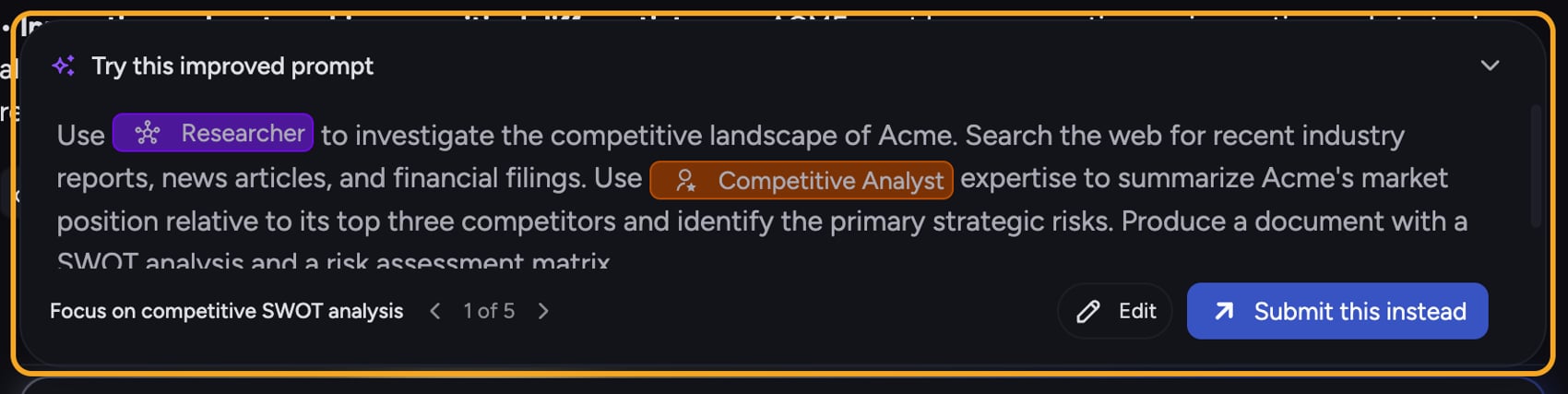 1. Type a prompt of at least a few words. After a short pause, the **Try this improved prompt** card appears. (For suggested *questions* rather than a rewrite of yours, see [Magic Suggestions](/help/answer-depth-chiefs-agents/magic-suggestions-context-aware-insight-prompts).)
2. Read the suggested version in the card. If more than one suggestion is ready, use the arrows to move through them — the card shows your position, e.g. **1 of 3**.
3. Click the suggestion to drop it into the prompt bar, then send it as usual.
## Choose On, Auto, or Off
1. Type a prompt of at least a few words. After a short pause, the **Try this improved prompt** card appears. (For suggested *questions* rather than a rewrite of yours, see [Magic Suggestions](/help/answer-depth-chiefs-agents/magic-suggestions-context-aware-insight-prompts).)
2. Read the suggested version in the card. If more than one suggestion is ready, use the arrows to move through them — the card shows your position, e.g. **1 of 3**.
3. Click the suggestion to drop it into the prompt bar, then send it as usual.
## Choose On, Auto, or Off
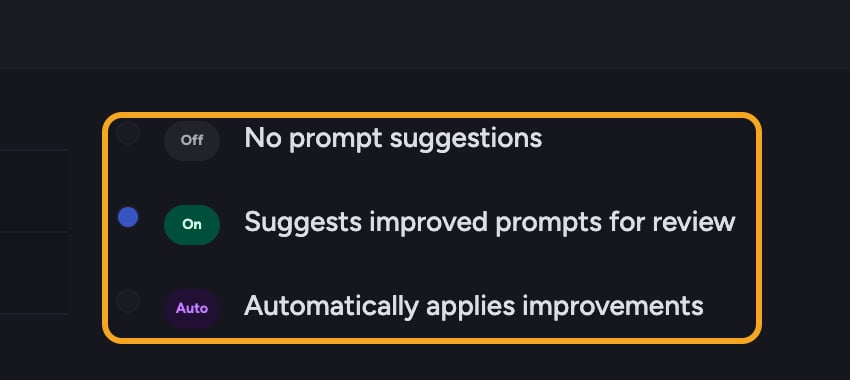 1. In the prompt bar, open the customize menu and select **Improve Prompts**.
2. Pick a mode:
* **On** — Chief suggests improved prompts for you to review before sending.
* **Auto** — Chief automatically applies improvements as you type.
* **Off** — no prompt suggestions.
ℹ️ **Good to Know:** In **Auto** mode Chief rewrites your prompt for you. If you don't like the rewrite, undo it to get your original words back.
## FAQ
Suggestions need at least a few words to work from, so very short prompts won't trigger them. They're also skipped when your prompt contains [template variables](/help/the-prompt-bar-scope/using-variable-fields-in-a-prompt) (placeholders like **#\{text:name}**), and when **Improve Prompts** is set to **Off**.
Yes — undo the change to restore your original wording. You can also switch **Improve Prompts** to **On** so Chief only suggests and never auto-applies, or to **Off** to stop suggestions completely.
Improving a prompt is a small, separate step Chief runs as you type. You're [billed](/help/plans-credits-billing/how-credits-work) for the prompt you actually send, the same as any other prompt.
1. In the prompt bar, open the customize menu and select **Improve Prompts**.
2. Pick a mode:
* **On** — Chief suggests improved prompts for you to review before sending.
* **Auto** — Chief automatically applies improvements as you type.
* **Off** — no prompt suggestions.
ℹ️ **Good to Know:** In **Auto** mode Chief rewrites your prompt for you. If you don't like the rewrite, undo it to get your original words back.
## FAQ
Suggestions need at least a few words to work from, so very short prompts won't trigger them. They're also skipped when your prompt contains [template variables](/help/the-prompt-bar-scope/using-variable-fields-in-a-prompt) (placeholders like **#\{text:name}**), and when **Improve Prompts** is set to **Off**.
Yes — undo the change to restore your original wording. You can also switch **Improve Prompts** to **On** so Chief only suggests and never auto-applies, or to **Off** to stop suggestions completely.
Improving a prompt is a small, separate step Chief runs as you type. You're [billed](/help/plans-credits-billing/how-credits-work) for the prompt you actually send, the same as any other prompt.