> ## Documentation Index
> Fetch the complete documentation index at: https://docs.chief.bot/llms.txt
> Use this file to discover all available pages before exploring further.
# Working with an answer: the response menu
> Under every finished answer is a row of action buttons — the response menu.
## Where to find it
Under every finished answer is a row of action buttons — the response menu. It is where you copy, [share](/help/sharing-visibility/sharing-an-individual-answer-or-text-block), save, and [download](/help/creating-exporting/downloading-responses-pdf-docx-xlsx-csv-markdown-text-tables) an answer, jump around inside it, or hand the whole thing to the **Do more with this answer** menu. The row appears once an answer is complete and substantial enough to act on.
 ## The buttons in the row
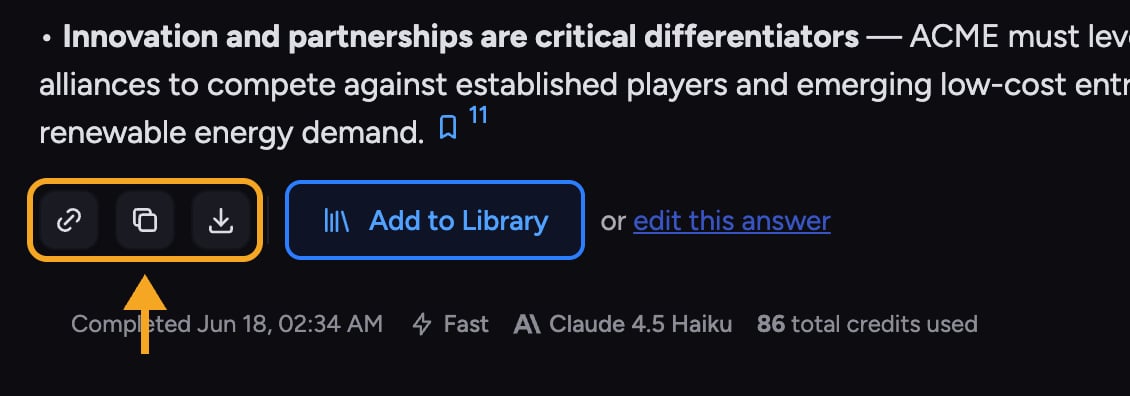 * **Sections** — opens the side panel to jump between headings. Appears when an answer has several sections.
* **Share** (link icon) — opens the Share dialog so you can send a link to this answer.
* **Copy** — copies the answer as rich text to your clipboard.
* **[Copy as Markdown](/help/creating-exporting/copying-responses-as-rich-text-or-markdown)** — appears for a few seconds right after you click Copy, for pasting into Markdown editors.
* **Select All** — also appears briefly after Copy, to select the whole answer.
* **Download** — appears when the answer produced a downloadable artifact (for example a document), with format options.
## Save the answer or edit it
* **Sections** — opens the side panel to jump between headings. Appears when an answer has several sections.
* **Share** (link icon) — opens the Share dialog so you can send a link to this answer.
* **Copy** — copies the answer as rich text to your clipboard.
* **[Copy as Markdown](/help/creating-exporting/copying-responses-as-rich-text-or-markdown)** — appears for a few seconds right after you click Copy, for pasting into Markdown editors.
* **Select All** — also appears briefly after Copy, to select the whole answer.
* **Download** — appears when the answer produced a downloadable artifact (for example a document), with format options.
## Save the answer or edit it
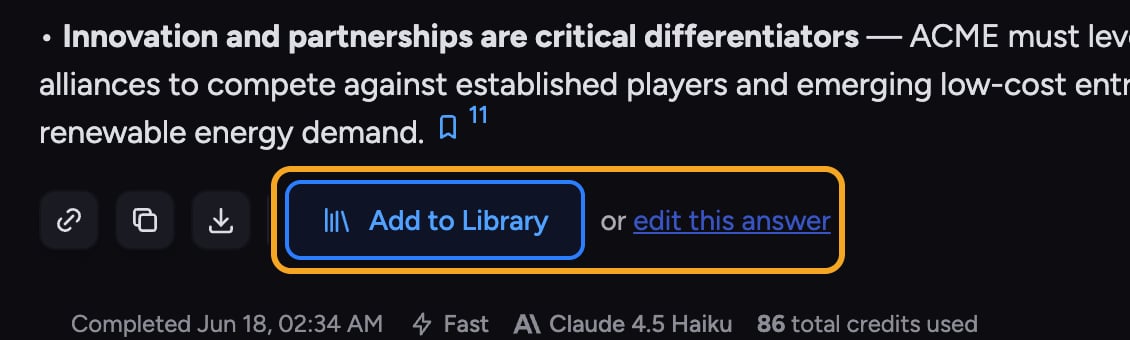 When an answer is a document-style artifact, the row also offers:
1. **[Add to Library](/help/your-knowledge-library/saving-a-chat-answer-back-to-your-library)** — saves the answer into the current Project's Library so it becomes a reusable source.
2. **[or edit this answer](/help/creating-exporting/working-with-artifacts-the-document-editor-concept)** — opens the answer in an editor so you can refine it before saving or sharing.
## Do more with this answer
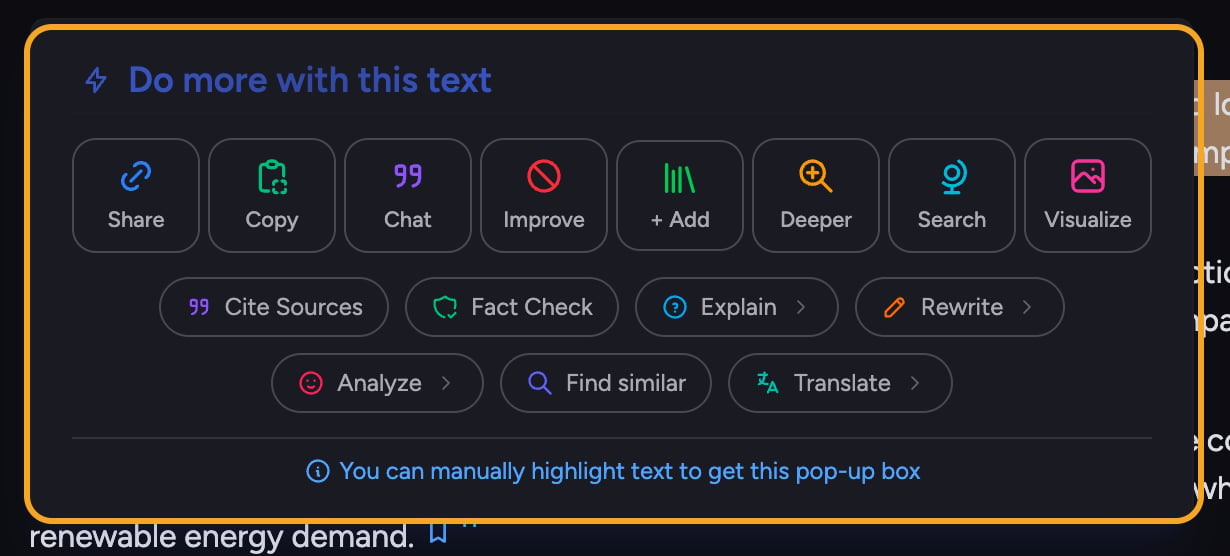
Hover an answer and a **bolt** icon appears on the left. Click it to open the **Do more with this answer** menu — the same toolkit as [the text selection menu](/help/chatting-with-chief/the-text-selection-menu-act-on-any-passage) (Cite Sources, Fact Check, Explain, Rewrite, Translate, and more), applied to the entire answer at once.
🚀 **Pro-Tip:** Use **Copy** for pasting into docs and email; use **Copy as Markdown** right after for tools like Notion or a code editor that expect Markdown.
## FAQ
The row appears only on completed answers that are long enough to act on — at least a few sentences. Short replies and answers still streaming do not show it. Wait for the answer to finish.
Yes. In [read-only and shared views](/help/sharing-visibility/viewing-shared-chats-as-a-guest), editing and saving actions (like Share chat thread, Copy as Markdown, Select All, and Add to Library) are hidden. Copy stays available.
They appear only for a few seconds after you click Copy, then hide again. Click **Copy** to bring them back.
When an answer is a document-style artifact, the row also offers:
1. **[Add to Library](/help/your-knowledge-library/saving-a-chat-answer-back-to-your-library)** — saves the answer into the current Project's Library so it becomes a reusable source.
2. **[or edit this answer](/help/creating-exporting/working-with-artifacts-the-document-editor-concept)** — opens the answer in an editor so you can refine it before saving or sharing.
## Do more with this answer
Hover an answer and a **bolt** icon appears on the left. Click it to open the **Do more with this answer** menu — the same toolkit as [the text selection menu](/help/chatting-with-chief/the-text-selection-menu-act-on-any-passage) (Cite Sources, Fact Check, Explain, Rewrite, Translate, and more), applied to the entire answer at once.
🚀 **Pro-Tip:** Use **Copy** for pasting into docs and email; use **Copy as Markdown** right after for tools like Notion or a code editor that expect Markdown.
## FAQ
The row appears only on completed answers that are long enough to act on — at least a few sentences. Short replies and answers still streaming do not show it. Wait for the answer to finish.
Yes. In [read-only and shared views](/help/sharing-visibility/viewing-shared-chats-as-a-guest), editing and saving actions (like Share chat thread, Copy as Markdown, Select All, and Add to Library) are hidden. Copy stays available.
They appear only for a few seconds after you click Copy, then hide again. Click **Copy** to bring them back.