> ## Documentation Index
> Fetch the complete documentation index at: https://docs.chief.bot/llms.txt
> Use this file to discover all available pages before exploring further.
# Exporting presentations to Google Slides
> If your team finishes decks in Google Slides, Chief can send a generated presentation straight there instead of making you rebuild it slide by slide.
If your team finishes decks in Google Slides, Chief can send a [generated presentation](/help/creating-exporting/building-presentations-choosing-a-theme) straight there instead of making you rebuild it slide by slide.
⚠️ **Important:** Exporting to Google Slides is an early-access feature and isn't enabled for every account yet. If you don't see the **Export to Google Slides** control in your presentation toolbar, it isn't available for your account — you can still [download the deck](/help/creating-exporting/downloading-responses-pdf-docx-xlsx-csv-markdown-text-tables) or save it to your Project.
 ## Export to Google Slides
1. Open a finished presentation (the export control appears only after generation completes).
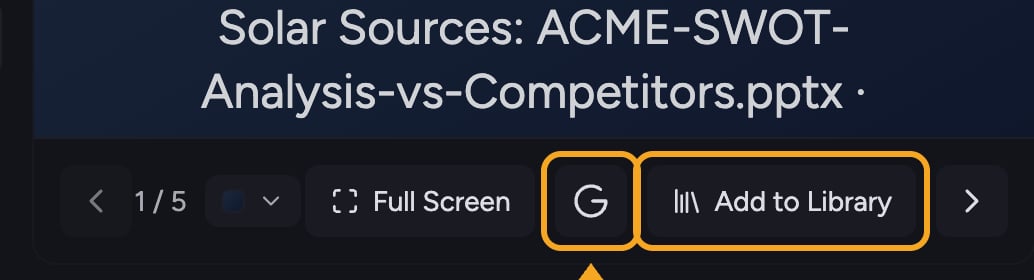
2. In the presentation toolbar, click the **Export to Google Slides** button (the [Google](/help/integrations/google-drive) icon).
3. Wait while Chief converts the deck — you'll see a spinner on the button during export.
4. When it finishes, open the resulting presentation in Google Slides.
## If export isn't available to you
While Google Slides export is in early access, use one of these instead:
* [**Add to Library**](/help/your-knowledge-library/saving-a-chat-answer-back-to-your-library) to save the deck in Chief for your team.
* Download the deck to share or print it.
## FAQ
It's an early-access feature that isn't enabled for every account yet. If it isn't in your presentation toolbar, your account doesn't have it — save the deck to your Library or download it in the meantime.
If you see "Failed to export presentation," try the export again. Make sure generation has fully finished first — the control only works on a completed deck.
No. The export control appears only once the presentation has finished streaming in.
## Export to Google Slides
1. Open a finished presentation (the export control appears only after generation completes).
2. In the presentation toolbar, click the **Export to Google Slides** button (the [Google](/help/integrations/google-drive) icon).
3. Wait while Chief converts the deck — you'll see a spinner on the button during export.
4. When it finishes, open the resulting presentation in Google Slides.
## If export isn't available to you
While Google Slides export is in early access, use one of these instead:
* [**Add to Library**](/help/your-knowledge-library/saving-a-chat-answer-back-to-your-library) to save the deck in Chief for your team.
* Download the deck to share or print it.
## FAQ
It's an early-access feature that isn't enabled for every account yet. If it isn't in your presentation toolbar, your account doesn't have it — save the deck to your Library or download it in the meantime.
If you see "Failed to export presentation," try the export again. Make sure generation has fully finished first — the control only works on a completed deck.
No. The export control appears only once the presentation has finished streaming in.