> ## Documentation Index
> Fetch the complete documentation index at: https://docs.chief.bot/llms.txt
> Use this file to discover all available pages before exploring further.
# Core concepts & glossary
> Chief organizes your work around a handful of building blocks.
 ## Learn the words and the rest clicks into place
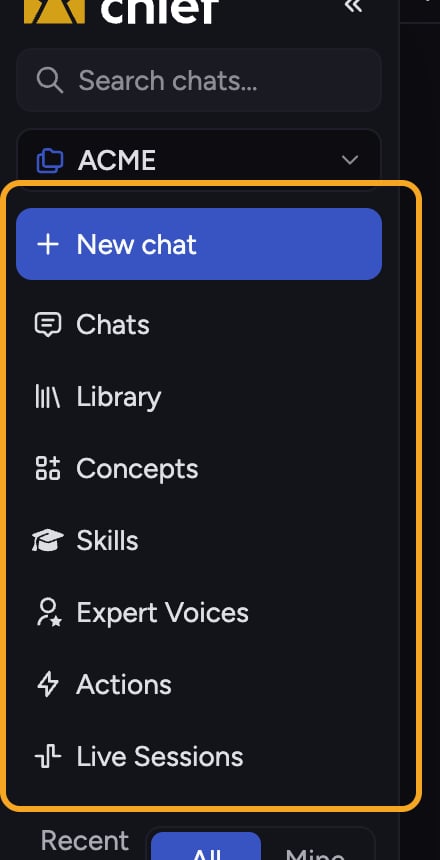
Chief organizes your work around a handful of building blocks. Knowing what each one means makes everything else faster. Here's the short version.
## The glossary
* **[Projects](/help/projects-sharing-teams/what-is-a-project)** — shared workspaces that hold Files, chats, and members. The unit you collaborate in.
* **[Chats](/help/chatting-with-chief/how-chats-work)** (chat threads) — your conversations with Chief.
* **[Library](/help/your-knowledge-library/what-is-the-library)** — where you upload documents, data, and other files to reference in your chats.
* **[Files](/help/your-knowledge-library/uploading-files-supported-file-types)** — the individual documents in your Library.
* **[Labels](/help/labels/creating-customizing-labels-colors-icons)** — tags you apply to Files to organize them.
* **[Collections](/help/collections/what-are-collections)** — let you create sophisticated "fences" around your data using boolean and/or filtering of Labels.
* **[Concepts](/help/concepts/what-are-concepts)** — topics you define; Chief continually monitors your Files to surface the parts most relevant to each one.
* **[Skills](/help/skills/what-are-skills)** — specific abilities. Mention a Skill in your chat to invoke that ability.
* **[Expert Voices](/help/expert-voices/what-are-expert-voices)** — customize how Chief responds, so it thinks and responds as a subject-matter expert.
* **[Actions](/help/actions-automation/what-are-actions)** — automatically trigger a chat response on a schedule or whenever new data is added to a chat's scope.
* **[Memories](/help/memories/what-are-memories)** — persistent notes that help Chief personalize its responses to you.
* **[Live Sessions](/help/meetings-live-sessions/what-are-live-sessions)** — capture meetings (via [the desktop app](/help/meetings-live-sessions/installing-the-chief-desktop-app-mac-required-for-capture)), recording decisions and follow-ups.
* **[Command Center](/help/getting-started/keyboard-shortcuts-the-command-palette-k-hint-mode)** — the hub behind the **+** button in [the prompt bar](/help/the-prompt-bar-scope/the-prompt-bar-a-tour-of-your-chat-controls) for uploads, settings, and more.
* **[Advanced Mode](/help/account-settings/regular-vs-advanced-mode)** — a user-mode setting that reveals extra capabilities like Concepts and Collections.
* **[Agents](/help/answer-depth-chiefs-agents/meet-chiefs-agents-explorer-librarian-researcher-planner)** — specialized intelligence workers Chief spins up to get larger jobs done.
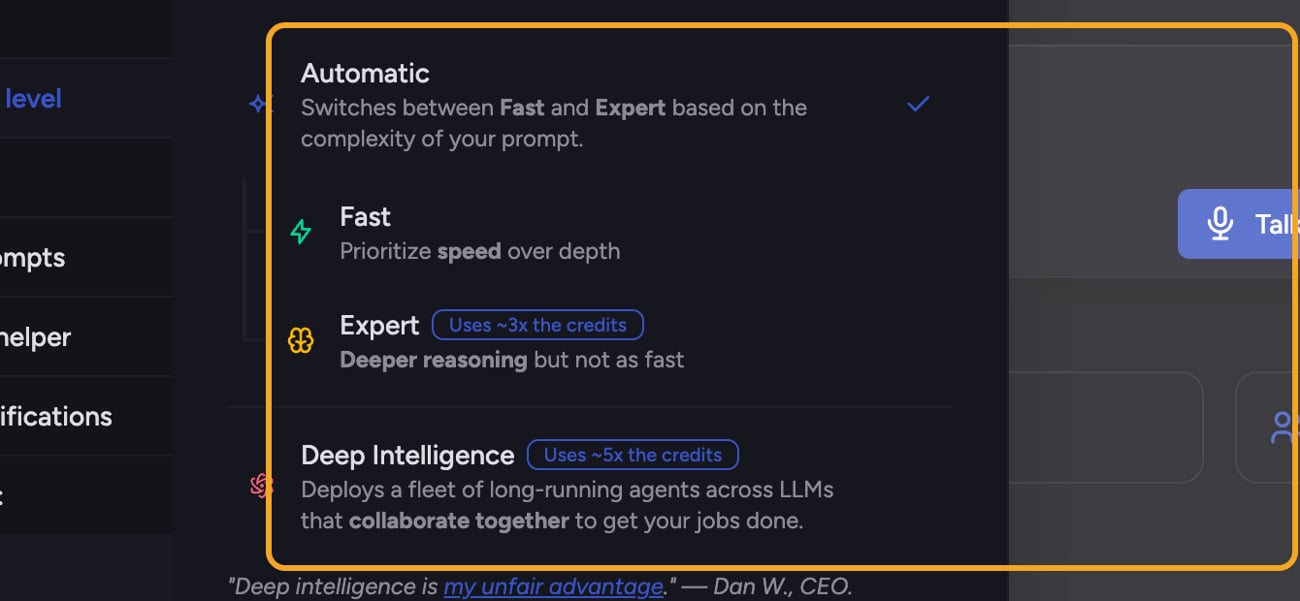
ℹ️ **Good to Know:** Chief also has [intelligence levels](/help/answer-depth-chiefs-agents/response-modes-automatic-fast-expert) you'll see while chatting: **Automatic**, **Fast**, **Expert**, and [**Deep Intelligence**](/help/answer-depth-chiefs-agents/deep-intelligence-research-mode). Automatic switches between Fast and Expert based on the complexity of your prompt; Deep Intelligence deploys a fleet of long-running agents and requires a paid subscription.
## Learn the words and the rest clicks into place
Chief organizes your work around a handful of building blocks. Knowing what each one means makes everything else faster. Here's the short version.
## The glossary
* **[Projects](/help/projects-sharing-teams/what-is-a-project)** — shared workspaces that hold Files, chats, and members. The unit you collaborate in.
* **[Chats](/help/chatting-with-chief/how-chats-work)** (chat threads) — your conversations with Chief.
* **[Library](/help/your-knowledge-library/what-is-the-library)** — where you upload documents, data, and other files to reference in your chats.
* **[Files](/help/your-knowledge-library/uploading-files-supported-file-types)** — the individual documents in your Library.
* **[Labels](/help/labels/creating-customizing-labels-colors-icons)** — tags you apply to Files to organize them.
* **[Collections](/help/collections/what-are-collections)** — let you create sophisticated "fences" around your data using boolean and/or filtering of Labels.
* **[Concepts](/help/concepts/what-are-concepts)** — topics you define; Chief continually monitors your Files to surface the parts most relevant to each one.
* **[Skills](/help/skills/what-are-skills)** — specific abilities. Mention a Skill in your chat to invoke that ability.
* **[Expert Voices](/help/expert-voices/what-are-expert-voices)** — customize how Chief responds, so it thinks and responds as a subject-matter expert.
* **[Actions](/help/actions-automation/what-are-actions)** — automatically trigger a chat response on a schedule or whenever new data is added to a chat's scope.
* **[Memories](/help/memories/what-are-memories)** — persistent notes that help Chief personalize its responses to you.
* **[Live Sessions](/help/meetings-live-sessions/what-are-live-sessions)** — capture meetings (via [the desktop app](/help/meetings-live-sessions/installing-the-chief-desktop-app-mac-required-for-capture)), recording decisions and follow-ups.
* **[Command Center](/help/getting-started/keyboard-shortcuts-the-command-palette-k-hint-mode)** — the hub behind the **+** button in [the prompt bar](/help/the-prompt-bar-scope/the-prompt-bar-a-tour-of-your-chat-controls) for uploads, settings, and more.
* **[Advanced Mode](/help/account-settings/regular-vs-advanced-mode)** — a user-mode setting that reveals extra capabilities like Concepts and Collections.
* **[Agents](/help/answer-depth-chiefs-agents/meet-chiefs-agents-explorer-librarian-researcher-planner)** — specialized intelligence workers Chief spins up to get larger jobs done.
ℹ️ **Good to Know:** Chief also has [intelligence levels](/help/answer-depth-chiefs-agents/response-modes-automatic-fast-expert) you'll see while chatting: **Automatic**, **Fast**, **Expert**, and [**Deep Intelligence**](/help/answer-depth-chiefs-agents/deep-intelligence-research-mode). Automatic switches between Fast and Expert based on the complexity of your prompt; Deep Intelligence deploys a fleet of long-running agents and requires a paid subscription.
 ## FAQ
A Skill is a specific ability you invoke by mentioning it in a chat. An Expert Voice changes how Chief responds — it answers as a particular subject-matter expert. You can use them together.
They appear only in Advanced mode. Switch your User Mode to "Advanced" in Settings → General to reveal them.
Yes. Chief uses "chat" and "chat thread" to mean the same thing — a single conversation.
## FAQ
A Skill is a specific ability you invoke by mentioning it in a chat. An Expert Voice changes how Chief responds — it answers as a particular subject-matter expert. You can use them together.
They appear only in Advanced mode. Switch your User Mode to "Advanced" in Settings → General to reveal them.
Yes. Chief uses "chat" and "chat thread" to mean the same thing — a single conversation.