> ## Documentation Index
> Fetch the complete documentation index at: https://docs.chief.bot/llms.txt
> Use this file to discover all available pages before exploring further.
# Chatting with the support team
> When the help center doesn't answer your question, you can message the support team directly from the Get Help widget.
## Chat with support without leaving Chief
When the help center doesn't answer your question, you can message the support team directly from the [**Get Help** widget](/help/help-feedback-whats-new/getting-help-in-chief). Your message starts a conversation, and the team replies to you in the same widget and at your account email.
## Start a conversation
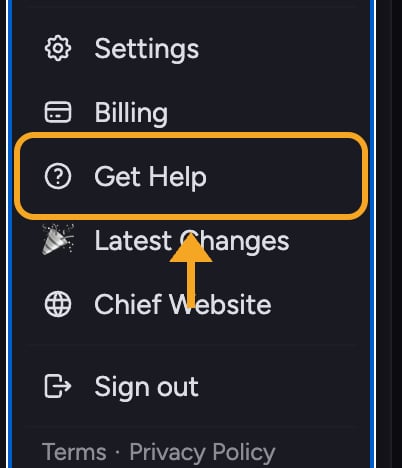 1. Click the **Get Help** button — the question-mark help icon in the left navigation bar (it's also in your account menu).
2. Wait for the help panel to open.
3. On the home view, click the option to **send a message** to start a new conversation.
4. Type your question. Add as much detail as you can: what you were doing, what you expected, and what happened.
5. Click **Send**.
Because you're signed in, [your name and email](/help/account-settings/managing-your-profile) come through automatically, so the team knows who to reply to.
ℹ️ **Good to Know:** The team replies by email and inside the widget. Keep an eye on [the inbox tied to your Chief account](/help/account-settings/changing-your-email-signing-out) so you don't miss the response.
## Read a reply
1. Open the **Get Help** widget again.
2. Go to the messages view to see your conversation history.
3. Open the conversation to read the reply and continue the thread.
## Frequently asked questions
Support replies aren't instant. The team responds during working hours. For the fastest self-service answer, search the help center first.
Check the inbox for the email on your Chief account, including the spam folder. Confirm your account email is correct in your settings. Then reopen the Get Help widget and check the messages view, where the reply also appears.
Use the message composer in the widget to add detail and any attachment options it offers. If you can't attach a file, [describe the issue clearly](/help/help-feedback-whats-new/submitting-feedback-or-reporting-a-bug) and the team can follow up by email.
1. Click the **Get Help** button — the question-mark help icon in the left navigation bar (it's also in your account menu).
2. Wait for the help panel to open.
3. On the home view, click the option to **send a message** to start a new conversation.
4. Type your question. Add as much detail as you can: what you were doing, what you expected, and what happened.
5. Click **Send**.
Because you're signed in, [your name and email](/help/account-settings/managing-your-profile) come through automatically, so the team knows who to reply to.
ℹ️ **Good to Know:** The team replies by email and inside the widget. Keep an eye on [the inbox tied to your Chief account](/help/account-settings/changing-your-email-signing-out) so you don't miss the response.
## Read a reply
1. Open the **Get Help** widget again.
2. Go to the messages view to see your conversation history.
3. Open the conversation to read the reply and continue the thread.
## Frequently asked questions
Support replies aren't instant. The team responds during working hours. For the fastest self-service answer, search the help center first.
Check the inbox for the email on your Chief account, including the spam folder. Confirm your account email is correct in your settings. Then reopen the Get Help widget and check the messages view, where the reply also appears.
Use the message composer in the widget to add detail and any attachment options it offers. If you can't attach a file, [describe the issue clearly](/help/help-feedback-whats-new/submitting-feedback-or-reporting-a-bug) and the team can follow up by email.