> ## Documentation Index
> Fetch the complete documentation index at: https://docs.chief.bot/llms.txt
> Use this file to discover all available pages before exploring further.
# Getting help in Chief
> Chief has a built-in Get Help widget.
## What the Get Help widget does
Chief has a built-in **Get Help** widget. Open it to search the help center, [start a conversation with the support team](/help/help-feedback-whats-new/chatting-with-the-support-team), and browse answers without leaving your workspace. It is the fastest way to get unstuck while you work.
## Open the Get Help widget
1. Look at the [left navigation bar](/help/getting-started/the-chief-interface-a-quick-tour) in Chief.
2. Click the **Get Help** button (the question-mark help icon).
3. Wait for the help panel to open next to the button.
4. Type your question in the search box, or pick a topic to start reading.
## Open Get Help from your account menu
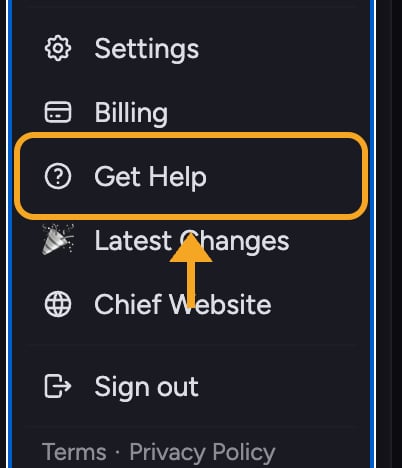 You can also reach the same widget from your account menu:
1. Click your **account avatar** in the navigation bar to open the [account menu](/help/account-settings/managing-your-profile).
2. Click **Get Help** in the menu.
3. Wait for the help panel to open.
🚀 **Pro-Tip:** Click the **Get Help** button a second time to close the panel. It works as a toggle, so you can quickly peek at an answer and get back to your work.
## Don't see the help button?
The Get Help widget is built for larger screens. On narrow windows (under about 1024px wide), the widget is hidden to keep the workspace uncluttered. If you can't find it, widen your browser window or switch to a desktop screen, then look again in the left navigation bar.
## FAQ
It is the question-mark help icon in the left navigation bar. You can also open it from your account menu under **Get Help**.
The widget can take a moment to load. Wait a second and click again. If it still doesn't open, reload the page and try once more. On screens narrower than about 1024px the widget is hidden by design, so widen your window or use a desktop screen.
The in-app widget is hidden on small screens. On a phone or narrow window, browse this help center [directly in your browser](/help/getting-started/chief-on-web-desktop-browser-extension) to find answers.
You can also reach the same widget from your account menu:
1. Click your **account avatar** in the navigation bar to open the [account menu](/help/account-settings/managing-your-profile).
2. Click **Get Help** in the menu.
3. Wait for the help panel to open.
🚀 **Pro-Tip:** Click the **Get Help** button a second time to close the panel. It works as a toggle, so you can quickly peek at an answer and get back to your work.
## Don't see the help button?
The Get Help widget is built for larger screens. On narrow windows (under about 1024px wide), the widget is hidden to keep the workspace uncluttered. If you can't find it, widen your browser window or switch to a desktop screen, then look again in the left navigation bar.
## FAQ
It is the question-mark help icon in the left navigation bar. You can also open it from your account menu under **Get Help**.
The widget can take a moment to load. Wait a second and click again. If it still doesn't open, reload the page and try once more. On screens narrower than about 1024px the widget is hidden by design, so widen your window or use a desktop screen.
The in-app widget is hidden on small screens. On a phone or narrow window, browse this help center [directly in your browser](/help/getting-started/chief-on-web-desktop-browser-extension) to find answers.