> ## Documentation Index
> Fetch the complete documentation index at: https://docs.chief.bot/llms.txt
> Use this file to discover all available pages before exploring further.
# How Chief creates Concepts
> The most valuable patterns in your data — "churn risk," your key competitors, recurring product themes — are usually spread across dozens of files, never written down in one place.
## Why this matters
The most valuable patterns in your data — "churn risk," your key competitors, recurring product themes — are usually spread across dozens of files, never written down in one place. [**Concepts**](/help/concepts/what-are-concepts) are how Chief solves that. A Concept gathers the highly relevant parts of every file that relate to an idea you care about and assembles them in one view, so you can think about a theme instead of hunting through documents. The payoff: you get an always-current, zero-maintenance map of what matters, instead of tagging files by hand.
## How it actually works
 Concepts come from two directions:
* **Built automatically.** As Chief ingests your files, it surfaces recurring themes, entities, people, companies, and ideas and assembles them into Concepts — with zero tagging or setup. The set evolves on its own as new data lands.
* **Defined by you.** When there's a specific idea you want Chief to track, you can [define a named Concept](/help/concepts/defining-a-concept-exploring-the-concept-graph) and describe what matters to you about it. Chief then continually monitors all the Files in your Project, finds the parts of each file that are highly relevant to that description, and assembles them for you.
Either way, a Concept isn't a summary Chief writes from memory — it's [**built from citations**](/help/concepts/concept-timelines). Each Concept pulls together the specific passages (chunks) from your assets that relate to it, so what you see traces straight back to source files. As you add files, Chief keeps monitoring and folds new relevant passages into the Concept automatically.
ℹ️ **Good to Know:** Generating a Concept takes a few seconds — and up to a few minutes for larger data sets. A newly defined Concept may show "being generated" while Chief assembles its citations, and a Concept will show "no citations yet" until it finds relevant passages in your Files.
## A worked example
Concepts come from two directions:
* **Built automatically.** As Chief ingests your files, it surfaces recurring themes, entities, people, companies, and ideas and assembles them into Concepts — with zero tagging or setup. The set evolves on its own as new data lands.
* **Defined by you.** When there's a specific idea you want Chief to track, you can [define a named Concept](/help/concepts/defining-a-concept-exploring-the-concept-graph) and describe what matters to you about it. Chief then continually monitors all the Files in your Project, finds the parts of each file that are highly relevant to that description, and assembles them for you.
Either way, a Concept isn't a summary Chief writes from memory — it's [**built from citations**](/help/concepts/concept-timelines). Each Concept pulls together the specific passages (chunks) from your assets that relate to it, so what you see traces straight back to source files. As you add files, Chief keeps monitoring and folds new relevant passages into the Concept automatically.
ℹ️ **Good to Know:** Generating a Concept takes a few seconds — and up to a few minutes for larger data sets. A newly defined Concept may show "being generated" while Chief assembles its citations, and a Concept will show "no citations yet" until it finds relevant passages in your Files.
## A worked example
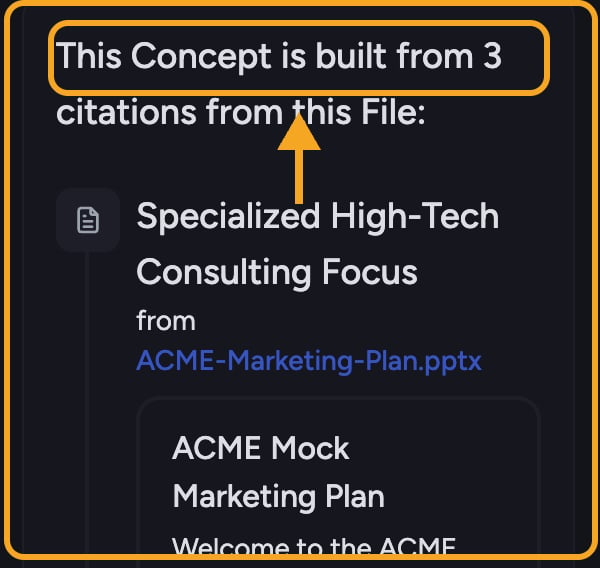 You define a Concept called "Pricing Objections" and describe it as "anything where a prospect or customer pushed back on cost." Chief scans [every file in the Project](/help/your-knowledge-library/what-is-the-library) — sales call transcripts, support threads, notes — and assembles the relevant passages into one Concept view, each linked back to its source. Next week you upload three new call recordings; without you doing anything, the new pricing pushback from those calls appears inside the same Concept. You now have a living, cited record of every cost objection in one place.
## FAQ
Usually nothing. Generation can take from a few seconds up to a few minutes on larger data sets. A Concept also stays empty until Chief actually finds passages in your Files that match its description — if it stays empty, the description may be too narrow, or the relevant files may not be in this Project yet.
Concepts you define carry your own name and description and reflect a theme you chose to track. Chief-created Concepts surface automatically from patterns in your data. You can [sort your Concepts list](/help/concepts/navigating-the-concepts-view-viewing-concept-details) by "created by you" or "created by Chief" to tell them apart.
No. Concepts require zero tagging and zero setup. You upload files; Chief does the rest and keeps the Concept current as new data arrives.
You define a Concept called "Pricing Objections" and describe it as "anything where a prospect or customer pushed back on cost." Chief scans [every file in the Project](/help/your-knowledge-library/what-is-the-library) — sales call transcripts, support threads, notes — and assembles the relevant passages into one Concept view, each linked back to its source. Next week you upload three new call recordings; without you doing anything, the new pricing pushback from those calls appears inside the same Concept. You now have a living, cited record of every cost objection in one place.
## FAQ
Usually nothing. Generation can take from a few seconds up to a few minutes on larger data sets. A Concept also stays empty until Chief actually finds passages in your Files that match its description — if it stays empty, the description may be too narrow, or the relevant files may not be in this Project yet.
Concepts you define carry your own name and description and reflect a theme you chose to track. Chief-created Concepts surface automatically from patterns in your data. You can [sort your Concepts list](/help/concepts/navigating-the-concepts-view-viewing-concept-details) by "created by you" or "created by Chief" to tell them apart.
No. Concepts require zero tagging and zero setup. You upload files; Chief does the rest and keeps the Concept current as new data arrives.