> ## Documentation Index
> Fetch the complete documentation index at: https://docs.chief.bot/llms.txt
> Use this file to discover all available pages before exploring further.
# Sending a Live Session to an AI agent
> Create an editable Markdown handoff from a finished Live Session for a coding agent or another AI tool.
Use **Send to AI agent** after a Live Session to turn the meeting into an editable Markdown handoff for a coding agent or another AI tool. The handoff carries the meeting context the agent needs to create presentations, PRDs, documents, software, and more.
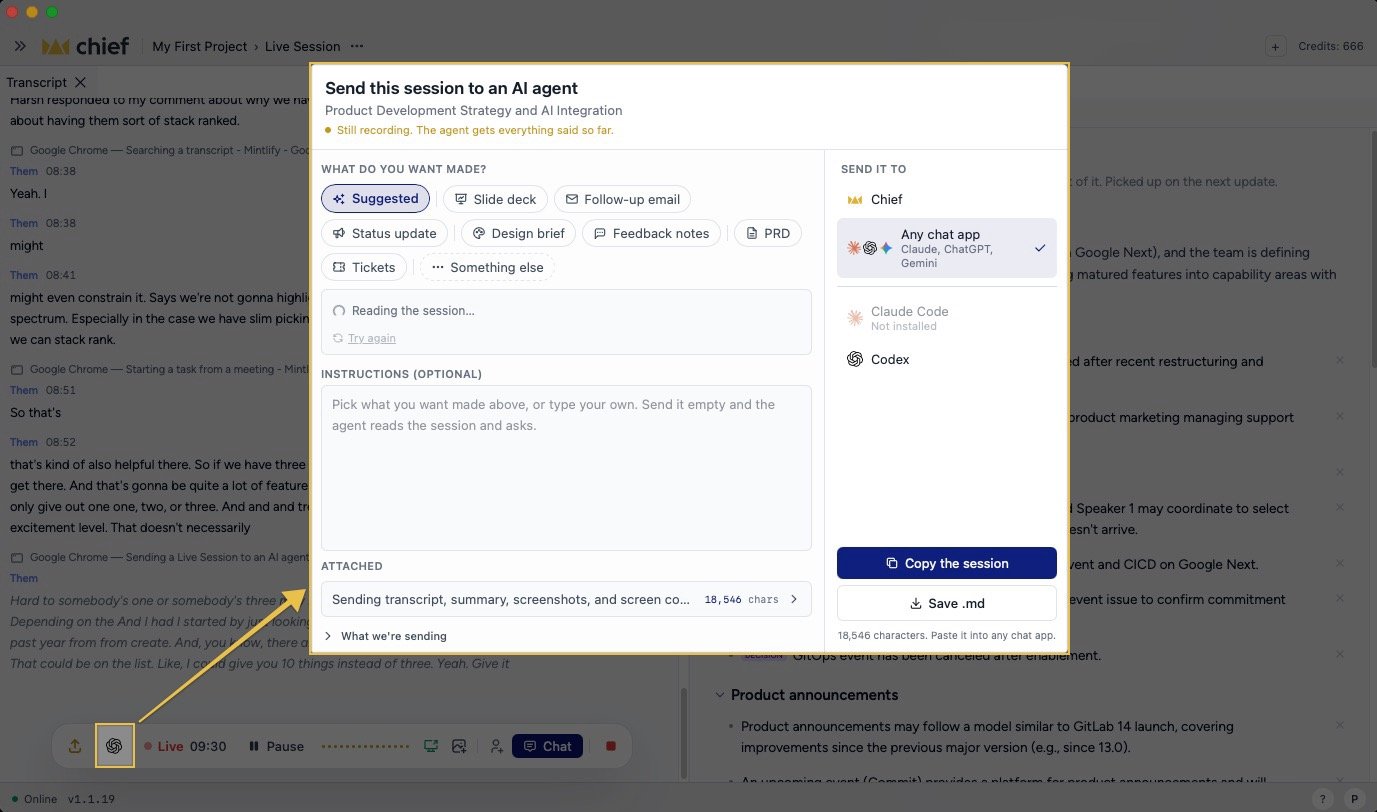 ## Prepare the agent handoff
1. End the [Live Session](/help/meetings-live-sessions/starting-a-live-session).
2. Click **Put this session to work** in the session bar.
3. Click **Send to AI agent to create**.
4. In **Instructions to AI agent**, describe what you want the agent to build.
5. Review or edit the **Live Session markdown**.
The generated handoff includes session metadata, your pre-session context, the summary, to-dos, decisions, and the full [transcript](/help/meetings-live-sessions/how-transcription-works-speaker-attribution). It also places [images](/help/meetings-live-sessions/adding-screenshots-images-to-a-transcript) and [screen-context events](/help/meetings-live-sessions/sharing-screen-context) at the points where they occurred.
## Copy or save the handoff
* Click **Copy** to put the complete handoff on your clipboard, then paste it into your agent.
* Click **Save .md** to save it as a Markdown file that you can attach or place in a repository.
Chief does not send the content to a specific external tool for you. You choose where to paste or attach the handoff.
**Important:** Review the Markdown before sharing it. A handoff can contain participant email addresses, meeting details, transcript text, screenshots, and screen context from the session.
## Let the agent retrieve more context
The exported file identifies the Live Session and explains how an agent can use Chief's MCP server or REST API for current or additional Project context. The export never embeds your Personal Access Token. If the agent needs access, [create and provide credentials securely](/help/security-privacy/managing-api-tokens-securely) for the correct [Project](/help/projects-sharing-teams/what-is-a-project).
## FAQ
The full action appears after the session ends, when the transcript and recap are ready. During recording, the same session control is icon-only.
Yes. Edit the **Live Session markdown** field before you click **Copy** or **Save .md**. Your edits affect the exported handoff, not the stored transcript in Chief.
Yes, after Chief publishes durable image links. Images still uploading are omitted until their upload finishes.
## Prepare the agent handoff
1. End the [Live Session](/help/meetings-live-sessions/starting-a-live-session).
2. Click **Put this session to work** in the session bar.
3. Click **Send to AI agent to create**.
4. In **Instructions to AI agent**, describe what you want the agent to build.
5. Review or edit the **Live Session markdown**.
The generated handoff includes session metadata, your pre-session context, the summary, to-dos, decisions, and the full [transcript](/help/meetings-live-sessions/how-transcription-works-speaker-attribution). It also places [images](/help/meetings-live-sessions/adding-screenshots-images-to-a-transcript) and [screen-context events](/help/meetings-live-sessions/sharing-screen-context) at the points where they occurred.
## Copy or save the handoff
* Click **Copy** to put the complete handoff on your clipboard, then paste it into your agent.
* Click **Save .md** to save it as a Markdown file that you can attach or place in a repository.
Chief does not send the content to a specific external tool for you. You choose where to paste or attach the handoff.
**Important:** Review the Markdown before sharing it. A handoff can contain participant email addresses, meeting details, transcript text, screenshots, and screen context from the session.
## Let the agent retrieve more context
The exported file identifies the Live Session and explains how an agent can use Chief's MCP server or REST API for current or additional Project context. The export never embeds your Personal Access Token. If the agent needs access, [create and provide credentials securely](/help/security-privacy/managing-api-tokens-securely) for the correct [Project](/help/projects-sharing-teams/what-is-a-project).
## FAQ
The full action appears after the session ends, when the transcript and recap are ready. During recording, the same session control is icon-only.
Yes. Edit the **Live Session markdown** field before you click **Copy** or **Save .md**. Your edits affect the exported handoff, not the stored transcript in Chief.
Yes, after Chief publishes durable image links. Images still uploading are omitted until their upload finishes.