> ## Documentation Index
> Fetch the complete documentation index at: https://docs.chief.bot/llms.txt
> Use this file to discover all available pages before exploring further.
# Uploading an existing transcript in the Live Sessions App
> Process an existing TXT, CSV, SRT, VTT, or DOCX transcript into a Live Session recap without recording a meeting.
Upload a transcript you already have to create a Live Session summary, action items, decisions, topics, and chat without recording the original meeting again.
## Upload and process the transcript
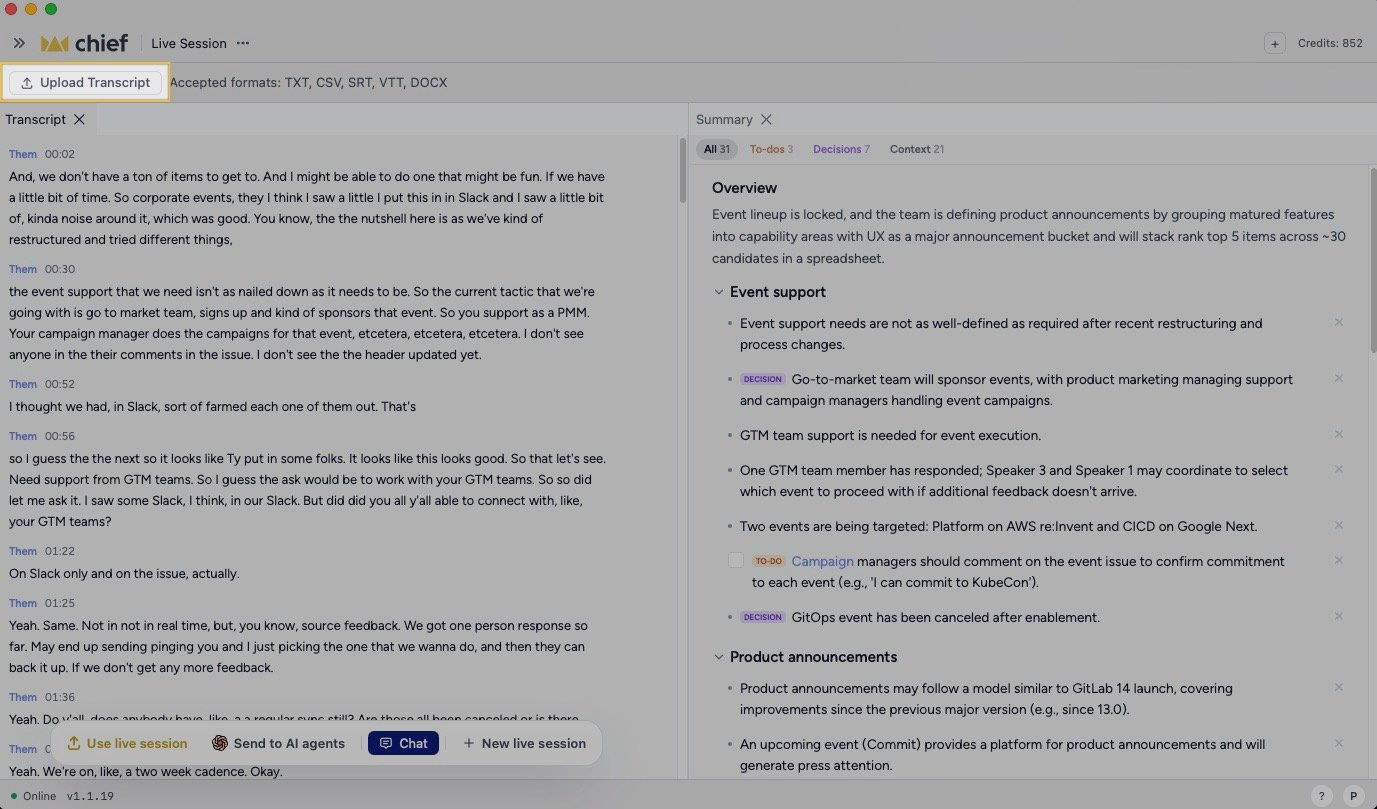 1. Open the paired [Chief Live Sessions App](/help/meetings-live-sessions/installing-the-chief-desktop-app-mac-required-for-capture).
2. Make sure no Live Session is recording or being joined.
3. Click **Upload Transcript** in the bar above the main workspace.
4. Choose a TXT, CSV, SRT, VTT, or DOCX file.
5. Keep the app open while it shows **Processing *filename*…**.
6. When the app shows **Imported *filename* — see the summary panel**, review the generated recap.
The import creates a Live Session from the file. You can then review the [summary, decisions, and action items](/help/meetings-live-sessions/auto-generated-summaries-decisions-action-items-chat-suggestions) or [send the result to an AI agent](/help/meetings-live-sessions/sending-a-live-session-to-an-ai-agent).
**Good to Know:** Importing a transcript is different from [capturing a meeting live](/help/meetings-live-sessions/starting-a-live-session). Chief processes the words in the file; it cannot recover audio or visual context that the transcript does not contain.
## If processing fails
The app shows the import error beside **Upload Transcript**. Confirm the file uses one of the accepted formats and try again. If the same file continues to fail, [send a bug report and recent app logs](/help/help-feedback-whats-new/submitting-feedback-or-reporting-a-bug) to Chief Support.
## FAQ
The Live Sessions App accepts TXT, CSV, SRT, VTT, and DOCX transcript files.
Finish or leave the active Live Session first. Upload is shown only while the app is idle and is hidden while a session is recording, starting, or joining.
No. The import processes the transcript file. Screenshots and screen context must have been captured separately during a live meeting.
1. Open the paired [Chief Live Sessions App](/help/meetings-live-sessions/installing-the-chief-desktop-app-mac-required-for-capture).
2. Make sure no Live Session is recording or being joined.
3. Click **Upload Transcript** in the bar above the main workspace.
4. Choose a TXT, CSV, SRT, VTT, or DOCX file.
5. Keep the app open while it shows **Processing *filename*…**.
6. When the app shows **Imported *filename* — see the summary panel**, review the generated recap.
The import creates a Live Session from the file. You can then review the [summary, decisions, and action items](/help/meetings-live-sessions/auto-generated-summaries-decisions-action-items-chat-suggestions) or [send the result to an AI agent](/help/meetings-live-sessions/sending-a-live-session-to-an-ai-agent).
**Good to Know:** Importing a transcript is different from [capturing a meeting live](/help/meetings-live-sessions/starting-a-live-session). Chief processes the words in the file; it cannot recover audio or visual context that the transcript does not contain.
## If processing fails
The app shows the import error beside **Upload Transcript**. Confirm the file uses one of the accepted formats and try again. If the same file continues to fail, [send a bug report and recent app logs](/help/help-feedback-whats-new/submitting-feedback-or-reporting-a-bug) to Chief Support.
## FAQ
The Live Sessions App accepts TXT, CSV, SRT, VTT, and DOCX transcript files.
Finish or leave the active Live Session first. Upload is shown only while the app is idle and is hidden while a session is recording, starting, or joining.
No. The import processes the transcript file. Screenshots and screen context must have been captured separately during a live meeting.