> ## Documentation Index
> Fetch the complete documentation index at: https://docs.chief.bot/llms.txt
> Use this file to discover all available pages before exploring further.
# Importing memories from text
> Already have your context written down — notes, a bio, a brief, an onboarding doc?
Already have your context written down — notes, a bio, a brief, an onboarding doc? Instead of typing [memories](/help/memories/what-are-memories) one by one, paste the text and let Chief extract memories from it. You review every suggestion before anything is saved.
## Import memories from a block of text
 1. Open the memory page for [the scope you want](/help/memories/personal-vs-project-vs-organization-memories) (**Settings → Memory**, a project's **Memories** page, or the organization's **Memory** page).
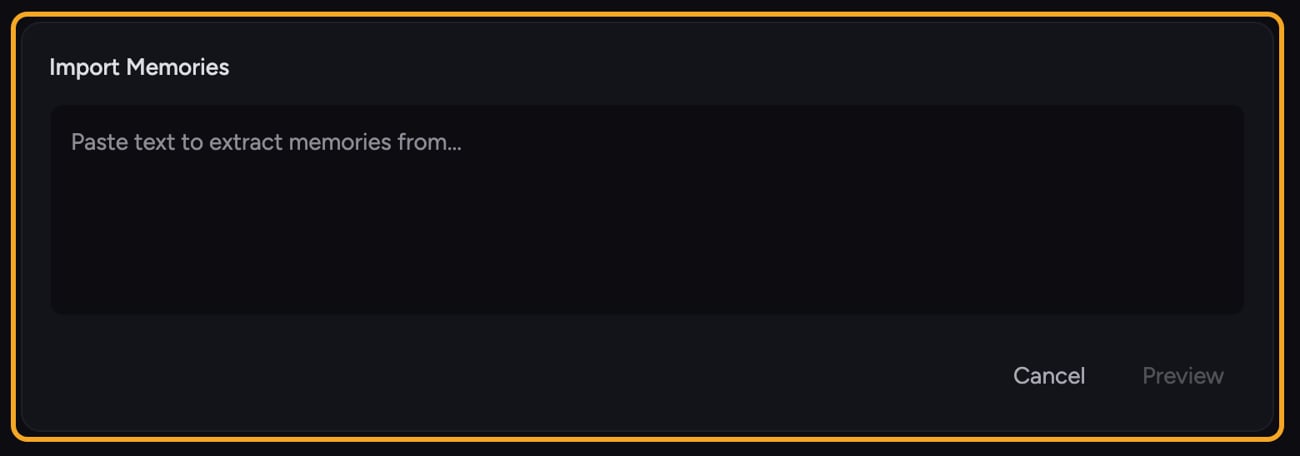
2. In the section header, click the **Import** button (the upload icon). The **Import Memories** panel opens.
3. Paste your text into the box. The placeholder reads *"Paste text to extract memories from..."*
4. Click **Preview**. Chief reads the text and proposes a list of memories, with every suggestion checked by default.
5. Review the list. Untick any suggestion you don't want. The count below shows **"X of Y selected"**.
6. Click **Confirm Import**. Chief saves the selected memories and confirms with *"Successfully imported \{count} memories."*
7. To bring in another batch, click **Import More**; otherwise close the panel.
🚀 **Pro-Tip:** Paste structured text — short bullet points or single-sentence facts — for the cleanest extraction. A wall of prose still works, but tidy input gives tidier memories.
ℹ️ **Good to Know:** Nothing is saved at the preview stage. Memories are only created after you click **Confirm Import**, and only the suggestions you left ticked are imported.
## FAQ
Chief extracts durable facts and preferences, not every sentence. If the text was vague or conversational, it may not produce suggestions. Try pasting clearer, more factual statements, or add the memory by hand instead.
An error banner appears at the top of the **Import Memories** panel with the reason. Previewing returns you to the text box so you can adjust and try again; an import error keeps your selections so you can retry **Confirm Import**. Already-imported memories are not duplicated.
Yes. Imported memories go into whichever scope's page you started from. Open the project's **Memories** page or the [organization's **Memory** page](/help/organization-administration/organization-memory-shared-across-all-projects) first, then click **Import** — as long as you have permission to add memories there.
1. Open the memory page for [the scope you want](/help/memories/personal-vs-project-vs-organization-memories) (**Settings → Memory**, a project's **Memories** page, or the organization's **Memory** page).
2. In the section header, click the **Import** button (the upload icon). The **Import Memories** panel opens.
3. Paste your text into the box. The placeholder reads *"Paste text to extract memories from..."*
4. Click **Preview**. Chief reads the text and proposes a list of memories, with every suggestion checked by default.
5. Review the list. Untick any suggestion you don't want. The count below shows **"X of Y selected"**.
6. Click **Confirm Import**. Chief saves the selected memories and confirms with *"Successfully imported \{count} memories."*
7. To bring in another batch, click **Import More**; otherwise close the panel.
🚀 **Pro-Tip:** Paste structured text — short bullet points or single-sentence facts — for the cleanest extraction. A wall of prose still works, but tidy input gives tidier memories.
ℹ️ **Good to Know:** Nothing is saved at the preview stage. Memories are only created after you click **Confirm Import**, and only the suggestions you left ticked are imported.
## FAQ
Chief extracts durable facts and preferences, not every sentence. If the text was vague or conversational, it may not produce suggestions. Try pasting clearer, more factual statements, or add the memory by hand instead.
An error banner appears at the top of the **Import Memories** panel with the reason. Previewing returns you to the text box so you can adjust and try again; an import error keeps your selections so you can retry **Confirm Import**. Already-imported memories are not duplicated.
Yes. Imported memories go into whichever scope's page you started from. Open the project's **Memories** page or the [organization's **Memory** page](/help/organization-administration/organization-memory-shared-across-all-projects) first, then click **Import** — as long as you have permission to add memories there.