> ## Documentation Index
> Fetch the complete documentation index at: https://docs.chief.bot/llms.txt
> Use this file to discover all available pages before exploring further.
# Letting Chief auto-capture memories from chats
> Chief can capture memories for you while you chat.
Chief can capture [memories](/help/memories/what-are-memories) for you while you [chat](/help/chatting-with-chief/how-chats-work). When collection is turned on, Chief notices useful facts and preferences in your conversations and saves them automatically — so your memory list builds itself.
## Turn on auto-capture
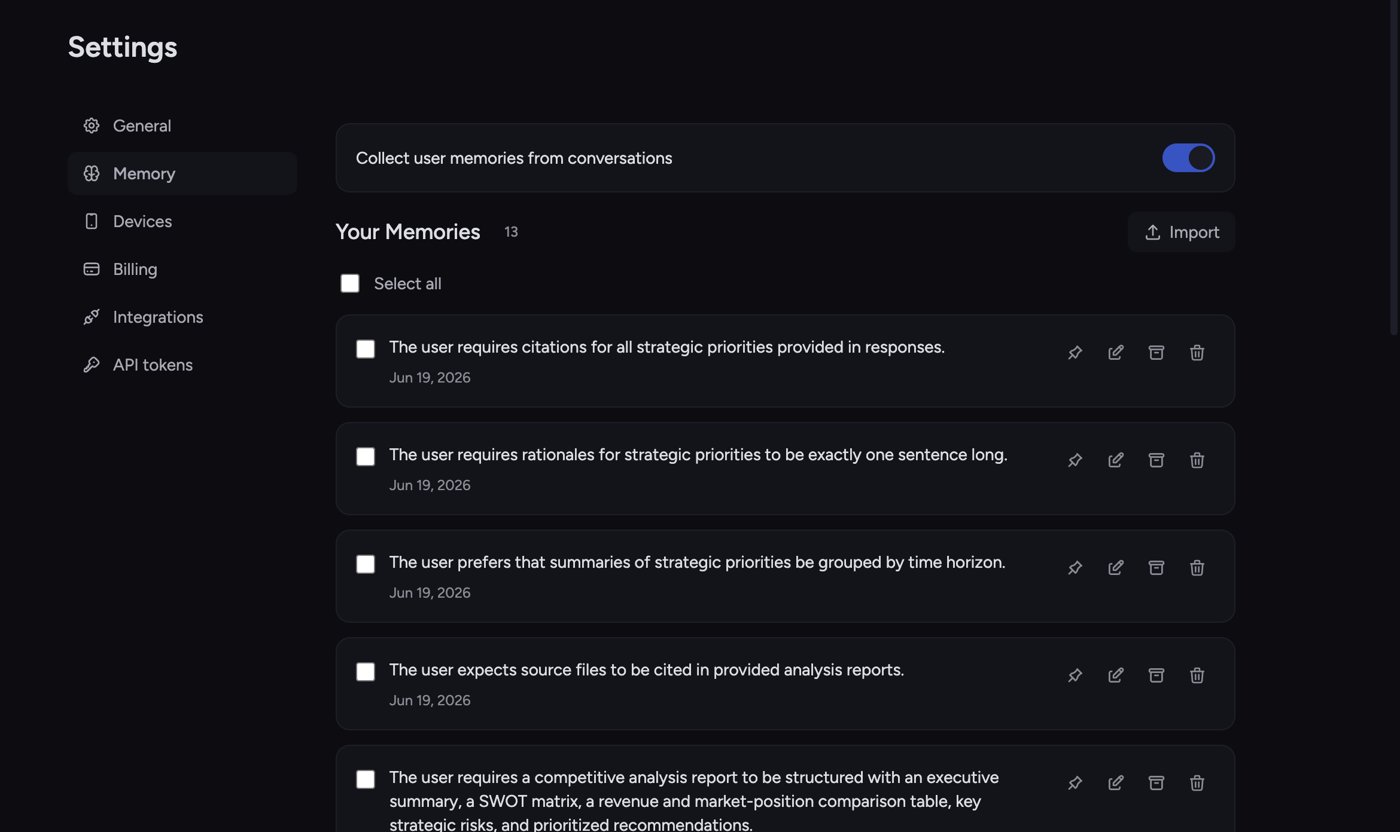
 1. Open the memory page for [the scope you want](/help/memories/personal-vs-project-vs-organization-memories): **Settings → Memory** for **Your Memories**, the project's **Memories** page for **Project Memories**, or the organization's **Memory** page for **Organization Memory**.
2. At the top of the page is a toggle switch. For personal memories it's labeled **Collect user memories from conversations**; for a project, **Collect project memories from conversations**; for an organization, **Enable organization memory**.
3. Click the toggle so it switches on. Collection is now active for that scope.
ℹ️ **Good to Know:** The toggle is per scope. Turning on collection for **Your Memories** doesn't turn it on for a project, and vice versa — set each one where you want it.
## What happens when Chief captures a memory
1. Open the memory page for [the scope you want](/help/memories/personal-vs-project-vs-organization-memories): **Settings → Memory** for **Your Memories**, the project's **Memories** page for **Project Memories**, or the organization's **Memory** page for **Organization Memory**.
2. At the top of the page is a toggle switch. For personal memories it's labeled **Collect user memories from conversations**; for a project, **Collect project memories from conversations**; for an organization, **Enable organization memory**.
3. Click the toggle so it switches on. Collection is now active for that scope.
ℹ️ **Good to Know:** The toggle is per scope. Turning on collection for **Your Memories** doesn't turn it on for a project, and vice versa — set each one where you want it.
## What happens when Chief captures a memory
 After a chat where Chief saves something, you'll see a small notification under the response — for example **"1 memory added"** or **"3 memories updated"** — with a **View memories** link. Click it to jump straight to the relevant memory page and review what was saved.
## Turn off auto-capture
1. Go back to the same memory page.
2. Click the toggle so it switches off.
3. A notice appears: *"Memory collection is disabled. Existing memories are still available and can be managed below."*
Turning collection off stops Chief from saving new memories in that scope. It does **not** delete anything you've already saved — your existing memories stay and keep working.
🚀 **Pro-Tip:** Leave collection on and skim the **View memories** link now and then. It's far less work than adding every memory by hand, and you can edit or delete anything Chief gets wrong.
## FAQ
No — that's intended. Turning off collection only stops **new** memories from being captured. Your existing memories remain available and Chief can still use them. Delete or archive any you no longer want.
Open the memory page, find the entry, and [click **Delete** (trash icon) to remove it, or **Edit** (pencil icon) to fix the wording](/help/memories/creating-editing-memories). To stop similar captures going forward, switch the collection toggle off for that scope.
Check three things: the collection toggle is on for that scope; the chat's memory mode isn't set to **Off** in the [prompt bar's](/help/the-prompt-bar-scope/the-prompt-bar-a-tour-of-your-chat-controls) **Memory** menu; and the conversation actually contained a durable fact worth saving — not every message produces a memory.
After a chat where Chief saves something, you'll see a small notification under the response — for example **"1 memory added"** or **"3 memories updated"** — with a **View memories** link. Click it to jump straight to the relevant memory page and review what was saved.
## Turn off auto-capture
1. Go back to the same memory page.
2. Click the toggle so it switches off.
3. A notice appears: *"Memory collection is disabled. Existing memories are still available and can be managed below."*
Turning collection off stops Chief from saving new memories in that scope. It does **not** delete anything you've already saved — your existing memories stay and keep working.
🚀 **Pro-Tip:** Leave collection on and skim the **View memories** link now and then. It's far less work than adding every memory by hand, and you can edit or delete anything Chief gets wrong.
## FAQ
No — that's intended. Turning off collection only stops **new** memories from being captured. Your existing memories remain available and Chief can still use them. Delete or archive any you no longer want.
Open the memory page, find the entry, and [click **Delete** (trash icon) to remove it, or **Edit** (pencil icon) to fix the wording](/help/memories/creating-editing-memories). To stop similar captures going forward, switch the collection toggle off for that scope.
Check three things: the collection toggle is on for that scope; the chat's memory mode isn't set to **Off** in the [prompt bar's](/help/the-prompt-bar-scope/the-prompt-bar-a-tour-of-your-chat-controls) **Memory** menu; and the conversation actually contained a durable fact worth saving — not every message produces a memory.