> ## Documentation Index
> Fetch the complete documentation index at: https://docs.chief.bot/llms.txt
> Use this file to discover all available pages before exploring further.
# Personal vs. project vs. organization memories
> Every memory lives in one of three scopes.
Every [memory](/help/memories/what-are-memories) lives in one of three scopes. The scope decides who the memory is for and where Chief uses it. Picking the right scope keeps personal preferences private and shared context shared.
## The three scopes
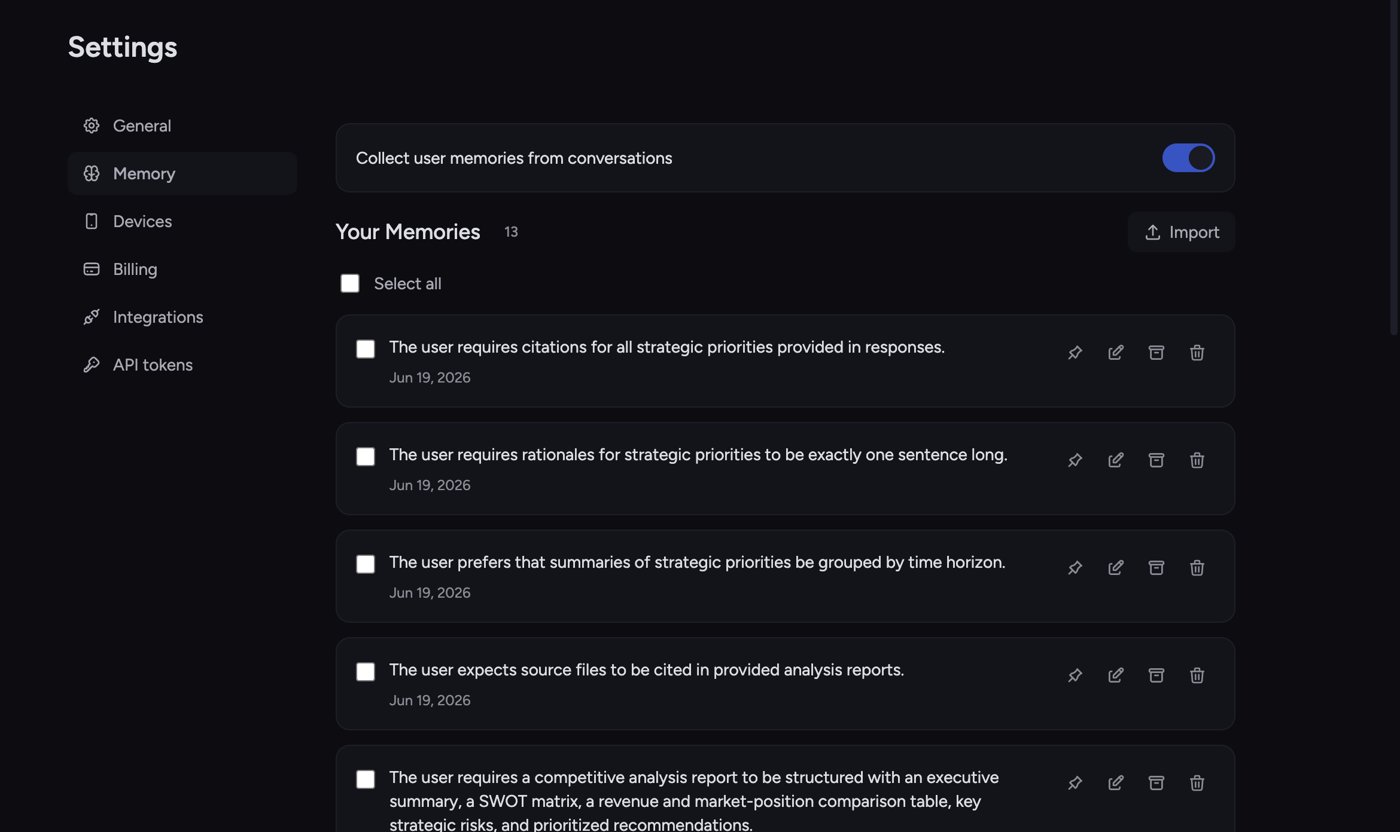 * **Your Memories (personal).** Facts and preferences about you. They follow you across all your work and aren't shared with anyone else. Found under **Settings → Memory**. Example: *"I prefer answers in British English."*
* **Project Memories.** Context tied to a specific [project](/help/projects-sharing-teams/what-is-a-project), shared with everyone who works in that project. Found on the project's **Memories** page. Example: *"This project's launch date is in Q3."*
* **[Organization Memory](/help/organization-administration/organization-memory-shared-across-all-projects).** Context shared across your whole organization. Found on the organization's **Memory** page. Example: *"Our brand voice is friendly and concise."*
## Choosing the right scope
1. **Just about you?** Use **Your Memories**. Your tone, your tools, your working style.
2. **About one project?** Use **Project Memories** so teammates in that project benefit too.
3. **True for the whole company?** Use **Organization Memory**.
ℹ️ **Good to Know:** Each scope has its own collection toggle and its own list. A memory you add to **Your Memories** won't appear under **Project Memories** — you choose the scope when you create it by being on that scope's page.
## Controlling which scopes a chat uses
* **Your Memories (personal).** Facts and preferences about you. They follow you across all your work and aren't shared with anyone else. Found under **Settings → Memory**. Example: *"I prefer answers in British English."*
* **Project Memories.** Context tied to a specific [project](/help/projects-sharing-teams/what-is-a-project), shared with everyone who works in that project. Found on the project's **Memories** page. Example: *"This project's launch date is in Q3."*
* **[Organization Memory](/help/organization-administration/organization-memory-shared-across-all-projects).** Context shared across your whole organization. Found on the organization's **Memory** page. Example: *"Our brand voice is friendly and concise."*
## Choosing the right scope
1. **Just about you?** Use **Your Memories**. Your tone, your tools, your working style.
2. **About one project?** Use **Project Memories** so teammates in that project benefit too.
3. **True for the whole company?** Use **Organization Memory**.
ℹ️ **Good to Know:** Each scope has its own collection toggle and its own list. A memory you add to **Your Memories** won't appear under **Project Memories** — you choose the scope when you create it by being on that scope's page.
## Controlling which scopes a chat uses
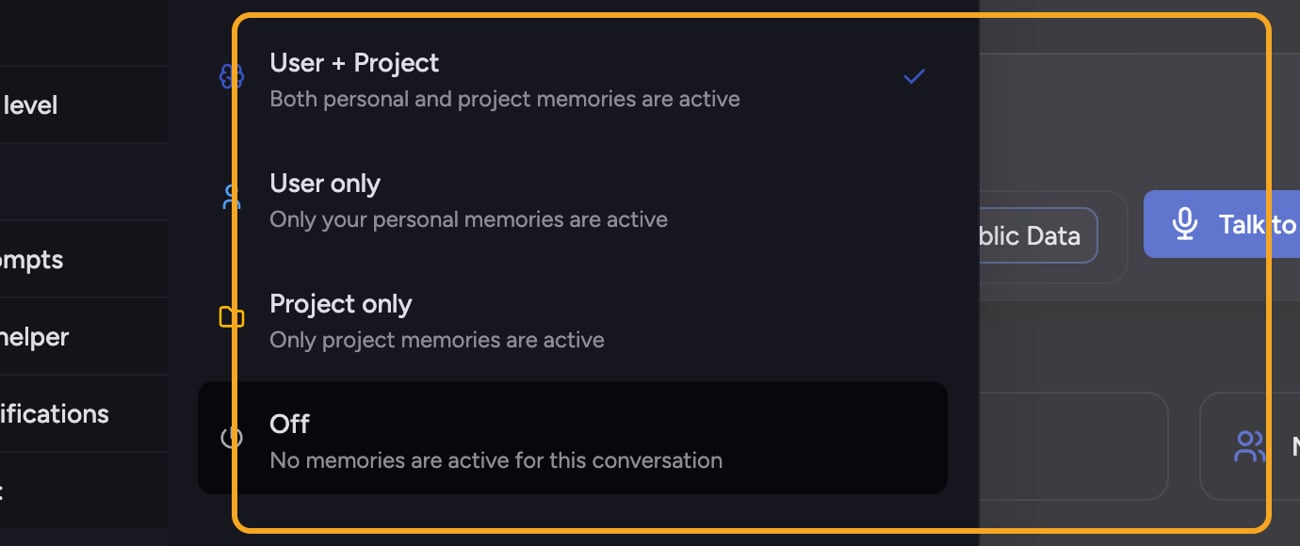 In the [prompt bar](/help/the-prompt-bar-scope/the-prompt-bar-a-tour-of-your-chat-controls), the **Memory** menu sets which memories are active for the current conversation:
* **User + Project** — both your personal and the project's memories are active.
* **User only** — only your personal memories are active.
* **Project only** — only the project's memories are active.
* **Off** — no memories are active for this conversation.
## Who can edit what
Personal memories are yours to manage. For **Project Memories** and **Organization Memory**, editing depends on [your role](/help/projects-sharing-teams/roles-access-levels-owner-collaborator-reader): owners can edit any memory in that scope, and collaborators can edit the memories they created. If you can't edit a shared memory, the edit, archive, and delete icons won't appear on it.
## FAQ
No. **Your Memories** are private to you. Only **Project Memories** and **Organization Memory** are shared, and only with people in that project or organization.
Check the scope. If you added it under **Settings → Memory**, it's a personal memory and won't appear as a project memory. Add it on the project's **Memories** page instead. Also confirm the chat's memory mode includes that scope.
Organization Memory needs to be [enabled](/help/organization-administration/organization-settings-overview) (the **Enable organization memory** toggle) and your role has to allow access. If it's empty, no organization memories have been added yet; if you can't reach it, ask an organization owner.
In the [prompt bar](/help/the-prompt-bar-scope/the-prompt-bar-a-tour-of-your-chat-controls), the **Memory** menu sets which memories are active for the current conversation:
* **User + Project** — both your personal and the project's memories are active.
* **User only** — only your personal memories are active.
* **Project only** — only the project's memories are active.
* **Off** — no memories are active for this conversation.
## Who can edit what
Personal memories are yours to manage. For **Project Memories** and **Organization Memory**, editing depends on [your role](/help/projects-sharing-teams/roles-access-levels-owner-collaborator-reader): owners can edit any memory in that scope, and collaborators can edit the memories they created. If you can't edit a shared memory, the edit, archive, and delete icons won't appear on it.
## FAQ
No. **Your Memories** are private to you. Only **Project Memories** and **Organization Memory** are shared, and only with people in that project or organization.
Check the scope. If you added it under **Settings → Memory**, it's a personal memory and won't appear as a project memory. Add it on the project's **Memories** page instead. Also confirm the chat's memory mode includes that scope.
Organization Memory needs to be [enabled](/help/organization-administration/organization-settings-overview) (the **Enable organization memory** toggle) and your role has to allow access. If it's empty, no organization memories have been added yet; if you can't reach it, ask an organization owner.