> ## Documentation Index
> Fetch the complete documentation index at: https://docs.chief.bot/llms.txt
> Use this file to discover all available pages before exploring further.
# Organization settings overview
> Your Organization is the top-level container for your company in Chief.
Your **Organization** is the top-level container for your company in Chief. It holds your [Projects](/help/projects-sharing-teams/what-is-a-project) and the settings that apply across all of them. Organization settings are where an owner names the company, manages shared memory, and connects company-wide integrations.
## Open Organization settings
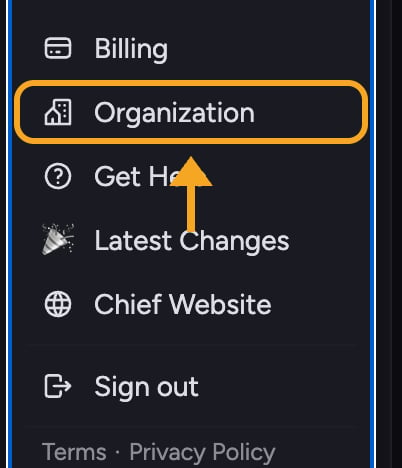 1. Go to **Organization** in Chief. The Organization settings page opens with a left-hand navigation menu.
2. Select a section from the menu: **General**, **Memory**, or **Integrations**.
## What each section controls
* **General** — Set the **Organization name**, which is shown across the app and to anyone you collaborate with. Edit it and select **Save changes**.
* **Memory** — Manage [**Organization Memory**](/help/organization-administration/organization-memory-shared-across-all-projects): facts and context Chief reuses across every Project in the Organization.
* **Integrations** — [Connect company-wide services](/help/organization-administration/org-wide-integrations-google-workspace-domain-delegation) such as Google Workspace once for the whole Organization.
⚠️ **Important:** Organization settings are only available to [**organization owners**](/help/organization-administration/managing-members-roles-at-the-org-level). If you are not an owner, you will see "You don't have access to this page." Ask an owner to make a change for you.
## FAQ
That page is owner-only. Only an organization owner can view or change General, Memory, and Integrations settings. Contact an owner in your Organization to make the change.
Membership and roles (Owner, Collaborator, Reader) are managed at the **Project** level, not in Organization settings. See "Managing members & roles at the org level" for how access is organized.
No. Renaming only changes the Organization's display name shown across the app. Your Projects, chats, and Library content are untouched.
1. Go to **Organization** in Chief. The Organization settings page opens with a left-hand navigation menu.
2. Select a section from the menu: **General**, **Memory**, or **Integrations**.
## What each section controls
* **General** — Set the **Organization name**, which is shown across the app and to anyone you collaborate with. Edit it and select **Save changes**.
* **Memory** — Manage [**Organization Memory**](/help/organization-administration/organization-memory-shared-across-all-projects): facts and context Chief reuses across every Project in the Organization.
* **Integrations** — [Connect company-wide services](/help/organization-administration/org-wide-integrations-google-workspace-domain-delegation) such as Google Workspace once for the whole Organization.
⚠️ **Important:** Organization settings are only available to [**organization owners**](/help/organization-administration/managing-members-roles-at-the-org-level). If you are not an owner, you will see "You don't have access to this page." Ask an owner to make a change for you.
## FAQ
That page is owner-only. Only an organization owner can view or change General, Memory, and Integrations settings. Contact an owner in your Organization to make the change.
Membership and roles (Owner, Collaborator, Reader) are managed at the **Project** level, not in Organization settings. See "Managing members & roles at the org level" for how access is organized.
No. Renaming only changes the Organization's display name shown across the app. Your Projects, chats, and Library content are untouched.