> ## Documentation Index
> Fetch the complete documentation index at: https://docs.chief.bot/llms.txt
> Use this file to discover all available pages before exploring further.
# Checking your credit balance & usage
> Chief keeps your credit balance one click away.
Chief keeps your [credit balance](/help/plans-credits-billing/how-credits-work) one click away. Check it before a big task so you know you have room to work.
## Check your personal balance and usage
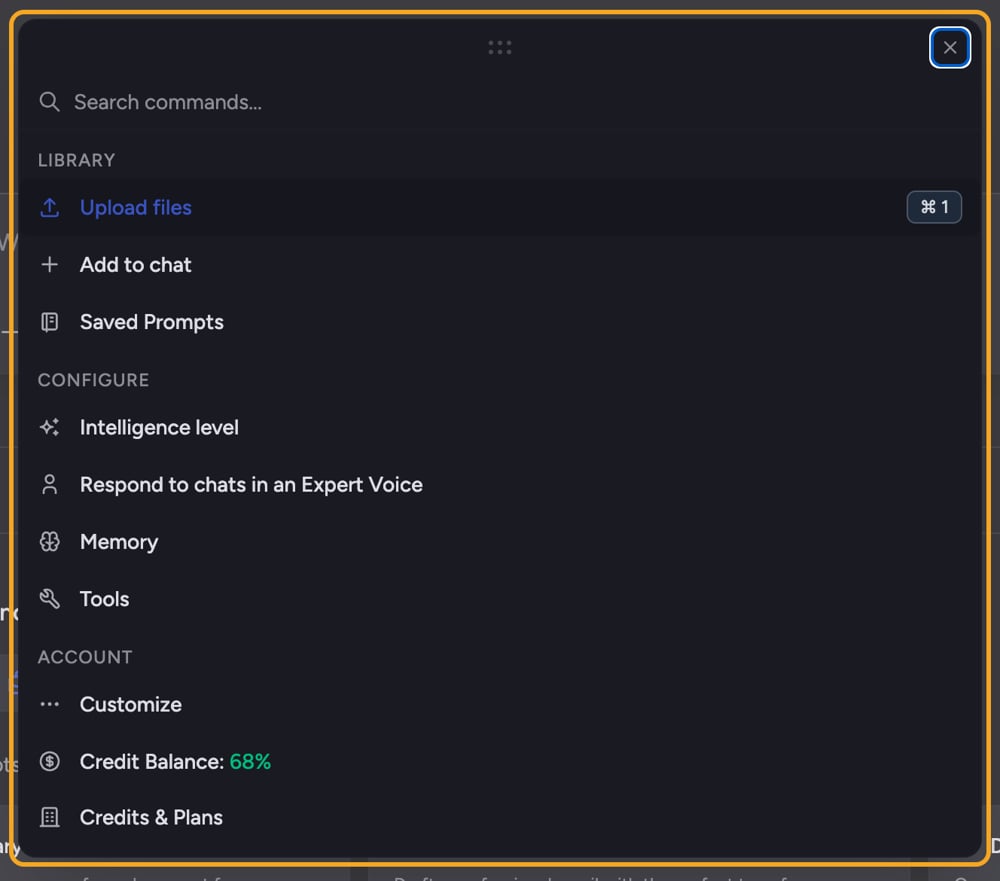 1. Open **Settings** and go to the **Billing** section.
2. At the top, read the **plan header** — it shows your [current plan](/help/plans-credits-billing/plans-overview-explore-pro-power-user-enterprise) name and a short description.
3. Below it, find the **Credits Balance** row (coin icon). It shows your available credits and the percentage remaining, for example "**12,400** credits available (62%)".
4. Read the **Usage This Month** row (trending-up icon). It shows credits used and a progress bar, for example "**7,600** credits used (38%)".
ℹ️ **Good to know:** The balance color is a quick health signal — green means you have plenty (65%+ remaining), amber means you're getting low (21–64%), and red means you're nearly out (20% or less).
## Check a project's balance
When you work inside a project, [the credits may come from a different balance](/help/plans-credits-billing/personal-vs-organization-billing) than your personal one — for example, the organization that pays for the project.
1. Open the project, then open its **Billing** tab.
2. Read the **Balance** field for that project's available credits, and the **Plan type** field for the plan funding it.
3. If the project is paid for by someone else, you'll see who it's **Powered by** or **Billed to**, and a "Different from your personal plan" note when it doesn't match your own plan.
## FAQ
The credit balance and usage section only appears once billing data has loaded. If you only see the plan header, give it a moment to load, or refresh. If you're signed out or browsing as a guest, [sign in](/help/getting-started/creating-your-account-signing-in) first.
No. Projects can be funded by a different plan than your own. The amount shown on a project's Billing tab is that project's balance, which may belong to the organization paying for it — not your personal credits. See "Personal vs. organization billing" for how this works.
It means your remaining credits are at or below 20%. Select the warning link to go to the pricing page and [refill](/help/plans-credits-billing/refilling-credits) before you run out.
1. Open **Settings** and go to the **Billing** section.
2. At the top, read the **plan header** — it shows your [current plan](/help/plans-credits-billing/plans-overview-explore-pro-power-user-enterprise) name and a short description.
3. Below it, find the **Credits Balance** row (coin icon). It shows your available credits and the percentage remaining, for example "**12,400** credits available (62%)".
4. Read the **Usage This Month** row (trending-up icon). It shows credits used and a progress bar, for example "**7,600** credits used (38%)".
ℹ️ **Good to know:** The balance color is a quick health signal — green means you have plenty (65%+ remaining), amber means you're getting low (21–64%), and red means you're nearly out (20% or less).
## Check a project's balance
When you work inside a project, [the credits may come from a different balance](/help/plans-credits-billing/personal-vs-organization-billing) than your personal one — for example, the organization that pays for the project.
1. Open the project, then open its **Billing** tab.
2. Read the **Balance** field for that project's available credits, and the **Plan type** field for the plan funding it.
3. If the project is paid for by someone else, you'll see who it's **Powered by** or **Billed to**, and a "Different from your personal plan" note when it doesn't match your own plan.
## FAQ
The credit balance and usage section only appears once billing data has loaded. If you only see the plan header, give it a moment to load, or refresh. If you're signed out or browsing as a guest, [sign in](/help/getting-started/creating-your-account-signing-in) first.
No. Projects can be funded by a different plan than your own. The amount shown on a project's Billing tab is that project's balance, which may belong to the organization paying for it — not your personal credits. See "Personal vs. organization billing" for how this works.
It means your remaining credits are at or below 20%. Select the warning link to go to the pricing page and [refill](/help/plans-credits-billing/refilling-credits) before you run out.