> ## Documentation Index
> Fetch the complete documentation index at: https://docs.chief.bot/llms.txt
> Use this file to discover all available pages before exploring further.
# Credit cost by mode
> Chief lets you dial intelligence up or down per task.
Chief lets you dial intelligence up or down per task. Higher intelligence does more thinking, which costs more [credits](/help/plans-credits-billing/how-credits-work). Choosing the right level for each job is the simplest way to control your spend.
## The intelligence levels and their cost
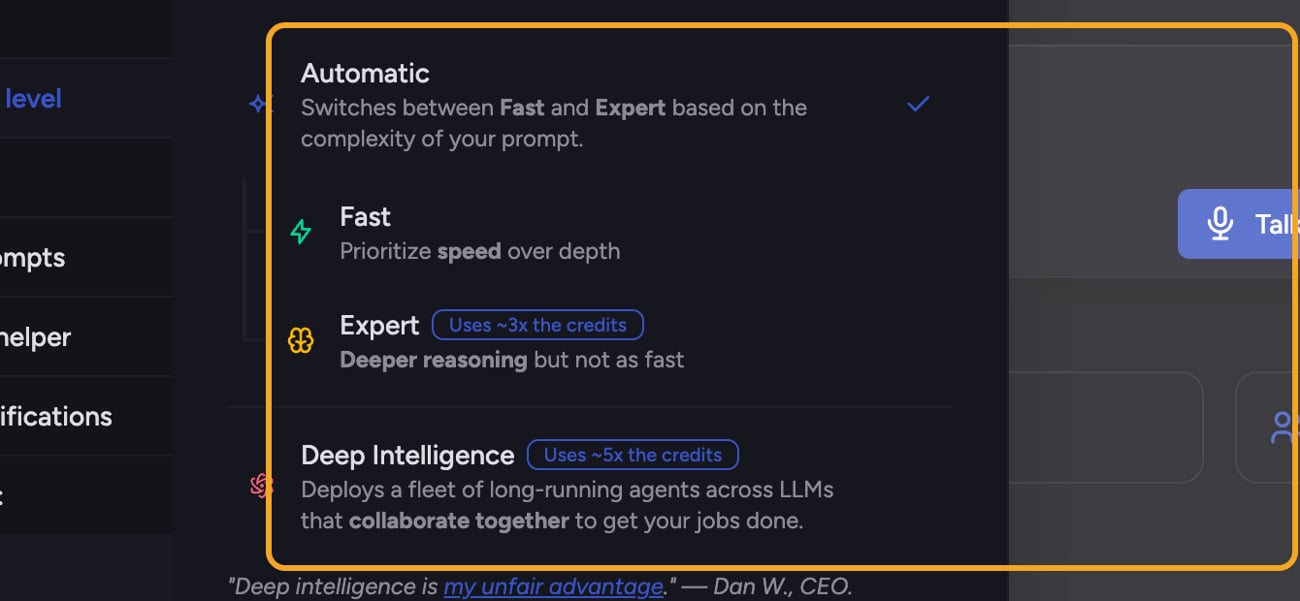 Open the [**Intelligence level**](/help/answer-depth-chiefs-agents/response-modes-automatic-fast-expert) menu in the prompt bar to pick a level. Each option shows its relative credit cost:
* **Auto (Automatic)** — Baseline cost. Switches between Fast and Expert based on the complexity of your prompt, so simple prompts stay cheap and complex ones get more depth automatically.
* **Fast** — Baseline cost. Prioritizes speed over depth.
* **Expert** — **Uses \~3x the credits.** Deeper reasoning, but not as fast.
* **[Deep Intelligence](/help/answer-depth-chiefs-agents/deep-intelligence-research-mode)** — **Uses \~5x the credits.** Deploys a fleet of long-running agents across LLMs that collaborate to get bigger jobs done. Available on paid plans.
💡 **Tip:** Leave Chief on Auto for day-to-day work. It uses Fast (baseline) when a prompt is simple and only escalates to Expert when the prompt warrants it — giving you depth when it matters without paying for it on every message.
## How to change the level for a task
Open the [**Intelligence level**](/help/answer-depth-chiefs-agents/response-modes-automatic-fast-expert) menu in the prompt bar to pick a level. Each option shows its relative credit cost:
* **Auto (Automatic)** — Baseline cost. Switches between Fast and Expert based on the complexity of your prompt, so simple prompts stay cheap and complex ones get more depth automatically.
* **Fast** — Baseline cost. Prioritizes speed over depth.
* **Expert** — **Uses \~3x the credits.** Deeper reasoning, but not as fast.
* **[Deep Intelligence](/help/answer-depth-chiefs-agents/deep-intelligence-research-mode)** — **Uses \~5x the credits.** Deploys a fleet of long-running agents across LLMs that collaborate to get bigger jobs done. Available on paid plans.
💡 **Tip:** Leave Chief on Auto for day-to-day work. It uses Fast (baseline) when a prompt is simple and only escalates to Expert when the prompt warrants it — giving you depth when it matters without paying for it on every message.
## How to change the level for a task
 1. In the [prompt bar](/help/the-prompt-bar-scope/the-prompt-bar-a-tour-of-your-chat-controls), open the **Intelligence level** menu.
2. Select the level you want. Each row shows a credit-multiplier badge (for example "Uses \~3x the credits") for the paid levels.
3. Send your prompt — it runs at the level you selected.
## FAQ
They're approximate guides — Chief labels Expert as "\~3x" and Deep Intelligence as "\~5x" relative to baseline. Actual usage varies with the length and complexity of each task. Use them to compare levels, not to predict an exact charge.
Deep Intelligence is a paid feature. On a free plan the row shows an "Upgrade" prompt instead of selecting it. [Upgrade to a paid plan](/help/plans-credits-billing/plans-overview-explore-pro-power-user-enterprise) to unlock it.
Prompts that [mention agents](/help/answer-depth-chiefs-agents/calling-on-a-specific-agent-in-your-prompt) require Deep Intelligence. Chief blocks the lower levels and offers a link to remove the agents and switch back to Auto if you'd rather run a cheaper level.
1. In the [prompt bar](/help/the-prompt-bar-scope/the-prompt-bar-a-tour-of-your-chat-controls), open the **Intelligence level** menu.
2. Select the level you want. Each row shows a credit-multiplier badge (for example "Uses \~3x the credits") for the paid levels.
3. Send your prompt — it runs at the level you selected.
## FAQ
They're approximate guides — Chief labels Expert as "\~3x" and Deep Intelligence as "\~5x" relative to baseline. Actual usage varies with the length and complexity of each task. Use them to compare levels, not to predict an exact charge.
Deep Intelligence is a paid feature. On a free plan the row shows an "Upgrade" prompt instead of selecting it. [Upgrade to a paid plan](/help/plans-credits-billing/plans-overview-explore-pro-power-user-enterprise) to unlock it.
Prompts that [mention agents](/help/answer-depth-chiefs-agents/calling-on-a-specific-agent-in-your-prompt) require Deep Intelligence. Chief blocks the lower levels and offers a link to remove the agents and switch back to Auto if you'd rather run a cheaper level.