> ## Documentation Index
> Fetch the complete documentation index at: https://docs.chief.bot/llms.txt
> Use this file to discover all available pages before exploring further.
# Personal vs. organization billing
> In Chief, the credits a task uses don't always come from your personal balance.
In Chief, the [credits](/help/plans-credits-billing/how-credits-work) a task uses don't always come from your personal balance. When you work inside a project, the project decides which balance pays. Knowing which one is in play tells you whose balance to refill when credits run low.
## The three ways a project can be billed
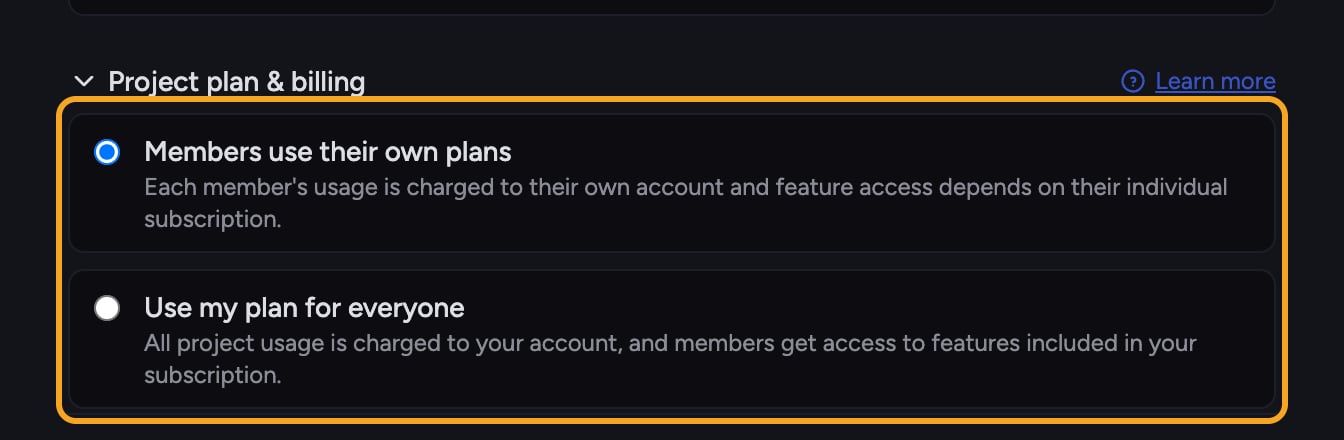 * **Your own plan.** Outside any project — or in a project on your own plan — tasks draw from your personal credit balance. You refill it yourself.
* **An organization pays (powered by / billed to).** The project draws from the credits of [the organization](/help/organization-administration/organization-settings-overview) that owns it. The Billing tab shows it's "Powered by" that organization, or "Billed to" the paying owner. You don't refill this from your personal balance — the organization does.
* **Each member pays individually (caller mode).** The project bills each member to their own balance: "Each member of this project pays individually." Here your usage in the project comes out of your personal credits.
## How to tell which applies
1. Open the project, then open its [**Billing** tab](/help/projects-sharing-teams/choosing-which-plan-funds-a-project-billing-source).
2. Read the line under the project name: **Powered by** / **Billed to** tells you an organization or owner pays; **Your usage is billed to** with the "Each member pays individually" hint means caller mode.
3. Check the **Balance** and **Plan type** fields — these reflect the paying plan, which may differ from your personal one. A "Different from your personal plan" badge confirms when it doesn't match.
⚠️ **Important:** If a project is paid for by an organization and that balance runs out, your personal credits won't unblock it. You'll need the paying organization to [refill](/help/plans-credits-billing/refilling-credits) — Chief shows the owner's email to contact.
## Where to see your own plan
Your [personal plan and balance](/help/plans-credits-billing/checking-your-credit-balance-usage) always live in **Settings → Billing**. A project's Billing tab shows only that project's billing, which may be funded by someone else.
## FAQ
That project is billed to an organization, not to you. Chief checks the project's paying balance, not your personal one. Your personal credits apply only outside the project or in projects billed to you. Contact the paying organization to refill.
Yes. Billing management for a project belongs to the organization or owner that pays for it. As a member you can view the project's Billing tab, but only the paying owner can refill or change its plan.
If the project is in caller mode ("Each member pays individually"), your usage there draws from your personal balance by design. To change how a project is billed, [the project or organization owner](/help/organization-administration/managing-members-roles-at-the-org-level) needs to adjust its billing setup — reach out to them.
* **Your own plan.** Outside any project — or in a project on your own plan — tasks draw from your personal credit balance. You refill it yourself.
* **An organization pays (powered by / billed to).** The project draws from the credits of [the organization](/help/organization-administration/organization-settings-overview) that owns it. The Billing tab shows it's "Powered by" that organization, or "Billed to" the paying owner. You don't refill this from your personal balance — the organization does.
* **Each member pays individually (caller mode).** The project bills each member to their own balance: "Each member of this project pays individually." Here your usage in the project comes out of your personal credits.
## How to tell which applies
1. Open the project, then open its [**Billing** tab](/help/projects-sharing-teams/choosing-which-plan-funds-a-project-billing-source).
2. Read the line under the project name: **Powered by** / **Billed to** tells you an organization or owner pays; **Your usage is billed to** with the "Each member pays individually" hint means caller mode.
3. Check the **Balance** and **Plan type** fields — these reflect the paying plan, which may differ from your personal one. A "Different from your personal plan" badge confirms when it doesn't match.
⚠️ **Important:** If a project is paid for by an organization and that balance runs out, your personal credits won't unblock it. You'll need the paying organization to [refill](/help/plans-credits-billing/refilling-credits) — Chief shows the owner's email to contact.
## Where to see your own plan
Your [personal plan and balance](/help/plans-credits-billing/checking-your-credit-balance-usage) always live in **Settings → Billing**. A project's Billing tab shows only that project's billing, which may be funded by someone else.
## FAQ
That project is billed to an organization, not to you. Chief checks the project's paying balance, not your personal one. Your personal credits apply only outside the project or in projects billed to you. Contact the paying organization to refill.
Yes. Billing management for a project belongs to the organization or owner that pays for it. As a member you can view the project's Billing tab, but only the paying owner can refill or change its plan.
If the project is in caller mode ("Each member pays individually"), your usage there draws from your personal balance by design. To change how a project is billed, [the project or organization owner](/help/organization-administration/managing-members-roles-at-the-org-level) needs to adjust its billing setup — reach out to them.