> ## Documentation Index
> Fetch the complete documentation index at: https://docs.chief.bot/llms.txt
> Use this file to discover all available pages before exploring further.
# Choosing which plan funds a project (billing source)
> Every Project has a plan & billing source — the subscription that funds the usage inside it and decides which features members get.
## What "billing source" means
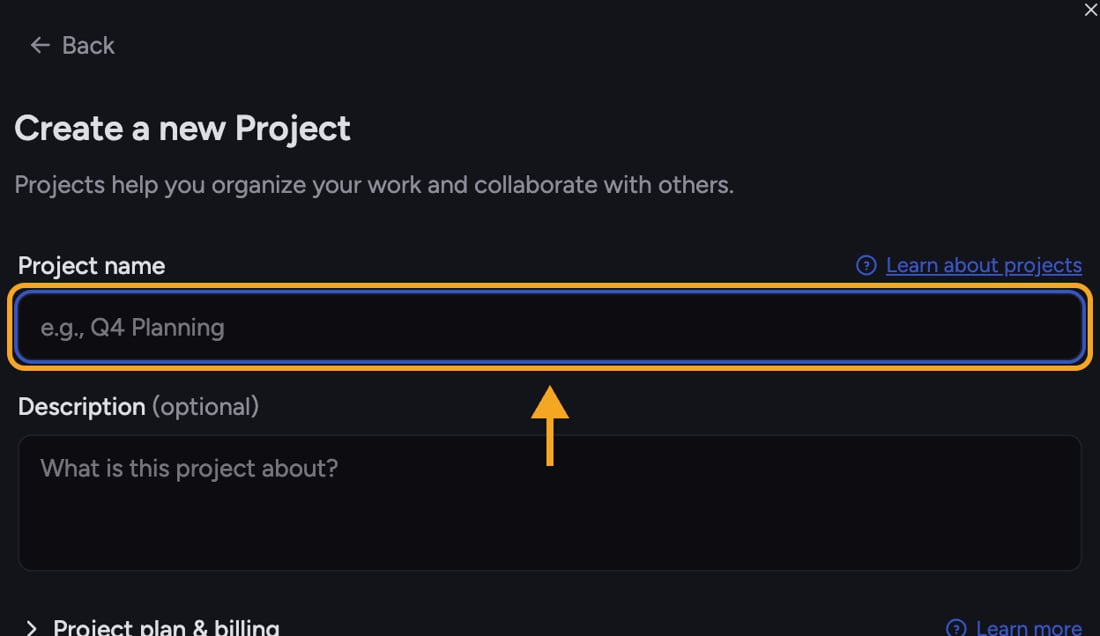 Every [Project](/help/projects-sharing-teams/what-is-a-project) has a **plan & billing** source — the [subscription](/help/plans-credits-billing/plans-overview-explore-pro-power-user-enterprise) that funds the usage inside it and decides which features members get. You set this when you [create a Project](/help/projects-sharing-teams/creating-configuring-a-project), in the **Project plan & billing** section of the create form.
## The two options
Every [Project](/help/projects-sharing-teams/what-is-a-project) has a **plan & billing** source — the [subscription](/help/plans-credits-billing/plans-overview-explore-pro-power-user-enterprise) that funds the usage inside it and decides which features members get. You set this when you [create a Project](/help/projects-sharing-teams/creating-configuring-a-project), in the **Project plan & billing** section of the create form.
## The two options
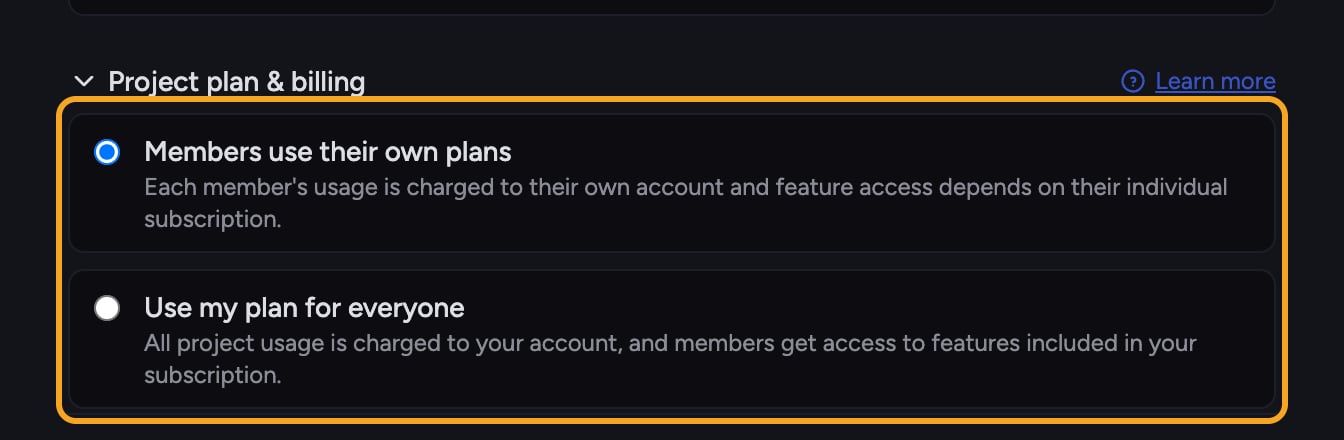 * **Members use their own plans** (the default) — [each member's usage is charged to their own account](/help/plans-credits-billing/personal-vs-organization-billing), and the features they can use depend on their individual subscription. Good for ad-hoc groups where everyone already has their own plan.
* **Use my plan for everyone** — all [Project usage](/help/plans-credits-billing/how-credits-work) is charged to your account, and members get access to the features included in your subscription. Good when you want to fund a team's work and guarantee everyone has the same capabilities.
ℹ️ **Good to Know:** With **Use my plan for everyone**, members get the features in *your* plan even if their own plan is smaller — useful for giving a whole team the same level of access from one subscription.
## Set the billing source when creating a Project
1. Open the [**Switch Projects** picker](/help/projects-sharing-teams/switching-bookmarking-discovering-projects) (click the project name at the top), then click **+ New Project**.
2. In the **Create a new Project** form, click the **Project plan & billing** heading (with the chevron) to expand the section.
3. Select **Members use their own plans** or **Use my plan for everyone**.
4. Click **Create project**.
If you don't expand the section, the Project is created with **Members use their own plans**. For details on how plans work, use the **Learn more** link next to the heading.
⚠️ **Important:** The billing source is chosen at creation time. If you need a different funding arrangement and can't change it on an existing Project, create a new Project with the option you want and move the work there.
## Frequently asked questions
It uses the default, **Members use their own plans**. Each member's usage is billed to their own account.
No — that's the point of the option. Usage is charged to your account and members get the features in your plan, so they don't need their own subscription to work in that Project.
The two radio options live under the collapsible **Project plan & billing** heading in the create form. Click the heading (with the chevron) to expand it — **Members use their own plans** and **Use my plan for everyone** appear directly below.
* **Members use their own plans** (the default) — [each member's usage is charged to their own account](/help/plans-credits-billing/personal-vs-organization-billing), and the features they can use depend on their individual subscription. Good for ad-hoc groups where everyone already has their own plan.
* **Use my plan for everyone** — all [Project usage](/help/plans-credits-billing/how-credits-work) is charged to your account, and members get access to the features included in your subscription. Good when you want to fund a team's work and guarantee everyone has the same capabilities.
ℹ️ **Good to Know:** With **Use my plan for everyone**, members get the features in *your* plan even if their own plan is smaller — useful for giving a whole team the same level of access from one subscription.
## Set the billing source when creating a Project
1. Open the [**Switch Projects** picker](/help/projects-sharing-teams/switching-bookmarking-discovering-projects) (click the project name at the top), then click **+ New Project**.
2. In the **Create a new Project** form, click the **Project plan & billing** heading (with the chevron) to expand the section.
3. Select **Members use their own plans** or **Use my plan for everyone**.
4. Click **Create project**.
If you don't expand the section, the Project is created with **Members use their own plans**. For details on how plans work, use the **Learn more** link next to the heading.
⚠️ **Important:** The billing source is chosen at creation time. If you need a different funding arrangement and can't change it on an existing Project, create a new Project with the option you want and move the work there.
## Frequently asked questions
It uses the default, **Members use their own plans**. Each member's usage is billed to their own account.
No — that's the point of the option. Usage is charged to your account and members get the features in your plan, so they don't need their own subscription to work in that Project.
The two radio options live under the collapsible **Project plan & billing** heading in the create form. Click the heading (with the chevron) to expand it — **Members use their own plans** and **Use my plan for everyone** appear directly below.