> ## Documentation Index
> Fetch the complete documentation index at: https://docs.chief.bot/llms.txt
> Use this file to discover all available pages before exploring further.
# Deleting a project
> Deleting a Project is permanent.
## Before you delete
Deleting a Project is permanent. The Project and **all its data** — [files](/help/your-knowledge-library/what-is-the-library), Knowledge, and [chats](/help/chatting-with-chief/deleting-a-chat) — are removed and can't be recovered. If [the Project is shared](/help/projects-sharing-teams/removing-members-managing-access), the data is deleted for *every* member, not just you.
⚠️ **Important:** There is no undo. Make sure anything you need is saved elsewhere before you continue.
## Delete a Project
 1. Open the [**Switch Projects** picker](/help/projects-sharing-teams/switching-bookmarking-discovering-projects) by clicking the project name at the top of the app, then click **All projects**.
2. Find the Project you want to remove and click its red **Delete Project** (trash) icon.
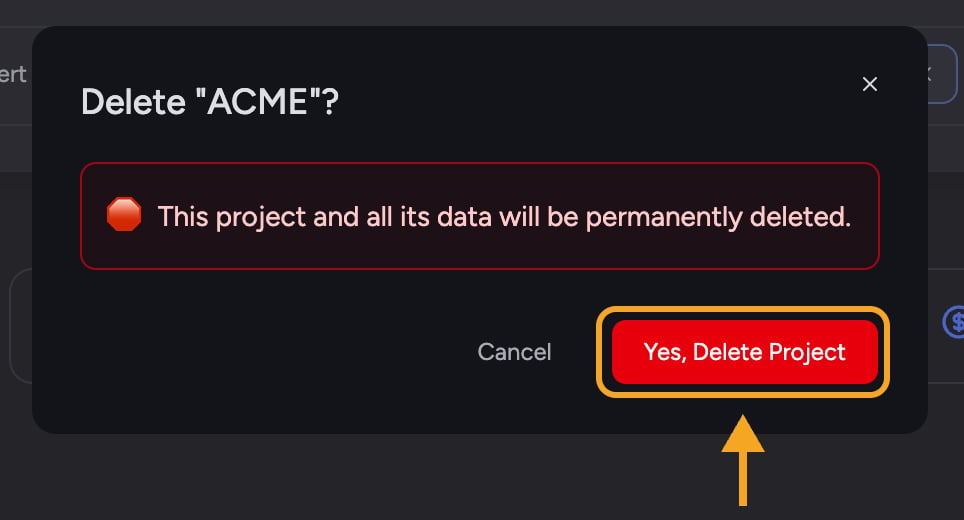
3. A confirmation dialog appears, titled **Delete "\[Project name]"?**. It warns that the Project and all its data will be permanently deleted — and, if the Project is shared, that this applies to all users with access.
4. Click **Yes, Delete Project** to confirm (or **Cancel** to keep it).
1. Open the [**Switch Projects** picker](/help/projects-sharing-teams/switching-bookmarking-discovering-projects) by clicking the project name at the top of the app, then click **All projects**.
2. Find the Project you want to remove and click its red **Delete Project** (trash) icon.
3. A confirmation dialog appears, titled **Delete "\[Project name]"?**. It warns that the Project and all its data will be permanently deleted — and, if the Project is shared, that this applies to all users with access.
4. Click **Yes, Delete Project** to confirm (or **Cancel** to keep it).
 After deletion, Chief switches you to one of your other Projects so you always have an active workspace.
## The default Project can't be deleted
Your account's default Project can't be removed — its **Delete Project** control is unavailable, with the note: "You can't delete this default project, but you can rename it." If you no longer want its current name or contents, [rename it](/help/projects-sharing-teams/creating-configuring-a-project) instead and reuse it.
## Frequently asked questions
You're looking at your default Project, which can't be deleted. You can rename it from the same picker. (Deleting also requires [the right permissions](/help/projects-sharing-teams/roles-access-levels-owner-collaborator-reader), so a non-Owner may not see the option on shared Projects either.)
Deleting a shared Project removes it and all its data for everyone with access, not just you. There's no way to restore it.
This is usually temporary or a permissions issue. Refresh and try again, and confirm you have permission to delete the Project (an Owner can). If it keeps failing, the Project wasn't deleted and your data is intact.
After deletion, Chief switches you to one of your other Projects so you always have an active workspace.
## The default Project can't be deleted
Your account's default Project can't be removed — its **Delete Project** control is unavailable, with the note: "You can't delete this default project, but you can rename it." If you no longer want its current name or contents, [rename it](/help/projects-sharing-teams/creating-configuring-a-project) instead and reuse it.
## Frequently asked questions
You're looking at your default Project, which can't be deleted. You can rename it from the same picker. (Deleting also requires [the right permissions](/help/projects-sharing-teams/roles-access-levels-owner-collaborator-reader), so a non-Owner may not see the option on shared Projects either.)
Deleting a shared Project removes it and all its data for everyone with access, not just you. There's no way to restore it.
This is usually temporary or a permissions issue. Refresh and try again, and confirm you have permission to delete the Project (an Owner can). If it keeps failing, the Project wasn't deleted and your data is intact.