> ## Documentation Index
> Fetch the complete documentation index at: https://docs.chief.bot/llms.txt
> Use this file to discover all available pages before exploring further.
# Sharing a prompt via link
> Chief turns any prompt into a shareable link.
## Send a prompt to anyone with a link
Chief turns any prompt into a shareable link. When someone opens it, the prompt loads straight into their [prompt bar](/help/the-prompt-bar-scope/the-prompt-bar-a-tour-of-your-chat-controls) — including any values you filled into its [variable fields](/help/the-prompt-bar-scope/using-variable-fields-in-a-prompt). There are two ways to share, depending on where the prompt lives.
## Share a featured prompt from the Launchpad
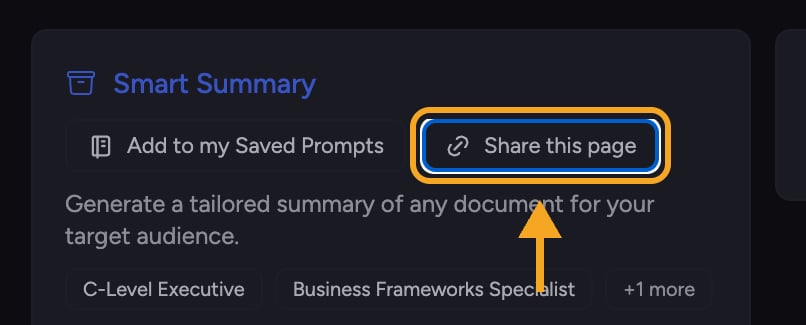 1. Open the [**Prompt Launchpad**](/help/prompts-the-launchpad/what-is-the-launchpad) and hover over the card you want to share.
2. Click the **Share this page** button (link icon) on the card. Chief copies the link to your clipboard and the button briefly shows **Copied**.
3. Paste the link into chat, email, or a doc to send it.
This link points to the prompt's own page, so the recipient sees it front and center.
## Share one of your Saved Prompts
1. Open the [**Prompt Launchpad**](/help/prompts-the-launchpad/what-is-the-launchpad) and hover over the card you want to share.
2. Click the **Share this page** button (link icon) on the card. Chief copies the link to your clipboard and the button briefly shows **Copied**.
3. Paste the link into chat, email, or a doc to send it.
This link points to the prompt's own page, so the recipient sees it front and center.
## Share one of your Saved Prompts
 1. Open the [**Saved Prompts**](/help/prompts-the-launchpad/saving-your-own-prompt-templates) panel and hover over the prompt row you want to share.
2. Click the **Share this prompt** button (share icon) that appears on the row.
3. Chief copies a link to your clipboard and shows **Prompt URL copied to clipboard**.
4. Paste the link wherever you want to send it.
ℹ️ **Good to Know:** If your Saved Prompt has variable fields you've already filled in, those values travel with the link. The recipient opens the prompt with your inputs pre-filled and can edit them before sending.
## Share the whole Launchpad view
1. Open the [**Saved Prompts**](/help/prompts-the-launchpad/saving-your-own-prompt-templates) panel and hover over the prompt row you want to share.
2. Click the **Share this prompt** button (share icon) that appears on the row.
3. Chief copies a link to your clipboard and shows **Prompt URL copied to clipboard**.
4. Paste the link wherever you want to send it.
ℹ️ **Good to Know:** If your Saved Prompt has variable fields you've already filled in, those values travel with the link. The recipient opens the prompt with your inputs pre-filled and can edit them before sending.
## Share the whole Launchpad view
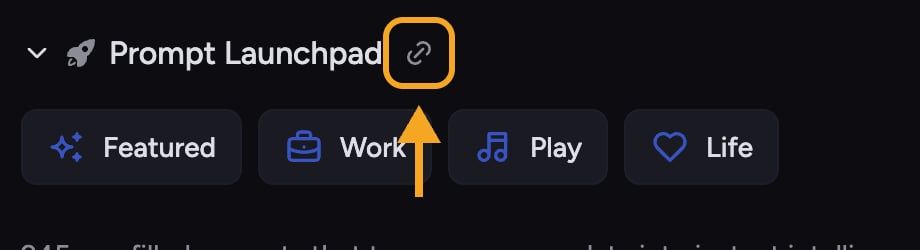 Want to share a category instead of a single prompt? With the Launchpad expanded, click the **link icon** next to the breadcrumb at the top. Chief copies a link to the current Launchpad view (including your search or category) and shows **Link copied**. Send it so the other person lands on the same set of prompts.
## Frequently asked questions
The link is copied to your clipboard, not opened in a new tab. Paste it (Cmd+V / Ctrl+V) into your message to confirm it copied. The button also flashes **Copied** or **Prompt URL copied to clipboard** when it works.
They'll need to be [signed in to Chief](/help/getting-started/creating-your-account-signing-in) to load the prompt into their own prompt bar and run it. The link carries the prompt text and any variable values you set.
No. A prompt link carries the prompt text and any variable values only. It does not share your files, projects, or [conversations](/help/sharing-visibility/sharing-a-chat-via-secret-link).
Want to share a category instead of a single prompt? With the Launchpad expanded, click the **link icon** next to the breadcrumb at the top. Chief copies a link to the current Launchpad view (including your search or category) and shows **Link copied**. Send it so the other person lands on the same set of prompts.
## Frequently asked questions
The link is copied to your clipboard, not opened in a new tab. Paste it (Cmd+V / Ctrl+V) into your message to confirm it copied. The button also flashes **Copied** or **Prompt URL copied to clipboard** when it works.
They'll need to be [signed in to Chief](/help/getting-started/creating-your-account-signing-in) to load the prompt into their own prompt bar and run it. The link carries the prompt text and any variable values you set.
No. A prompt link carries the prompt text and any variable values only. It does not share your files, projects, or [conversations](/help/sharing-visibility/sharing-a-chat-via-secret-link).