> ## Documentation Index
> Fetch the complete documentation index at: https://docs.chief.bot/llms.txt
> Use this file to discover all available pages before exploring further.
# How your data is used (concept) — and whether it trains AI
> This article answers the questions people ask most about their data in Chief: Is it private?
This article answers the questions people ask most about their data in Chief: Is it private? Does it train AI models? [Who can see it](/help/security-privacy/visibility-access-controls-private-restricted-project)?
## Does Chief train AI models on your data?
No. The third-party language models Chief uses to generate responses are **not trained on your data**. Your uploaded Files, chats, and project content are used to answer your questions — not to improve anyone's model.
ℹ️ **Good to Know:** You'll see "No LLMs trained on your data" on the sign-up screen and in file-upload prompts. That's the same commitment described here.
## Is your data private by default?
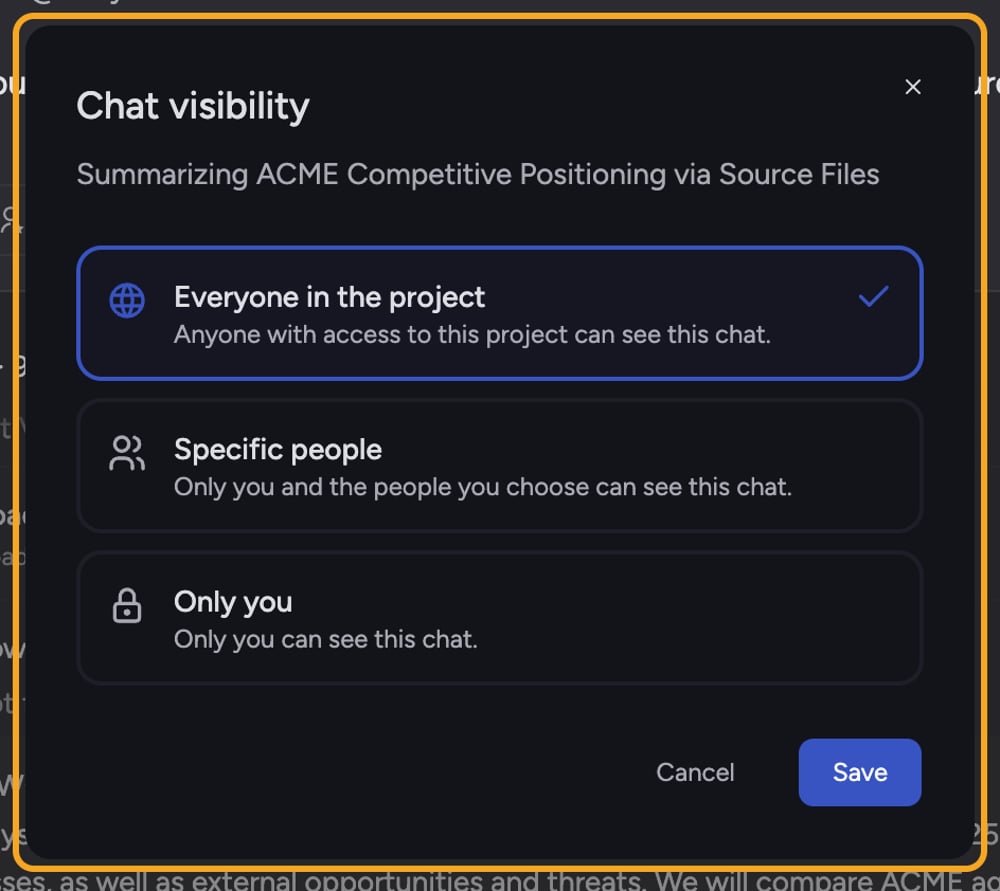 Yes. What you create in Chief belongs to you and your organization. By default a new chat is visible according to its [visibility setting](/help/sharing-visibility/chat-visibility-private-project-restricted) (Only you, Specific people, or Everyone in the project), and you control who can see it.
## How your data is used inside Chief
* **To answer you:** Files and chat content are [sent to the model](/help/how-chief-works-magic-under-the-hood/how-chief-finds-answers-in-your-files-retrieval-citations) so Chief can respond with context.
* **To power features you turn on:** for example, [connecting Google](/help/integrations/integrations-overview) brings mailbox and calendar content into a project. Chats in those projects start **Private** so that content isn't shared with the whole project by default.
* **Within your access boundary:** Chief only shows you content you're allowed to see based on project membership and chat visibility.
## Security and compliance, briefly
Chief is built to support **SOC 2 Type II**, **GDPR**, and **HIPAA** programs. For the full picture, see the [Trust and Security](https://go.chief.bot/trust-and-security) page and the [Compliance overview](/help/security-privacy/compliance-overview-dpa-privacy-policy-terms).
## Frequently asked questions
No. The models Chief uses are not trained on your data.
Only according to each chat's visibility setting. **Only you** chats are visible to you alone; **Everyone in the project** chats are visible to anyone with access to the project. You choose.
See the [Privacy Policy](https://chief.bot/privacy) and [Terms of Service](https://go.chief.bot/TOS). For specific retention periods or data-processing terms, confirm the current details with the Chief team.
Yes. What you create in Chief belongs to you and your organization. By default a new chat is visible according to its [visibility setting](/help/sharing-visibility/chat-visibility-private-project-restricted) (Only you, Specific people, or Everyone in the project), and you control who can see it.
## How your data is used inside Chief
* **To answer you:** Files and chat content are [sent to the model](/help/how-chief-works-magic-under-the-hood/how-chief-finds-answers-in-your-files-retrieval-citations) so Chief can respond with context.
* **To power features you turn on:** for example, [connecting Google](/help/integrations/integrations-overview) brings mailbox and calendar content into a project. Chats in those projects start **Private** so that content isn't shared with the whole project by default.
* **Within your access boundary:** Chief only shows you content you're allowed to see based on project membership and chat visibility.
## Security and compliance, briefly
Chief is built to support **SOC 2 Type II**, **GDPR**, and **HIPAA** programs. For the full picture, see the [Trust and Security](https://go.chief.bot/trust-and-security) page and the [Compliance overview](/help/security-privacy/compliance-overview-dpa-privacy-policy-terms).
## Frequently asked questions
No. The models Chief uses are not trained on your data.
Only according to each chat's visibility setting. **Only you** chats are visible to you alone; **Everyone in the project** chats are visible to anyone with access to the project. You choose.
See the [Privacy Policy](https://chief.bot/privacy) and [Terms of Service](https://go.chief.bot/TOS). For specific retention periods or data-processing terms, confirm the current details with the Chief team.