> ## Documentation Index
> Fetch the complete documentation index at: https://docs.chief.bot/llms.txt
> Use this file to discover all available pages before exploring further.
# Revoking access to a shared chat
> A secret link stays live until you turn it off.
A [secret link](/help/sharing-visibility/sharing-a-chat-via-secret-link) stays live until you turn it off. When a conversation should no longer be viewable outside your Project, revoke the link — this instantly breaks every copy of it that you sent, [emailed](/help/sharing-visibility/sharing-a-chat-by-email), or that [points to a single answer](/help/sharing-visibility/sharing-an-individual-answer-or-text-block).
## Revoke a shared chat's secret link
 1. Open the chat that is currently shared.
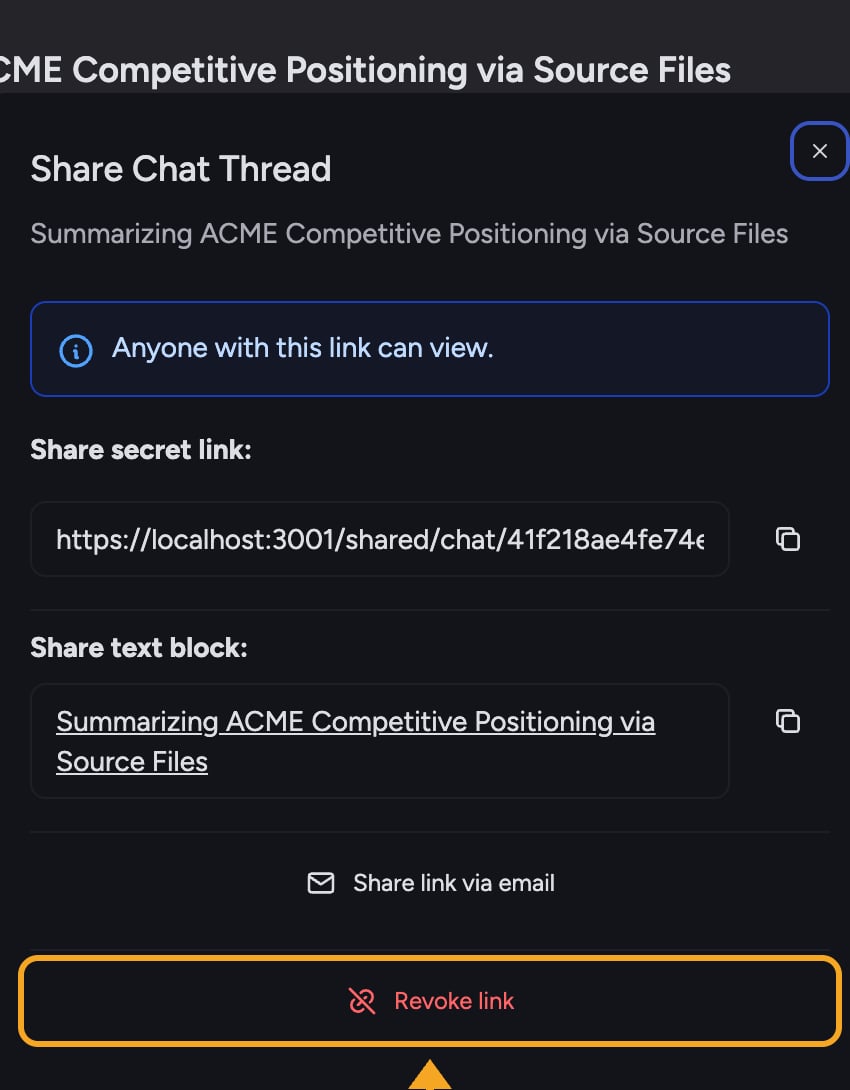
2. Select the **Share chat thread** button to open the **Share Chat Thread** dialog. Because the chat is shared, you will see the secret link and its options.
3. Select **Revoke link** at the bottom of the dialog.
4. The link is disabled. The dialog returns to "This chat thread is not currently shared," confirming the chat is no longer public.
⚠️ **Important:** Revoking takes effect immediately for everyone. Anyone who tries to open an old link — including links you sent by email or links that pointed to a single answer — will see that the shared chat is no longer available.
## What revoking does and does not change
* **Disables the link entirely** — there is no per-person revoke. One secret link serves the whole thread, so revoking it cuts off all recipients at once.
* **Does not change in-Project access** — members of your Project who could already see the chat (based on [its visibility](/help/sharing-visibility/chat-visibility-private-project-restricted)) keep their access. Revoking only affects the external secret link.
* **You can re-share later** — selecting **Create secret link** again generates a new link. Previously shared links stay dead.
## FAQ
If revoking errors, assume the link may still be active. Close the dialog, reopen it, and try **Revoke link** again. The dialog's status line tells you whether the chat is currently shared.
No. Creating a new secret link produces a fresh link. [Anyone holding the old, revoked link](/help/sharing-visibility/viewing-shared-chats-as-a-guest) still cannot open the chat.
No. The chat stays in your Project exactly as it was. Revoking only removes outside access via the secret link.
1. Open the chat that is currently shared.
2. Select the **Share chat thread** button to open the **Share Chat Thread** dialog. Because the chat is shared, you will see the secret link and its options.
3. Select **Revoke link** at the bottom of the dialog.
4. The link is disabled. The dialog returns to "This chat thread is not currently shared," confirming the chat is no longer public.
⚠️ **Important:** Revoking takes effect immediately for everyone. Anyone who tries to open an old link — including links you sent by email or links that pointed to a single answer — will see that the shared chat is no longer available.
## What revoking does and does not change
* **Disables the link entirely** — there is no per-person revoke. One secret link serves the whole thread, so revoking it cuts off all recipients at once.
* **Does not change in-Project access** — members of your Project who could already see the chat (based on [its visibility](/help/sharing-visibility/chat-visibility-private-project-restricted)) keep their access. Revoking only affects the external secret link.
* **You can re-share later** — selecting **Create secret link** again generates a new link. Previously shared links stay dead.
## FAQ
If revoking errors, assume the link may still be active. Close the dialog, reopen it, and try **Revoke link** again. The dialog's status line tells you whether the chat is currently shared.
No. Creating a new secret link produces a fresh link. [Anyone holding the old, revoked link](/help/sharing-visibility/viewing-shared-chats-as-a-guest) still cannot open the chat.
No. The chat stays in your Project exactly as it was. Revoking only removes outside access via the secret link.