> ## Documentation Index
> Fetch the complete documentation index at: https://docs.chief.bot/llms.txt
> Use this file to discover all available pages before exploring further.
# Sharing a chat by email
> Instead of copying a secret link and pasting it elsewhere, you can have Chief email the link to specific people for you.
Instead of copying a [secret link](/help/sharing-visibility/sharing-a-chat-via-secret-link) and pasting it elsewhere, you can have Chief email the link to specific people for you. This is handy when you want to reach a named list of recipients directly.
## Before you start
Email sharing sends the secret link, so a chat must already be shared. If you have not created a secret link yet, do that first (see "Sharing a chat via secret link") — the email section appears only once the chat is shared.
## Send a chat by email
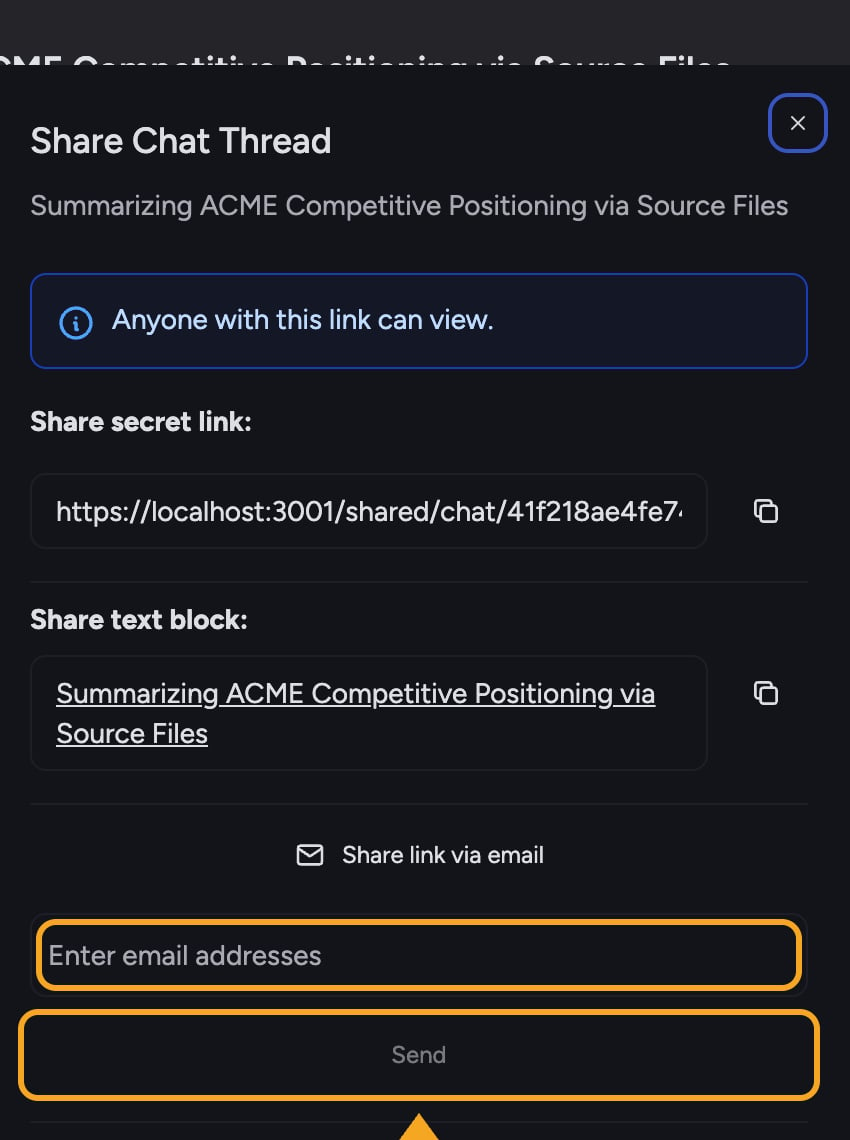 1. Open the chat and select the **Share chat thread** button to open the **Share Chat Thread** dialog.
2. With the chat shared, select **Share link via email**. An email entry field expands.
3. In the **Enter email addresses** field, type each recipient's email address. You can add up to 10 addresses.
4. Select **Send**. The button shows "Sending…" while the messages go out.
5. When it finishes, you will see a success message such as "Email sent successfully!" (or a count when you send to several people). The address field clears.
ℹ️ **Good to know:** Everyone you email receives the same secret link, which is a [read-only view](/help/sharing-visibility/viewing-shared-chats-as-a-guest) of the entire chat thread. Email sharing does not restrict each recipient to a personal copy. When the conversation should no longer be viewable, [revoke the link](/help/sharing-visibility/revoking-access-to-a-shared-chat).
## FAQ
Chief lists the specific addresses that failed after the colon in the error. The ones not listed were sent successfully. Check the failed addresses for typos and try sending again to just those.
The **Share link via email** option only appears after the chat has a secret link. Create the link first, then the email section becomes available in the same dialog.
Each send is capped at 10 addresses. For a larger group, send in batches, or copy the secret link and share it through your own email or chat tool.
1. Open the chat and select the **Share chat thread** button to open the **Share Chat Thread** dialog.
2. With the chat shared, select **Share link via email**. An email entry field expands.
3. In the **Enter email addresses** field, type each recipient's email address. You can add up to 10 addresses.
4. Select **Send**. The button shows "Sending…" while the messages go out.
5. When it finishes, you will see a success message such as "Email sent successfully!" (or a count when you send to several people). The address field clears.
ℹ️ **Good to know:** Everyone you email receives the same secret link, which is a [read-only view](/help/sharing-visibility/viewing-shared-chats-as-a-guest) of the entire chat thread. Email sharing does not restrict each recipient to a personal copy. When the conversation should no longer be viewable, [revoke the link](/help/sharing-visibility/revoking-access-to-a-shared-chat).
## FAQ
Chief lists the specific addresses that failed after the colon in the error. The ones not listed were sent successfully. Check the failed addresses for typos and try sending again to just those.
The **Share link via email** option only appears after the chat has a secret link. Create the link first, then the email section becomes available in the same dialog.
Each send is capped at 10 addresses. For a larger group, send in batches, or copy the secret link and share it through your own email or chat tool.