> ## Documentation Index
> Fetch the complete documentation index at: https://docs.chief.bot/llms.txt
> Use this file to discover all available pages before exploring further.
# Sharing an individual answer or text block
> When one answer or a short passage is all you want to point someone to, Chief can build a link that opens the chat and scrolls straight to that spot.
When one answer or a short passage is all you want to point someone to, Chief can build a link that opens the chat and scrolls straight to that spot. It is the fastest way to say "look at this part" without describing where to find it.
⚠️ **Important:** Sharing a single answer or text block still shares the **entire chat thread**. The link is a [secret link](/help/sharing-visibility/sharing-a-chat-via-secret-link) to the whole conversation that simply scrolls to the part you chose. Anyone you send it to can scroll up and down and read everything in the thread, not just the highlighted passage.
## Share a single answer
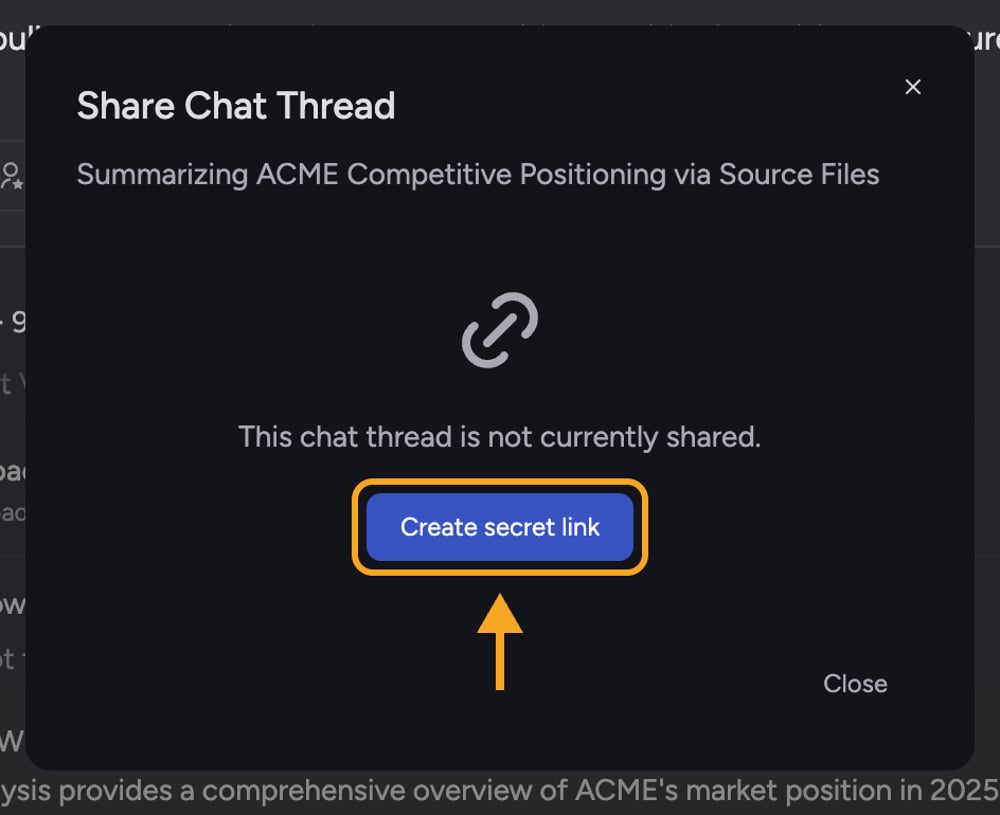 1. Find the answer you want to share in the chat.
2. Select the **Share chat thread** button on [that answer](/help/chatting-with-chief/working-with-an-answer-the-response-menu) (tooltip: "Create a secret link to share entire chat thread"). The **Share Chat Thread** dialog opens, noting that the page will scroll to this answer.
3. If the chat is not shared yet, select **Create secret link**. The link is created and copied to your clipboard.
4. Paste the link to share it. When someone opens it, the page scrolls to the answer you chose.
## Share a highlighted passage (text block)
1. Find the answer you want to share in the chat.
2. Select the **Share chat thread** button on [that answer](/help/chatting-with-chief/working-with-an-answer-the-response-menu) (tooltip: "Create a secret link to share entire chat thread"). The **Share Chat Thread** dialog opens, noting that the page will scroll to this answer.
3. If the chat is not shared yet, select **Create secret link**. The link is created and copied to your clipboard.
4. Paste the link to share it. When someone opens it, the page scrolls to the answer you chose.
## Share a highlighted passage (text block)
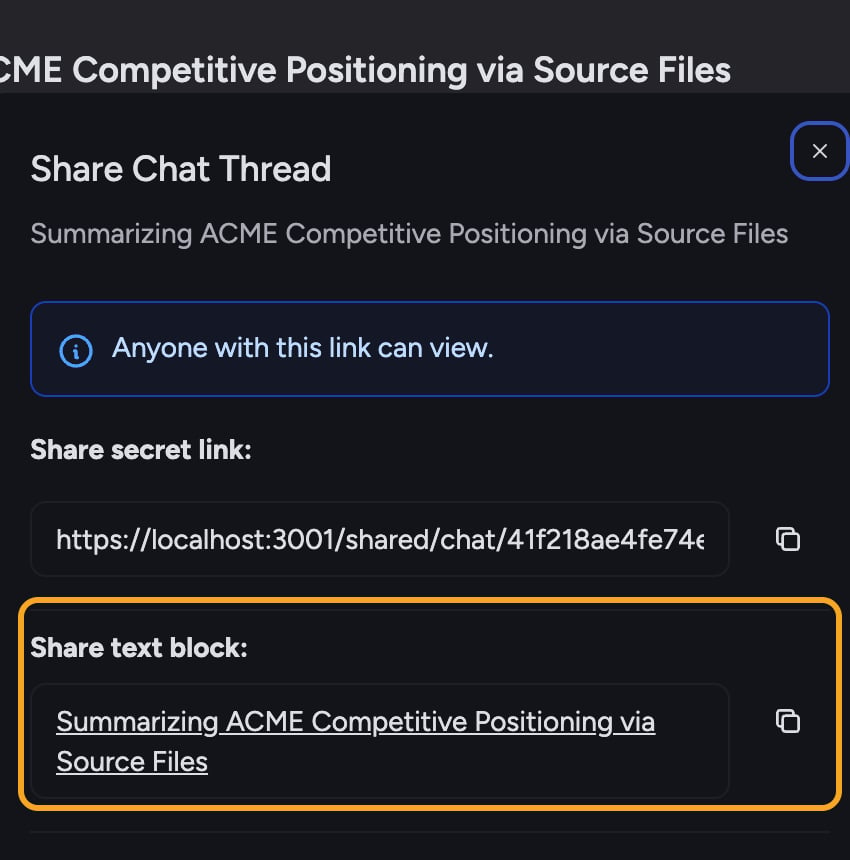 1. Select the text you want to point to inside an answer. The [text menu](/help/chatting-with-chief/the-text-selection-menu-act-on-any-passage) appears.
2. Choose **Share** from the menu (tooltip: "Share chat thread and highlight selected text"). The **Share Chat Thread** dialog opens with a **Share text block** section showing your selected text.
3. Create the secret link if needed, then select the **copy** button next to the text block. Chief copies a clickable link wrapped around your highlighted text, ready to paste into an email or document.
4. When a recipient opens it, the shared page scrolls to and highlights that passage.
## FAQ
Yes. Answer and text-block sharing both create a secret link to the full thread; the highlight only controls where the page scrolls. If the rest of the conversation is sensitive, do not share an answer from it — [start a fresh chat](/help/chatting-with-chief/how-chats-work) with just the content you want to share, then share that.
The scroll-to-text feature depends on the passage still being present in the thread. If the answer was [edited or regenerated](/help/chatting-with-chief/editing-copying-downloading-messages) after you shared, the highlight may no longer match. Re-share from the current version of the answer.
Open the Share Chat Thread dialog again and select [**Revoke link**](/help/sharing-visibility/revoking-access-to-a-shared-chat). Because every answer and text-block link points to the same thread's secret link, revoking it disables all of them at once.
1. Select the text you want to point to inside an answer. The [text menu](/help/chatting-with-chief/the-text-selection-menu-act-on-any-passage) appears.
2. Choose **Share** from the menu (tooltip: "Share chat thread and highlight selected text"). The **Share Chat Thread** dialog opens with a **Share text block** section showing your selected text.
3. Create the secret link if needed, then select the **copy** button next to the text block. Chief copies a clickable link wrapped around your highlighted text, ready to paste into an email or document.
4. When a recipient opens it, the shared page scrolls to and highlights that passage.
## FAQ
Yes. Answer and text-block sharing both create a secret link to the full thread; the highlight only controls where the page scrolls. If the rest of the conversation is sensitive, do not share an answer from it — [start a fresh chat](/help/chatting-with-chief/how-chats-work) with just the content you want to share, then share that.
The scroll-to-text feature depends on the passage still being present in the thread. If the answer was [edited or regenerated](/help/chatting-with-chief/editing-copying-downloading-messages) after you shared, the highlight may no longer match. Re-share from the current version of the answer.
Open the Share Chat Thread dialog again and select [**Revoke link**](/help/sharing-visibility/revoking-access-to-a-shared-chat). Because every answer and text-block link points to the same thread's secret link, revoking it disables all of them at once.