> ## Documentation Index
> Fetch the complete documentation index at: https://docs.chief.bot/llms.txt
> Use this file to discover all available pages before exploring further.
# Creating a custom skill (AI-assisted)
> When a built-in Skill doesn't cover a task you repeat often, create your own.
When a [built-in Skill](/help/skills/using-built-in-skills) doesn't cover a task you repeat often, create your own. You don't have to write the instructions from scratch — Chief can draft them for you from a name and a short description. This is the fastest way to build a custom Skill.
## Create a custom Skill
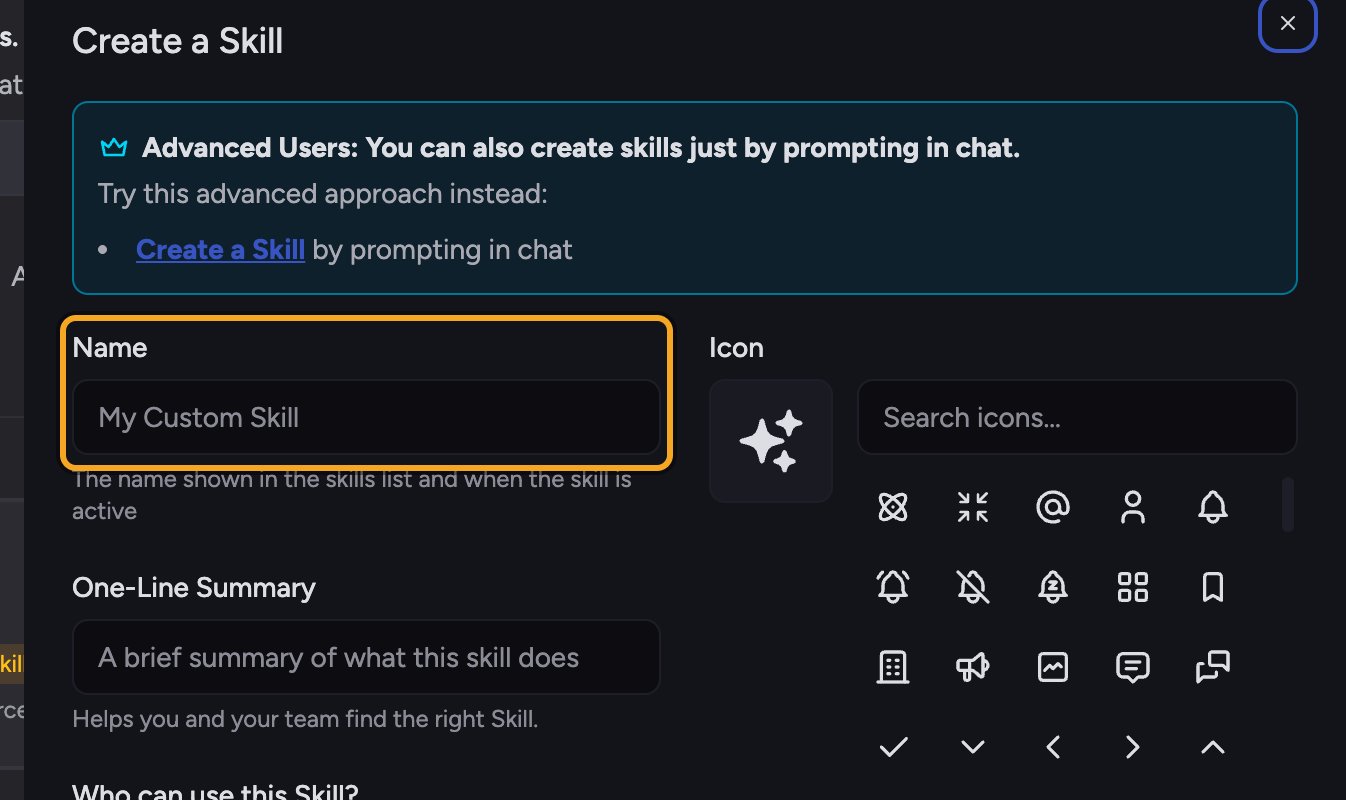 1. In the left navigation, click [**Skills**](/help/skills/what-are-skills) to open the Skills page.
2. Click the **Create a Skill** button. The **Create a Skill** dialog opens.
3. In the **Name** field, type a short, clear name for the Skill (for example, "Weekly Status Summary").
4. In the **One-Line Summary** field, type a brief summary of what the Skill does. This helps you and your team find it later.
5. Once the name has text, a green panel appears with a **Generate** button. Click **Generate**. Chief drafts the full Skill instructions for you and fills them into the content editor.
6. Review the generated instructions and edit them in the content editor if you want to refine the behavior.
7. Under **Who can use this Skill?**, choose [**Anyone in the Project** or **Private**](/help/skills/sharing-skills-with-your-project-vs-private).
8. Click **Save**. Your Skill is created, enabled, and ready to [mention with @](/help/skills/enabling-disabling-mentioning-skills-skill) in any chat.
🚀 **Pro-Tip:** Give Chief a little to work with. A descriptive name plus a one-line description produces a much sharper draft than a name alone. You can always run **Generate** again after adjusting them.
## FAQ
The **Generate** option only appears once the **Name** field has text. Type a name first, and the green panel with the button will show up.
No. Generate is a shortcut. You can write or paste the Skill instructions into the content editor yourself and skip it entirely.
Yes. Open the Skill on the Skills page and edit it any time. Editing a custom Skill you own never affects built-in Chief Skills.
1. In the left navigation, click [**Skills**](/help/skills/what-are-skills) to open the Skills page.
2. Click the **Create a Skill** button. The **Create a Skill** dialog opens.
3. In the **Name** field, type a short, clear name for the Skill (for example, "Weekly Status Summary").
4. In the **One-Line Summary** field, type a brief summary of what the Skill does. This helps you and your team find it later.
5. Once the name has text, a green panel appears with a **Generate** button. Click **Generate**. Chief drafts the full Skill instructions for you and fills them into the content editor.
6. Review the generated instructions and edit them in the content editor if you want to refine the behavior.
7. Under **Who can use this Skill?**, choose [**Anyone in the Project** or **Private**](/help/skills/sharing-skills-with-your-project-vs-private).
8. Click **Save**. Your Skill is created, enabled, and ready to [mention with @](/help/skills/enabling-disabling-mentioning-skills-skill) in any chat.
🚀 **Pro-Tip:** Give Chief a little to work with. A descriptive name plus a one-line description produces a much sharper draft than a name alone. You can always run **Generate** again after adjusting them.
## FAQ
The **Generate** option only appears once the **Name** field has text. Type a name first, and the green panel with the button will show up.
No. Generate is a shortcut. You can write or paste the Skill instructions into the content editor yourself and skip it entirely.
Yes. Open the Skill on the Skills page and edit it any time. Editing a custom Skill you own never affects built-in Chief Skills.