> ## Documentation Index
> Fetch the complete documentation index at: https://docs.chief.bot/llms.txt
> Use this file to discover all available pages before exploring further.
# What are Skills?
> A Skill is a reusable set of instructions that teaches Chief how to do one job well.
## Skills give Chief a specific ability on demand
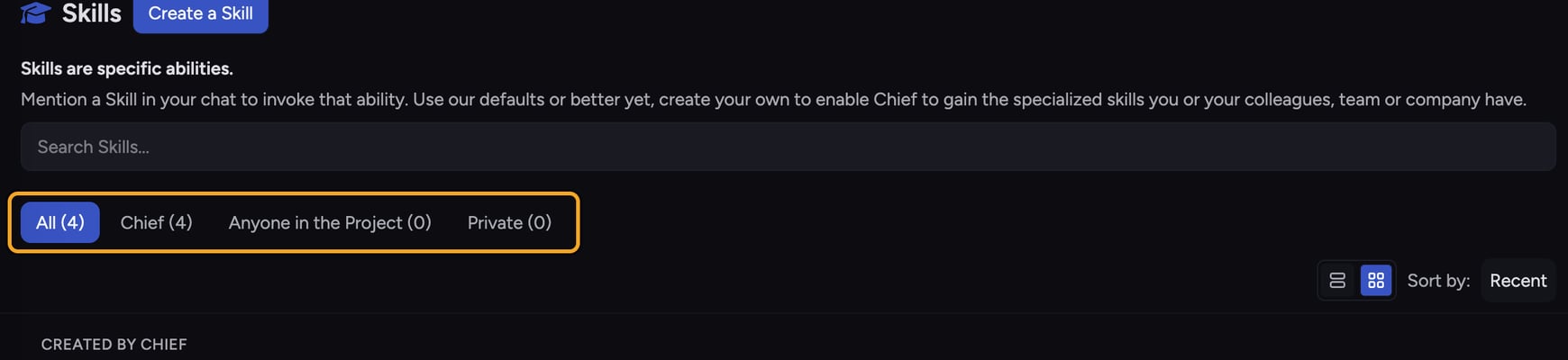 A **Skill** is a reusable set of instructions that teaches Chief how to do one job well. Instead of re-explaining a task every time, you capture it once, then [pull it into any chat by mentioning it](/help/skills/enabling-disabling-mentioning-skills-skill). Chief follows the Skill's instructions for that response, then goes back to normal.
Here is a concrete example. Say every week you paste raw meeting notes and ask Chief to turn them into action items with owners and due dates. You can save that as a Skill called "Meeting Action Items." From then on, you type **@Meeting Action Items**, paste the notes, and Chief produces the same structured output every time — no re-prompting.
## How Skills work
A **Skill** is a reusable set of instructions that teaches Chief how to do one job well. Instead of re-explaining a task every time, you capture it once, then [pull it into any chat by mentioning it](/help/skills/enabling-disabling-mentioning-skills-skill). Chief follows the Skill's instructions for that response, then goes back to normal.
Here is a concrete example. Say every week you paste raw meeting notes and ask Chief to turn them into action items with owners and due dates. You can save that as a Skill called "Meeting Action Items." From then on, you type **@Meeting Action Items**, paste the notes, and Chief produces the same structured output every time — no re-prompting.
## How Skills work
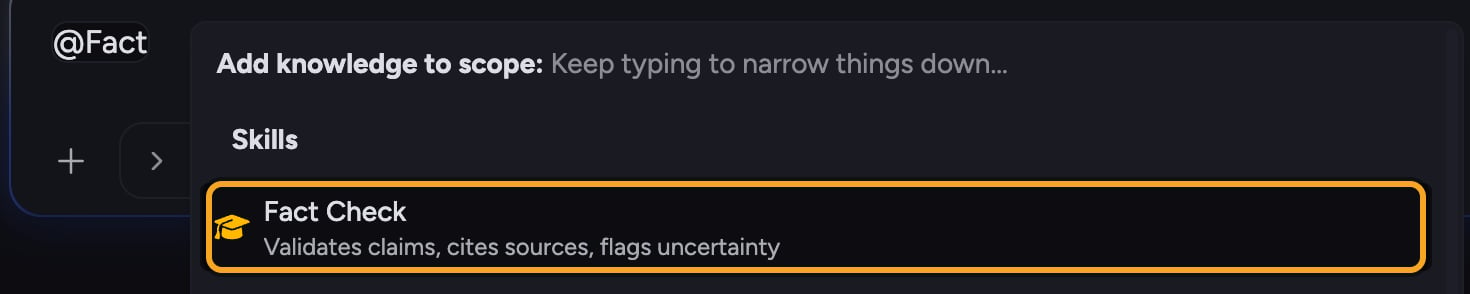 Every Skill has a name, a short description, and a body of instructions Chief reads when the Skill is active. There are two kinds of Skills in Chief:
* **[Built-in Skills](/help/skills/using-built-in-skills)** — ready-made Skills provided by Chief (shown with the **Chief** badge). Browse them on the Skills page.
* **[Custom Skills](/help/skills/creating-a-custom-skill-ai-assisted)** — Skills you create for a specific task. You can [scope a custom Skill](/help/skills/sharing-skills-with-your-project-vs-private) to **Anyone in the Project** or keep it **Private** to yourself.
You bring a Skill into a chat by mentioning it with **@** (for example, **@Skill name**) in the prompt bar. A Skill has to be enabled before you can mention it. Open the **Skills** page from the left navigation to see, enable, create, and manage all of them.
## Skills vs. Expert Voices
Both are managed in the same place, but they do different things. A **Skill** provides instructions for a specific task ("turn these notes into action items"). An [**Expert Voice**](/help/expert-voices/what-are-expert-voices) defines how Chief communicates with you — its tone, perspective, and style. You can use a Skill and an Expert Voice together in the same chat.
💡 **Good to Know:** Skills don't change [which files or projects Chief can see](/help/the-prompt-bar-scope/setting-the-scope-of-a-chat-using-files-labels-collections-concepts). They add task instructions on top of the knowledge Chief already has access to.
## FAQ
Open the **Skills** page from the left navigation. It lists built-in Skills (badged **Chief**) alongside any custom Skills shared with your Project or kept Private.
No. Chief ships with built-in Skills you can use right away. Create a custom Skill only when you have a repeatable task that the built-ins don't cover.
The most common cause is that the Skill is disabled. A disabled Skill can't be mentioned in a chat. Open the **Skills** page and switch the toggle on that Skill's card to on, then try again.
Every Skill has a name, a short description, and a body of instructions Chief reads when the Skill is active. There are two kinds of Skills in Chief:
* **[Built-in Skills](/help/skills/using-built-in-skills)** — ready-made Skills provided by Chief (shown with the **Chief** badge). Browse them on the Skills page.
* **[Custom Skills](/help/skills/creating-a-custom-skill-ai-assisted)** — Skills you create for a specific task. You can [scope a custom Skill](/help/skills/sharing-skills-with-your-project-vs-private) to **Anyone in the Project** or keep it **Private** to yourself.
You bring a Skill into a chat by mentioning it with **@** (for example, **@Skill name**) in the prompt bar. A Skill has to be enabled before you can mention it. Open the **Skills** page from the left navigation to see, enable, create, and manage all of them.
## Skills vs. Expert Voices
Both are managed in the same place, but they do different things. A **Skill** provides instructions for a specific task ("turn these notes into action items"). An [**Expert Voice**](/help/expert-voices/what-are-expert-voices) defines how Chief communicates with you — its tone, perspective, and style. You can use a Skill and an Expert Voice together in the same chat.
💡 **Good to Know:** Skills don't change [which files or projects Chief can see](/help/the-prompt-bar-scope/setting-the-scope-of-a-chat-using-files-labels-collections-concepts). They add task instructions on top of the knowledge Chief already has access to.
## FAQ
Open the **Skills** page from the left navigation. It lists built-in Skills (badged **Chief**) alongside any custom Skills shared with your Project or kept Private.
No. Chief ships with built-in Skills you can use right away. Create a custom Skill only when you have a repeatable task that the built-ins don't cover.
The most common cause is that the Skill is disabled. A disabled Skill can't be mentioned in a chat. Open the **Skills** page and switch the toggle on that Skill's card to on, then try again.