> ## Documentation Index
> Fetch the complete documentation index at: https://docs.chief.bot/llms.txt
> Use this file to discover all available pages before exploring further.
# Including public web data (Public Data)
> By default Chief answers from your Library.
By default Chief answers from your [Library](/help/your-knowledge-library/what-is-the-library). **Public Data** lets it also reach out to public web sources when that would make an answer better. You control whether this happens — and you can see when it did.
## Set Public Data for a chat
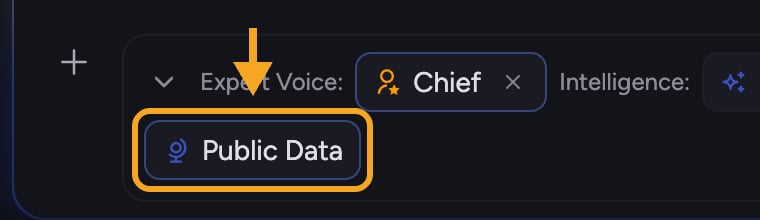 1. Click the **+** button in the [prompt bar](/help/the-prompt-bar-scope/the-prompt-bar-a-tour-of-your-chat-controls). The command menu opens.
2. Choose **Add from Library**, then **Public Data**. A two-option control appears.
3. Pick a mode:
* **Automatic** — Chief decides when to use public data. You will see a citation when public data was used.
* **Off** — Chief will not use public data; it answers from your Library only.
You can also reach this from the expanded [**Using:** toolbar](/help/the-prompt-bar-scope/setting-the-scope-of-a-chat-using-files-labels-collections-concepts), where the **Public Data** chip shows the current mode.
✅ **Tip:** Even with Public Data set to **Automatic**, you can force it on for one answer by simply writing **use public data** in your prompt.
## How to tell when it was used
1. Click the **+** button in the [prompt bar](/help/the-prompt-bar-scope/the-prompt-bar-a-tour-of-your-chat-controls). The command menu opens.
2. Choose **Add from Library**, then **Public Data**. A two-option control appears.
3. Pick a mode:
* **Automatic** — Chief decides when to use public data. You will see a citation when public data was used.
* **Off** — Chief will not use public data; it answers from your Library only.
You can also reach this from the expanded [**Using:** toolbar](/help/the-prompt-bar-scope/setting-the-scope-of-a-chat-using-files-labels-collections-concepts), where the **Public Data** chip shows the current mode.
✅ **Tip:** Even with Public Data set to **Automatic**, you can force it on for one answer by simply writing **use public data** in your prompt.
## How to tell when it was used
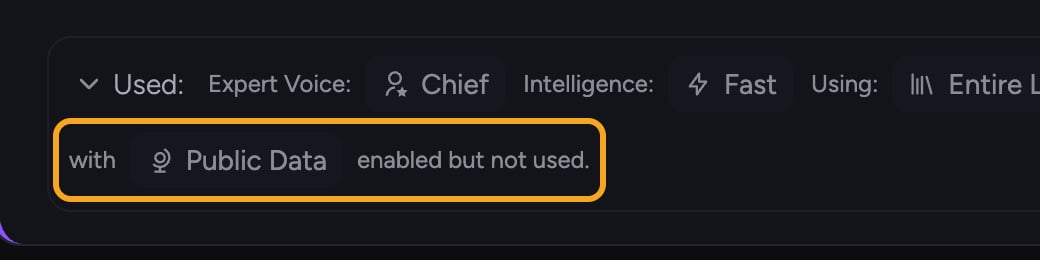 In **Automatic** mode, Chief adds a [citation](/help/chatting-with-chief/understanding-sources-citations-in-answers) to the answer whenever it drew on public data, so you can always see which parts came from the web versus your Library.
## FAQ
No. Automatic means Chief decides per answer. If your Library already covers the question, it may not reach out at all — and you will only see a public-data citation when it actually did.
Check the **Public Data** chip in the expanded **Using:** toolbar. If it shows **Off**, Chief stayed inside your Library. Switch it to **Automatic**, or add **use public data** to your prompt.
Yes. Set Public Data to **Off**. Chief will then answer using only your Library.
In **Automatic** mode, Chief adds a [citation](/help/chatting-with-chief/understanding-sources-citations-in-answers) to the answer whenever it drew on public data, so you can always see which parts came from the web versus your Library.
## FAQ
No. Automatic means Chief decides per answer. If your Library already covers the question, it may not reach out at all — and you will only see a public-data citation when it actually did.
Check the **Public Data** chip in the expanded **Using:** toolbar. If it shows **Off**, Chief stayed inside your Library. Switch it to **Automatic**, or add **use public data** to your prompt.
Yes. Set Public Data to **Off**. Chief will then answer using only your Library.