> ## Documentation Index
> Fetch the complete documentation index at: https://docs.chief.bot/llms.txt
> Use this file to discover all available pages before exploring further.
# Selecting a specific model (LLM)
> By default, Chief's LLM router picks the best model for each prompt.
By default, Chief's LLM router picks the best model for each prompt. If you would rather Chief use a specific provider's models, choose one from the **AI Provider** selector.
## Choose an AI Provider
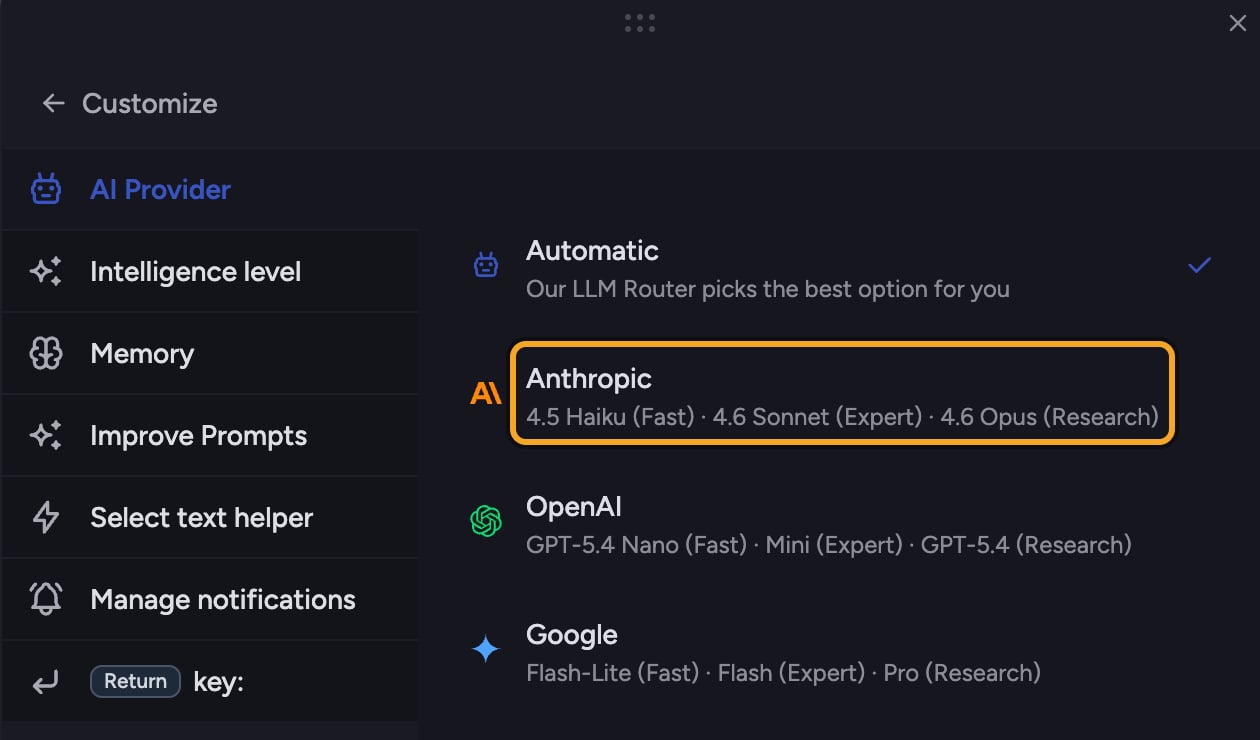 1. Click the **+** button in the [prompt bar](/help/the-prompt-bar-scope/the-prompt-bar-a-tour-of-your-chat-controls). The command menu opens.
2. Choose **Customize**, then open **AI Provider**.
3. Pick a provider:
* **Automatic** — Chief's router picks the best option for you (the default).
* **Anthropic** — Claude models.
* **OpenAI** — GPT models.
* **Google** — Gemini models.
4. When you pick a specific provider, a **Strategy** choice appears:
* **Prefer** — use the preferred provider when possible, fall back to others if needed.
* **Only** — exclusively use the selected provider, never fall back.
💡 **Good to know:** AI Provider and the **Intelligence:** level are independent. [Intelligence](/help/answer-depth-chiefs-agents/response-modes-automatic-fast-expert) (Automatic, Fast, Expert, [Research](/help/answer-depth-chiefs-agents/deep-intelligence-research-mode)) sets how much reasoning to apply; AI Provider sets whose models do the work. Within each provider, Chief still maps your Intelligence level to that provider's Fast, Expert, or Research model.
## Switch back to Automatic
Open **AI Provider** again and choose **Automatic** (or **Switch to Auto**) to hand model selection back to the router.
## FAQ
That happens with the **Prefer** strategy: if your provider is momentarily unavailable, Chief falls back to another so your prompt still runs. Choose **Only** if you never want a fallback — though [prompts may fail](/help/troubleshooting/a-chat-failed-or-stopped-how-to-recover) when that provider is unavailable.
Providers can be temporarily unavailable. Switch to **Automatic** to let the router pick the best available option, then switch back later.
Leave it on **Automatic** unless you have a specific reason to prefer one — the router is built to pick the best model for each prompt.
1. Click the **+** button in the [prompt bar](/help/the-prompt-bar-scope/the-prompt-bar-a-tour-of-your-chat-controls). The command menu opens.
2. Choose **Customize**, then open **AI Provider**.
3. Pick a provider:
* **Automatic** — Chief's router picks the best option for you (the default).
* **Anthropic** — Claude models.
* **OpenAI** — GPT models.
* **Google** — Gemini models.
4. When you pick a specific provider, a **Strategy** choice appears:
* **Prefer** — use the preferred provider when possible, fall back to others if needed.
* **Only** — exclusively use the selected provider, never fall back.
💡 **Good to know:** AI Provider and the **Intelligence:** level are independent. [Intelligence](/help/answer-depth-chiefs-agents/response-modes-automatic-fast-expert) (Automatic, Fast, Expert, [Research](/help/answer-depth-chiefs-agents/deep-intelligence-research-mode)) sets how much reasoning to apply; AI Provider sets whose models do the work. Within each provider, Chief still maps your Intelligence level to that provider's Fast, Expert, or Research model.
## Switch back to Automatic
Open **AI Provider** again and choose **Automatic** (or **Switch to Auto**) to hand model selection back to the router.
## FAQ
That happens with the **Prefer** strategy: if your provider is momentarily unavailable, Chief falls back to another so your prompt still runs. Choose **Only** if you never want a fallback — though [prompts may fail](/help/troubleshooting/a-chat-failed-or-stopped-how-to-recover) when that provider is unavailable.
Providers can be temporarily unavailable. Switch to **Automatic** to let the router pick the best available option, then switch back later.
Leave it on **Automatic** unless you have a specific reason to prefer one — the router is built to pick the best model for each prompt.