> ## Documentation Index
> Fetch the complete documentation index at: https://docs.chief.bot/llms.txt
> Use this file to discover all available pages before exploring further.
# My search isn't finding what I expect
> Option A — Finding a File in the Library.
## Symptoms
* Library search shows **No Files matched your search.** even though you know the content exists.
* Chat search returns **No matches for** your query, or **Search failed. Try again.**
* You're told to **Type at least \{count} characters to search**.
* You can't find a search box for transcripts.
## Likely causes
* [**Library search matches File names only**](/help/your-knowledge-library/searching-your-library) — not the text inside files.
* You're searching for words that appear in the content, not the file's name.
* Chat full-text search is gated to paid plans.
* The query was too short, or used only excluded terms.
## Solution
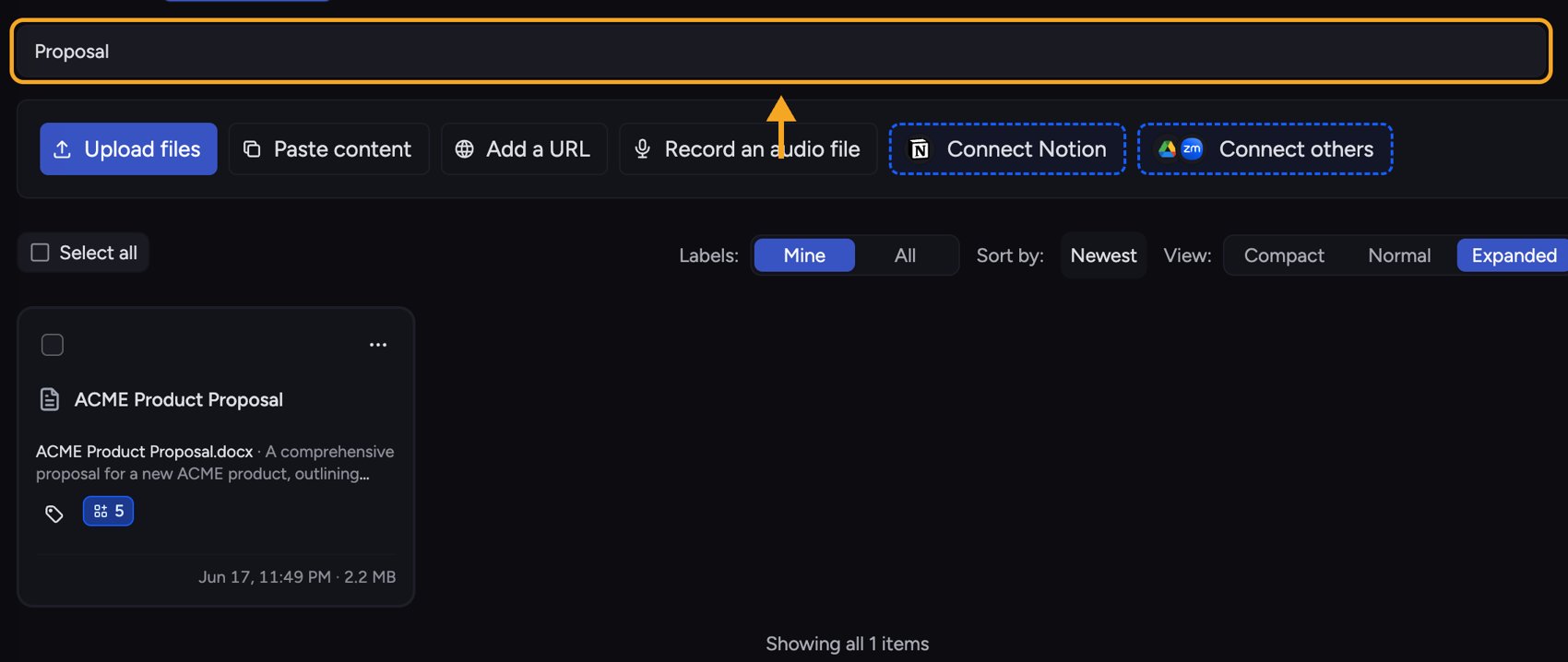 **Option A — Finding a File in the Library.**
1. In the **Library**, type into the search box. Remember it matches the **file name**, so search by what the file is called, not by a phrase inside it.
2. If you get **No Files matched your search**, clear the box and try a shorter or partial name.
3. To find content *inside* files, don't use Library search — [start a chat and ask Chief](/help/your-knowledge-library/how-chief-uses-your-files-to-answer-questions) about the topic. The hint "Did you mean to chat instead?" points you here.
**Option B — Searching your past chats.**
1. Open [**Search**](/help/getting-started/the-chief-interface-a-quick-tour) for chats and type your query (at least the minimum number of characters shown).
2. Use the inline filters — **From**, **Scope**, **After**, **Before** — to narrow results. Use quotes for an exact phrase and prefix a word with **-** to exclude it.
3. If you see "Add at least one positive word," your query was only exclusions — add a term to search for.
4. On **Search failed. Try again.**, re-run the search.
⚠️ **Important:** Full-text search across your chats is a [paid feature](/help/plans-credits-billing/plans-overview-explore-pro-power-user-enterprise). If you see "Upgrade to Pro to use chat search," click **See plans** to enable it.
## Still stuck?
If chat search keeps failing on a valid query, [get help](/help/help-feedback-whats-new/getting-help-in-chief) — email **[support@chief.bot](mailto:support@chief.bot)** with the search terms you used.
## FAQ
That's expected — Library search matches file names, not the text inside files. To search inside your documents, start a chat and ask Chief about that content directly.
There's [no transcript search box](/help/meetings-live-sessions/searching-a-transcript). Open the Live Session and read the **Transcript**, or click **Start chat** from the session and ask Chief to find the part you need.
Try a simpler query with at least the minimum characters and no syntax errors (don't search with only excluded words). If it still fails, it's likely a temporary issue — contact support.
**Option A — Finding a File in the Library.**
1. In the **Library**, type into the search box. Remember it matches the **file name**, so search by what the file is called, not by a phrase inside it.
2. If you get **No Files matched your search**, clear the box and try a shorter or partial name.
3. To find content *inside* files, don't use Library search — [start a chat and ask Chief](/help/your-knowledge-library/how-chief-uses-your-files-to-answer-questions) about the topic. The hint "Did you mean to chat instead?" points you here.
**Option B — Searching your past chats.**
1. Open [**Search**](/help/getting-started/the-chief-interface-a-quick-tour) for chats and type your query (at least the minimum number of characters shown).
2. Use the inline filters — **From**, **Scope**, **After**, **Before** — to narrow results. Use quotes for an exact phrase and prefix a word with **-** to exclude it.
3. If you see "Add at least one positive word," your query was only exclusions — add a term to search for.
4. On **Search failed. Try again.**, re-run the search.
⚠️ **Important:** Full-text search across your chats is a [paid feature](/help/plans-credits-billing/plans-overview-explore-pro-power-user-enterprise). If you see "Upgrade to Pro to use chat search," click **See plans** to enable it.
## Still stuck?
If chat search keeps failing on a valid query, [get help](/help/help-feedback-whats-new/getting-help-in-chief) — email **[support@chief.bot](mailto:support@chief.bot)** with the search terms you used.
## FAQ
That's expected — Library search matches file names, not the text inside files. To search inside your documents, start a chat and ask Chief about that content directly.
There's [no transcript search box](/help/meetings-live-sessions/searching-a-transcript). Open the Live Session and read the **Transcript**, or click **Start chat** from the session and ask Chief to find the part you need.
Try a simpler query with at least the minimum characters and no syntax errors (don't search with only excluded words). If it still fails, it's likely a temporary issue — contact support.