> ## Documentation Index
> Fetch the complete documentation index at: https://docs.chief.bot/llms.txt
> Use this file to discover all available pages before exploring further.
# Saving a chat answer back to your Library
> When Chief produces an answer worth keeping, you can save it back to your Library as a File.
## Turn an answer into a saved file
 When Chief produces an answer worth keeping, you can save it back to your [Library](/help/your-knowledge-library/what-is-the-library) as a File. From then on it lives alongside your other knowledge and can power [future chats](/help/chatting-with-chief/how-chats-work).
## Save an answer
When Chief produces an answer worth keeping, you can save it back to your [Library](/help/your-knowledge-library/what-is-the-library) as a File. From then on it lives alongside your other knowledge and can power [future chats](/help/chatting-with-chief/how-chats-work).
## Save an answer
 1. In the chat, open the [answer](/help/chatting-with-chief/working-with-an-answer-the-response-menu) or [artifact](/help/creating-exporting/working-with-artifacts-the-document-editor-concept) you want to keep.
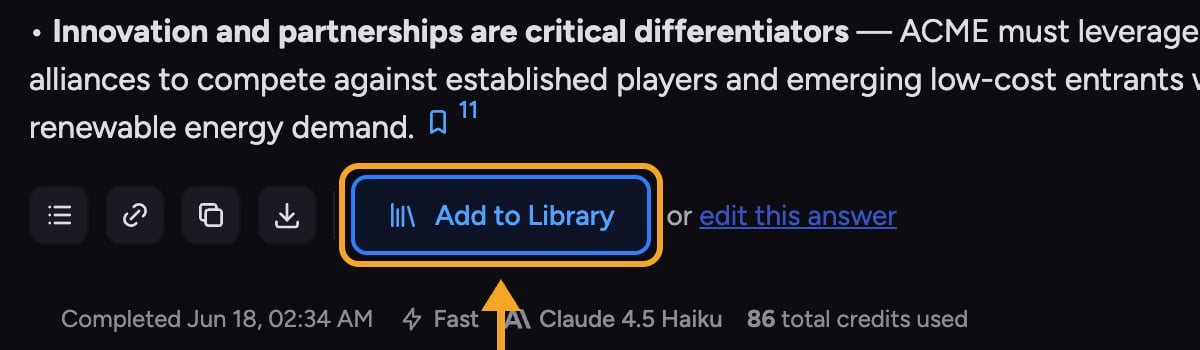
2. Click the **Add to Library** control (its tooltip reads "Add this chat answer to your Project Library as a File").
3. Chief saves the answer and confirms with **Added!** and a green banner. The new File appears in your Library.
4. Use the link in the confirmation to open the saved File in your Library.
💡 **Pro-Tip:** Saved answers become part of your Library, so Chief can [draw on them in later chats](/help/your-knowledge-library/how-chief-uses-your-files-to-answer-questions) just like any uploaded file.
**Related articles:** [What is the Library?](/help/your-knowledge-library/what-is-the-library) · [How Chief uses your files to answer questions](/help/your-knowledge-library/how-chief-uses-your-files-to-answer-questions) · [Working with an answer: the response menu](/help/chatting-with-chief/working-with-an-answer-the-response-menu)
## FAQ
Saving failed — for example, "Failed to save presentation to Project Library." Try again. If it keeps failing, the answer may still be generating; wait until it finishes, then save.
Into the current project's Library as a new File. Open it from the confirmation link, or find it in your Library afterward.
1. In the chat, open the [answer](/help/chatting-with-chief/working-with-an-answer-the-response-menu) or [artifact](/help/creating-exporting/working-with-artifacts-the-document-editor-concept) you want to keep.
2. Click the **Add to Library** control (its tooltip reads "Add this chat answer to your Project Library as a File").
3. Chief saves the answer and confirms with **Added!** and a green banner. The new File appears in your Library.
4. Use the link in the confirmation to open the saved File in your Library.
💡 **Pro-Tip:** Saved answers become part of your Library, so Chief can [draw on them in later chats](/help/your-knowledge-library/how-chief-uses-your-files-to-answer-questions) just like any uploaded file.
**Related articles:** [What is the Library?](/help/your-knowledge-library/what-is-the-library) · [How Chief uses your files to answer questions](/help/your-knowledge-library/how-chief-uses-your-files-to-answer-questions) · [Working with an answer: the response menu](/help/chatting-with-chief/working-with-an-answer-the-response-menu)
## FAQ
Saving failed — for example, "Failed to save presentation to Project Library." Try again. If it keeps failing, the answer may still be generating; wait until it finishes, then save.
Into the current project's Library as a new File. Open it from the confirmation link, or find it in your Library afterward.