

chief-mcp is a
Model Context Protocol server for Chief. It
lets any MCP client — Claude Code, Claude Desktop, Cursor, or Codex — manage
chats, assets, labels, actions, live sessions, skills, and memories directly in
your Chief project.
Chief hosts the server at https://mcp.chief.bot/mcp. It uses Streamable HTTP,
so compatible clients can connect without installing a binary or running a
local process. The open-source server is a static Go binary built on the
Go SDK and talks only to the Chief public REST API.
This is Chief as an MCP server. Chief can also act as an MCP client and call out
to your own servers from inside a chat — that’s a separate feature, covered in
MCP servers — connecting custom tools.
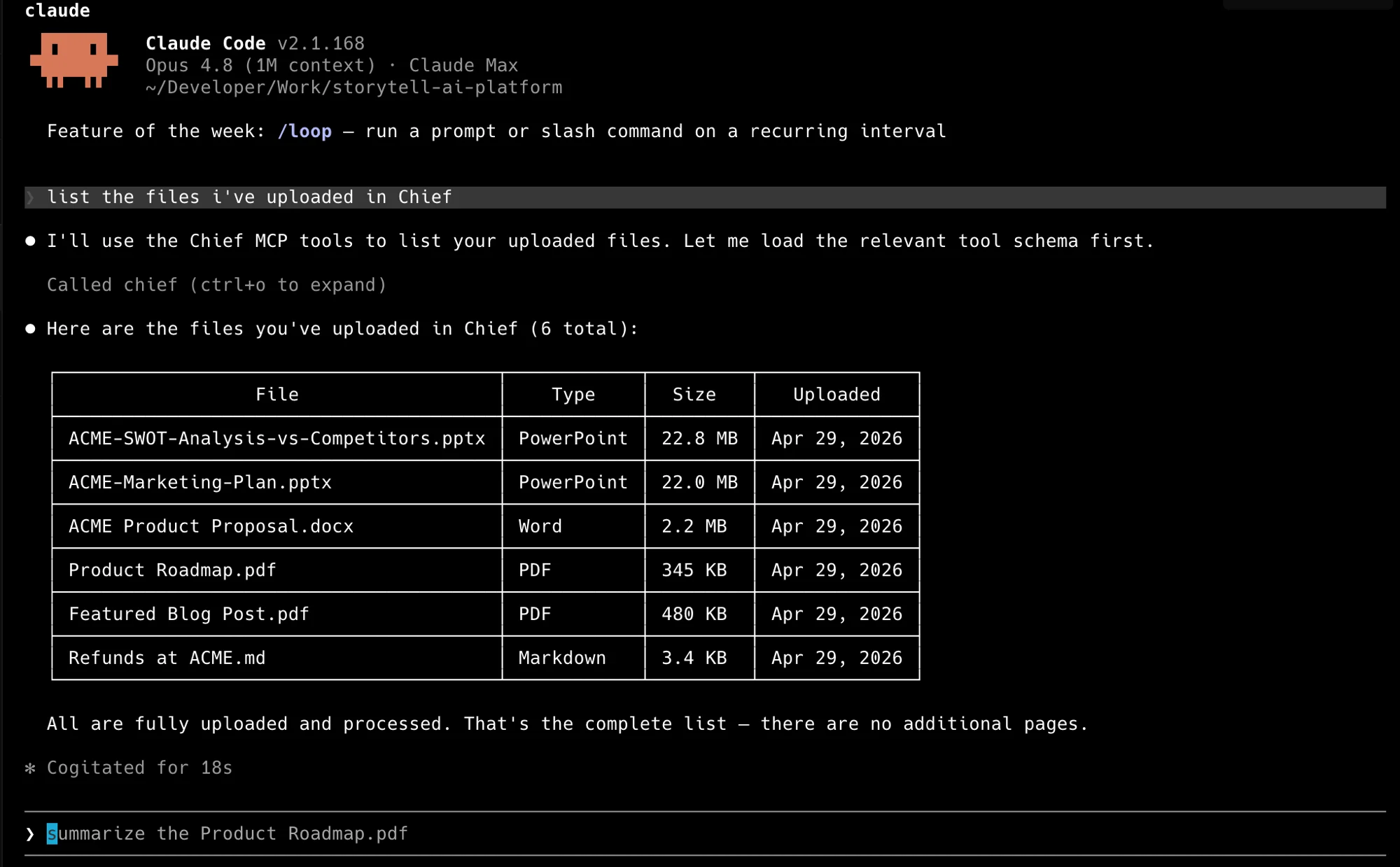
Claude Code calling Chief over MCP — one prompt, your real files.
Connect to the hosted server
Point any Streamable HTTP client athttps://mcp.chief.bot/mcp. Authenticate
each request with X-API-Key: <personal-access-token> and select a project with
X-Project-Id: <project-id>. Clients limited to the Authorization header can
send Authorization: Bearer <personal-access-token> instead.
Optional self-hosted install
Homebrew is the recommended install on macOS:go install requires a Go toolchain. Prebuilt
binaries for each platform are on the
releases page.
Credentials
A Chief Personal Access Token is required and sent as the API key. Most tools are project-scoped and also need a project id. Pass credentials as flags or read them from the environment:
Create a token in the Chief app under Settings → API tokens — see
Introduction for tokens and project ids, or the help center’s
API access & personal access tokens for
the click-by-click version.
Security
- Treat your Personal Access Token like a password. Pass it through
CHIEF_API_KEYrather than committing it into a client config file. - A token only reaches the projects it is scoped to. Set
CHIEF_PROJECT_ID(or theX-Project-Idheader in HTTP mode) to bound the server to one project. --insecuredisables TLS verification and is for local development only.
Tools
The server exposes 44 tools across seven resources.What you can ask it
Once the server is connected you drive it in plain language — your agent picks the right tools and chains them. The tools above map to requests like:- “What did we decide about pricing in the last few chats?” — the agent calls
list_chatsandget_chatto read recent conversations, then answers from them. - “Upload every PDF in this folder and tag them
contracts.” —upload_fileper file, thencreate_labelandattach_label. - “Summarize the most recent live session.” —
list_sessions, thenget_session. - “Create an action that emails me a summary of new assets every morning.” —
create_actionwith a schedule. - “Remember that I always want answers in metric units.” —
create_memory.
CHIEF_PROJECT_ID.
Transports
The vendor-hosted endpoint uses Streamable HTTP athttps://mcp.chief.bot/mcp. If you choose to run the binary yourself, two
transports are selected by subcommand:
- stdio (default) — for a local agent that launches the binary as a subprocess.
- http — for remote or web-based agents. Each request authenticates from its
headers: the API key as a Bearer token in
Authorization(orX-API-Key), and the project inX-Project-Id.
In HTTP mode the server authenticates each request from its headers, so
--api-key applies to stdio only. --project sets the default project for
requests that omit X-Project-Id.Configure a client
The fastest path is the hosted endpoint, which needs no local installation. See MCP clients for hosted Claude Code and Cursor setup. For an optional self-hosted stdio setup, thechief CLI
writes a ready-to-paste config prefilled with the installed binary path and your
credentials:
chief-mcp? Use the hand-written snippets on
MCP clients instead — they need no extra tooling.
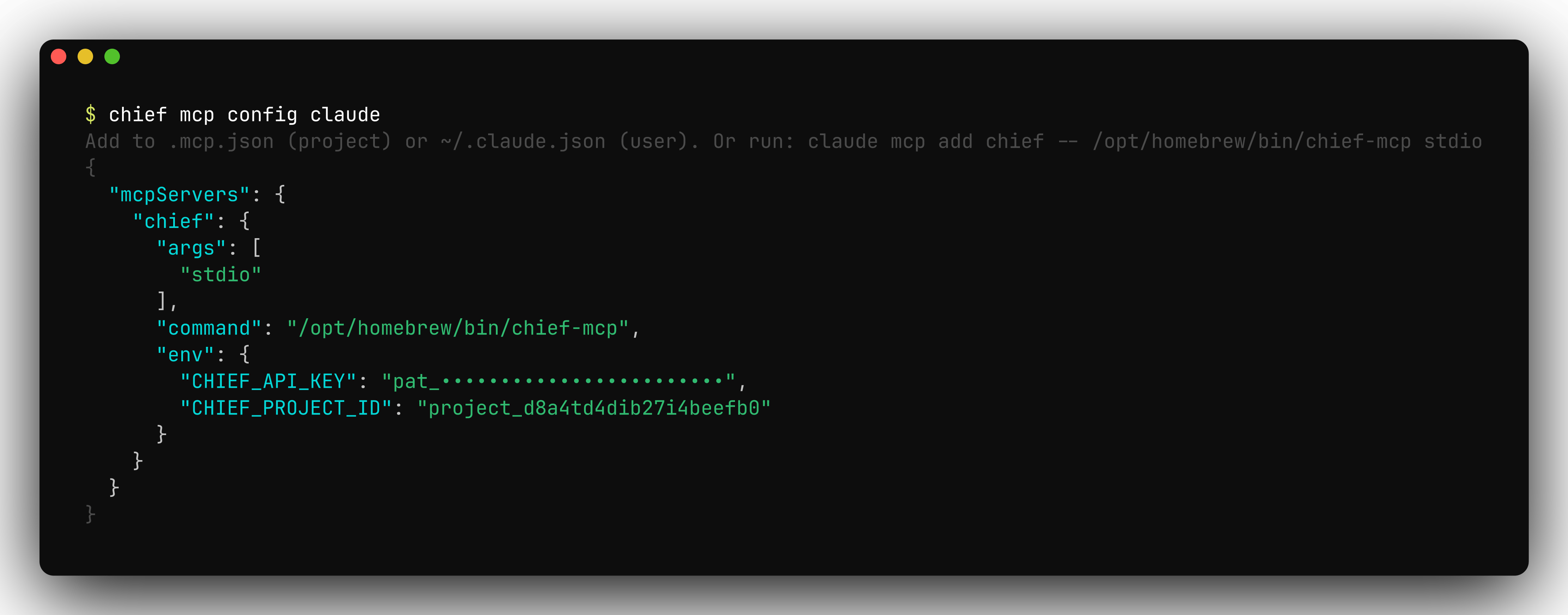
chief mcp config prints a ready-to-paste server snippet with your credentials filled in.
Troubleshooting
- Authentication failed — confirm
CHIEF_API_KEYis set in the server’s environment (or sent as a header in HTTP mode) and that the token is valid.chief doctorchecks credentials and connectivity. - A tool returns “not found” — confirm the id exists in the project the
server is scoped to (
CHIEF_PROJECT_ID). A wrong or missing project id is the usual cause. - The client doesn’t list the server or its tools — restart the client session. MCP servers are launched once and don’t hot-reload after a config change.
- Inspect the traffic — add
--debugto dump every HTTP request and response the server makes.
FAQ
Is there a hosted Chief MCP endpoint I can point my agent at?
Is there a hosted Chief MCP endpoint I can point my agent at?
Yes. Connect a Streamable HTTP client to
https://mcp.chief.bot/mcp with your PAT and, for project-scoped tools, an X-Project-Id header.Which MCP clients are supported?
Which MCP clients are supported?
Any MCP client. Claude Code, Claude Desktop, Cursor, Codex, and VS Code are the ones covered in these docs — see MCP clients for per-client config.
How many tools does the server expose?
How many tools does the server expose?
44 tools across seven resources: chats, assets, labels, actions, live sessions, skills, and memories.
My client does not list the server or its tools. Why?
My client does not list the server or its tools. Why?
Restart the client session. MCP servers are launched once and do not hot-reload after a config change.
Do I need the chief CLI to use the MCP server?
Do I need the chief CLI to use the MCP server?
No. The hosted server needs no CLI or local binary. Use the CLI only if you want it to generate configuration for an optional self-hosted stdio setup.
Can one server reach more than one project?
Can one server reach more than one project?
A server only sees the project it is scoped to. Point it at a different project with
CHIEF_PROJECT_ID, or send X-Project-Id per request in HTTP mode.