Connect Chief to Claude Code, Cursor, or Codex and start asking questions in minutes — no SDK or curl required.
Chief gives your AI coding agent direct access to your project. Ask questions about
everything your team has uploaded, add new documents, and automate the busywork —
right from Claude Code, Cursor, or Codex. No SDK, no curl, no boilerplate to get
started.
Claude Code runs on your computer, not in a browser tab. You may have chatted with Claude
on the web — Claude Code is different: it runs in your terminal, so it can reach your files and
your Chief project and build things for you. Once it’s connected you can both ask Chief
questions and hand it these docs and have it build an integration for you. This guide sets
up both.
An AI coding agent installed — Claude Code,
Cursor, or Codex. This guide uses
Claude Code in its examples.
A terminal — the macOS Terminal app, or Windows Terminal / PowerShell on
Windows. This is where you run the commands below.
A Chief account with access to a project.
New to the terminal or Claude Code? Start here.
The terminal is a text window where you type commands instead of clicking. To open one:
macOS — press Cmd + Space, type Terminal, and press Enter.
Windows — press the Start button and type Terminal, PowerShell, or Command Prompt. Any of the three works.
Claude Code is the agent that runs inside that terminal. Install it by following the
official install guide, then type
claude in your terminal to start it. Once it’s running, come back and follow the three
steps below.If the install is blocked or warns you:
Windows may show “Windows protected your PC” (SmartScreen). Click More info → Run
anyway.
macOS may say the app “can’t be opened.” Open System Settings → Privacy & Security
and choose Open Anyway.
Locked-down work computers often block new software outright. If an install is refused
no matter what, run through this on a personal computer instead.
These warnings are normal for new developer tools — they aren’t errors. Install only from the
official links above, then allow it to run.
If you don’t have it yet, install Claude Code with the recommended native installer:
curl -fsSL https://claude.ai/install.sh | bash
irm https://claude.ai/install.ps1 | iex
Then type claude in your terminal to start it. For other install methods and
troubleshooting, see the
official install guide. Prefer
Cursor or Codex? Use either — you’ll find their setup in step 4.
2
Get your Chief token
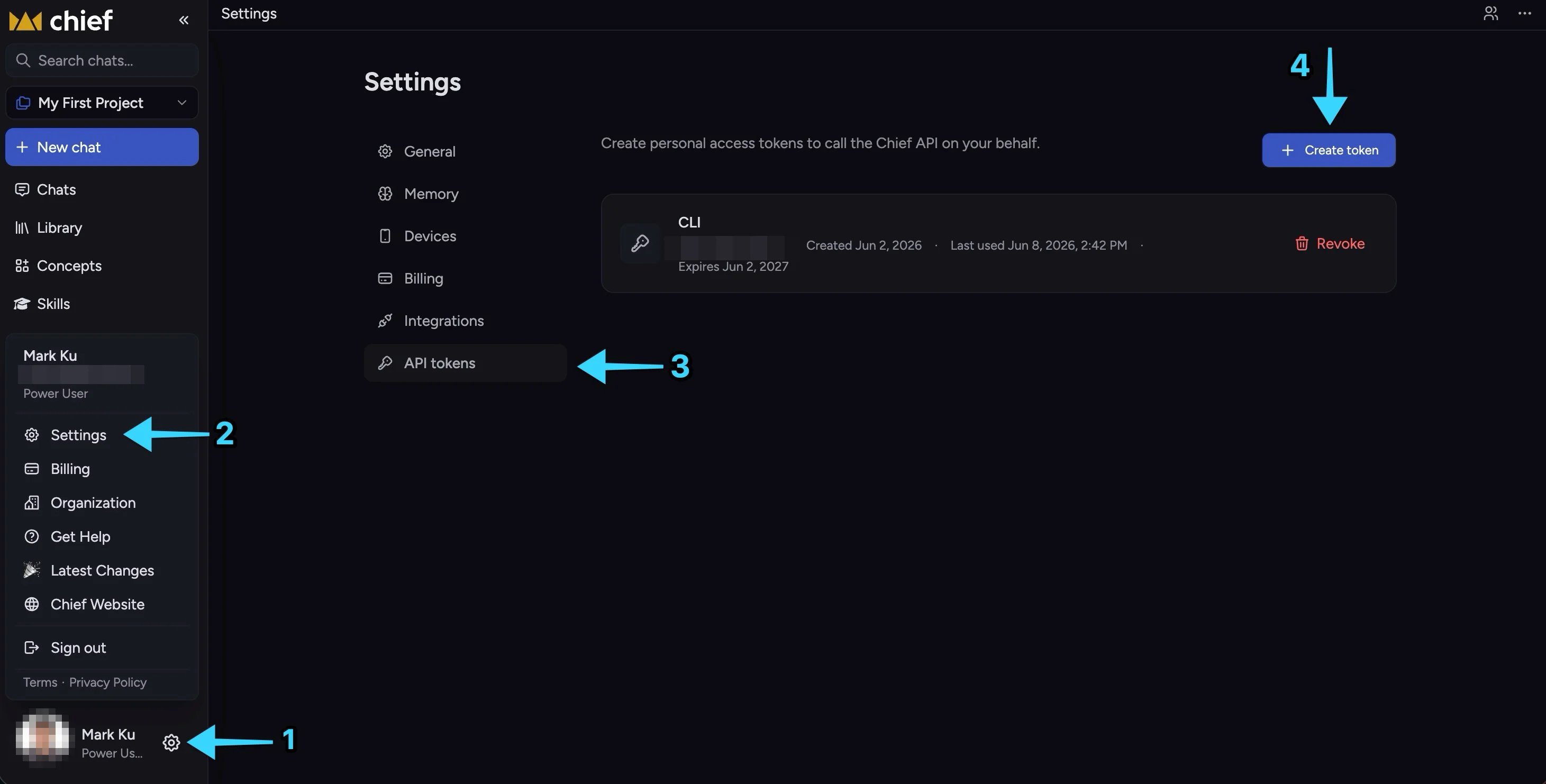
Sign in to Chief. Open your account menu (bottom-left), go to Settings, open the
API tokens tab, and choose Create token. (The help center covers this screen in
detail: API access & personal access tokens.)
Account menu → Settings → API tokens → Create token.
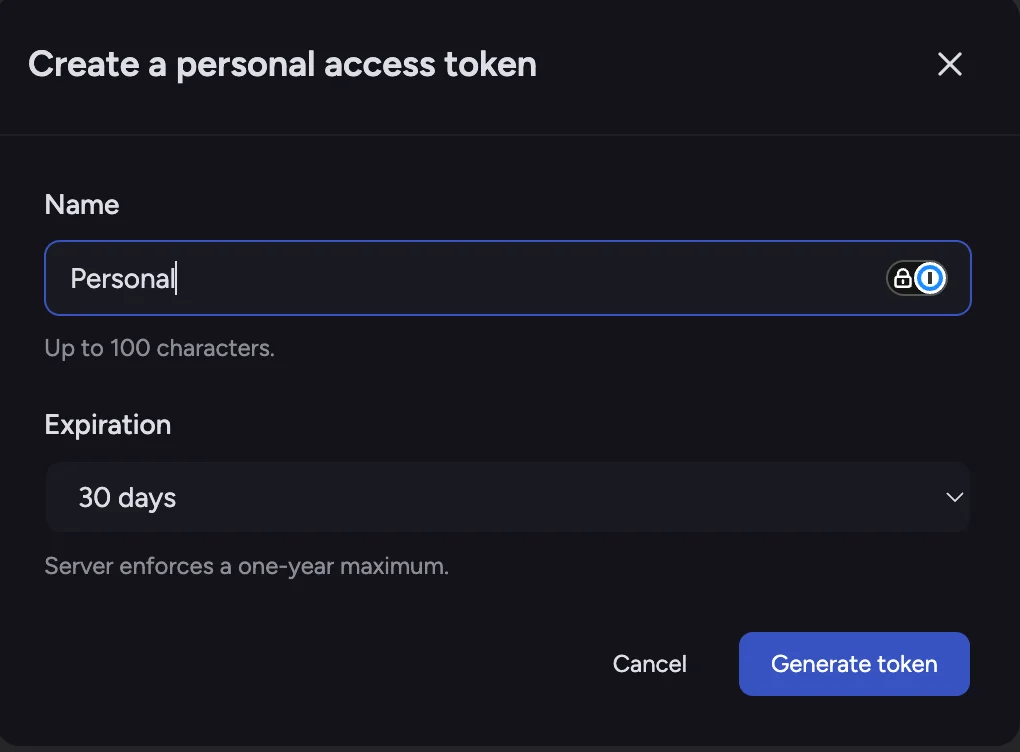
Give the token a name, pick an expiration, and select Generate token.
Name the token and choose an expiration, then Generate token.
Copy the token as soon as it appears — it starts with pat_.
The token is shown only once. Copy it now. If you lose it, delete it and create a
new one — there’s no penalty.
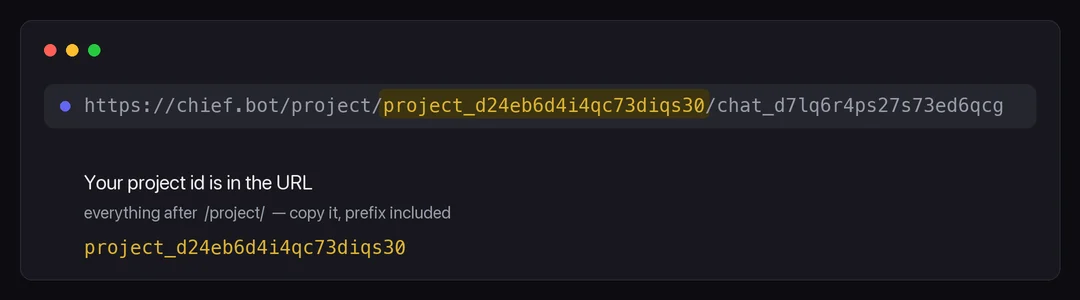
You’ll also need your project id (it starts with project_). Find it in the URL of
any project page — it’s the segment right after /project/:
Your project id is the /project/ segment of any project URL.
You’ll paste both into your agent’s config below.
3
Install the Chief MCP server
brew install --cask Storytell-ai/tap/chief-mcp
Other install options (Go, prebuilt binaries) are on the
MCP server page.
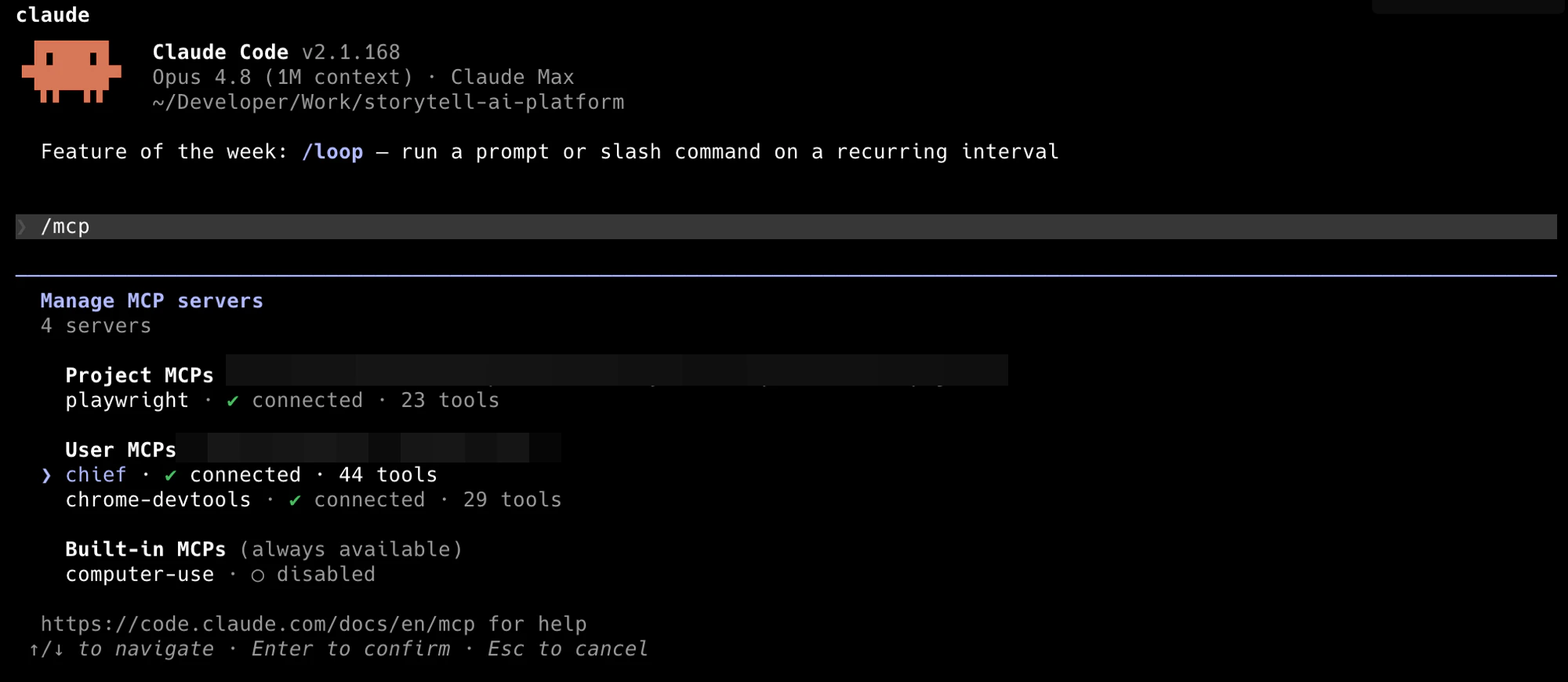
Restart Claude Code so it picks up the new server — that’s it.
After connecting, /mcp shows the Chief server and its tools — that's how you know it worked.
Using Cursor or Codex instead?
Cursor
Codex
After install, open the server in Cursor Settings → MCP and fill in your
CHIEF_API_KEY and CHIEF_PROJECT_ID. Prefer to paste config by hand? See
MCP clients → Cursor.
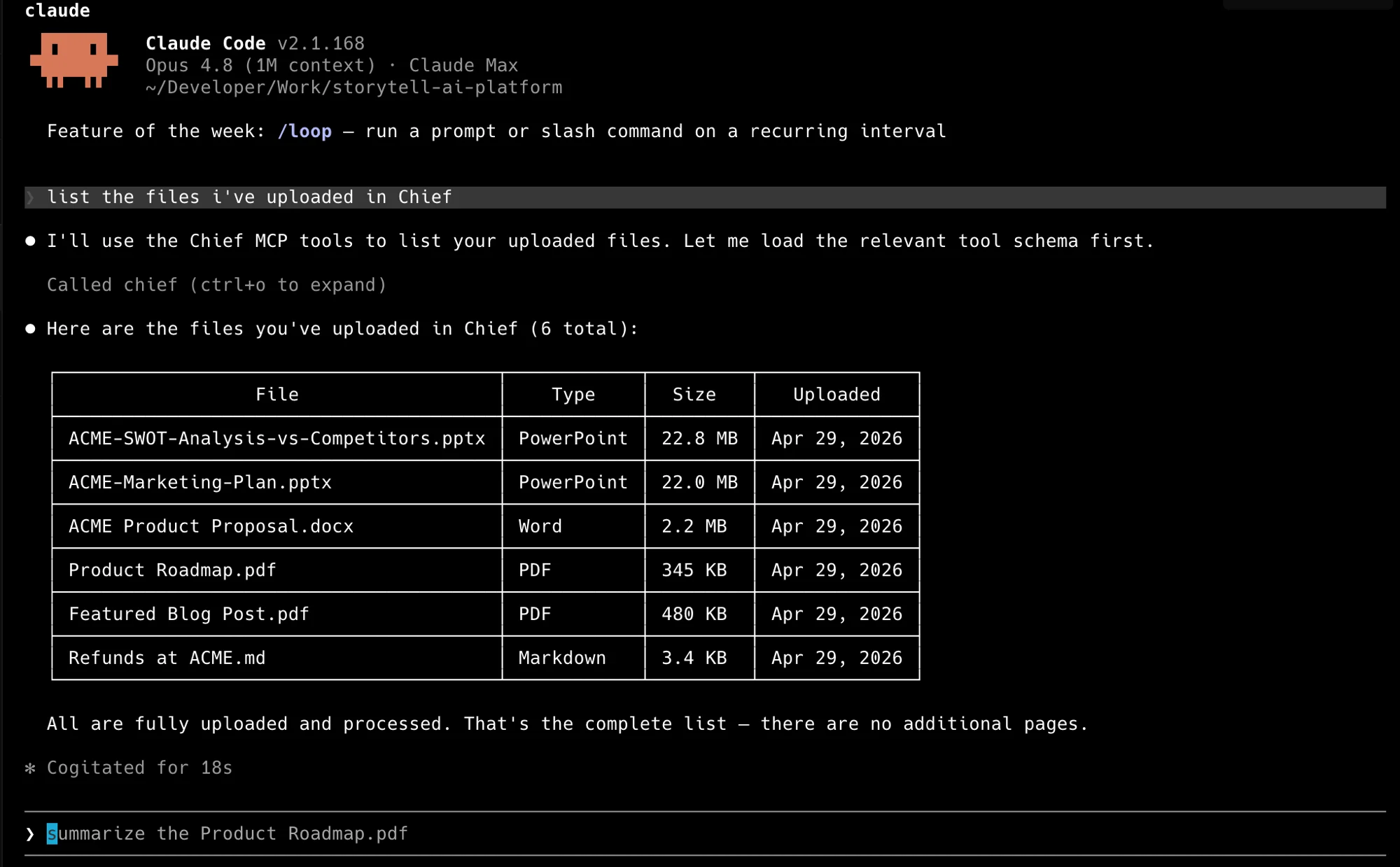
“Using Chief, what are the main themes across everything in my project?”
Your agent calls Chief, reads your project, and answers — no code from you. Ask it
anything about your project: list what you’ve uploaded, summarize a document, or pull
the themes across everything.
Claude Code listing a project's files through the Chief MCP tools.
Connecting over MCP lets your agent talk to Chief. You can also ask it to build against
the Chief API — a script, a sync job, whatever you need — and it will read this
documentation and write the code.In your terminal, set your credentials so the agent doesn’t need them in the chat, then
describe what you want:
A few prompts to start from — paste one in and adjust it to your goal:
“Read the Chief API docs at https://docs.chief.bot. Using CHIEF_API_KEY and
CHIEF_PROJECT_ID from my environment, write a script that uploads every PDF in this folder
to my project and labels them contracts.”
“Ask my Chief project for the three biggest risks across everything we’ve uploaded this
quarter, and print the answer.”
“Create a Chief action that emails me a summary of new uploads every weekday morning.”
“Write a script that pulls this week’s new assets from my Chief project and posts a short
summary to our team’s Slack channel.”
Point your agent straight at the docs and let it read what it needs. There’s an
agent-readable index at https://docs.chief.bot/llms.txt.
The agent reads the reference, writes the code, and runs it.
Start small, then build up.
Do I need to write any code to use Chief from an agent?
No. Connect the MCP server and ask in plain language. Writing code is the alternative path, not a prerequisite.
Which agents can connect?
Any MCP client. Claude Code, Claude Desktop, Cursor, Codex, and VS Code are covered here — see MCP clients for each one’s config.
Can the agent read these docs on its own?
Yes. There is an agent-readable index at https://docs.chief.bot/llms.txt. Point your agent at it and let it read what it needs.
Should I tell the agent which tool to call?
No. Give it the goal — “find and summarize…” — and let it plan the calls. The same request can correctly resolve through different tools on different runs.
The chief command for scripts, CI, and your shell.
API reference
Every endpoint, with an interactive playground.
⌘I
{"docsConfig":{"theme":"maple","$schema":"https://mintlify.com/docs.json","name":"Chief Help","description":"Learn how to use Chief and build integrations with the MCP server, REST API, and developer tools.","colors":{"primary":"#0F207D","light":"#DEB332","dark":"#3853C2"},"logo":{"light":"https://mintcdn.com/chief-2d405d1a/AS8sjWy8DcjbgFjA/logo/light.svg?fit=max\u0026auto=format\u0026n=AS8sjWy8DcjbgFjA\u0026q=85\u0026s=f274bd96d2db4405c244a13cf1bf7544","dark":"https://mintcdn.com/chief-2d405d1a/AS8sjWy8DcjbgFjA/logo/dark.svg?fit=max\u0026auto=format\u0026n=AS8sjWy8DcjbgFjA\u0026q=85\u0026s=deb2a331f876dd16c0ce19de8ef8f88f","href":"https://chief.bot"},"favicon":"https://mintcdn.com/chief-2d405d1a/AS8sjWy8DcjbgFjA/favicon.svg?fit=max\u0026auto=format\u0026n=AS8sjWy8DcjbgFjA\u0026q=85\u0026s=348f948ccbe43e2dbdd9a74482a5c090","api":{"openapi":["openapi.yaml"],"playground":{"display":"interactive"},"mdx":{"server":"https://api.storytell.ai"}},"background":{"color":{"light":"#F3F4F6","dark":"#0C0C11"}},"navbar":{"links":[{"href":"/api-reference/introduction","label":"API reference"},{"href":"https://chief.bot","label":"Support"}],"primary":{"type":"button","label":"Open Chief","href":"https://chief.bot"}},"seo":{"metatags":{"og:type":"website","twitter:card":"summary_large_image"}},"fonts":{"family":"Inter"},"icons":{"library":"lucide"},"contextual":{"options":["copy","view","chatgpt","claude","perplexity","mcp","cursor","vscode"],"display":"header"},"styling":{"latex":true},"navigation":{"global":{"anchors":[{"anchor":"Chief","icon":"house","href":"https://chief.bot"},{"anchor":"OpenAPI spec","icon":"file-code","href":"https://api.storytell.ai/v1/openapi.yaml"}]},"pages":[]}},"deployment":{"deploymentMetadataValue":{"subdomain":"chief-2d405d1a","hasAudioNarration":false,"actualSubdomain":"chief-2d405d1a","customDomains":["docs.chief.bot"],"gitSource":{"type":"github","owner":"storytell-ai","repo":"api-docs","deployBranch":"main","contentDirectory":"","isPrivate":true,"mountPath":"","label":""},"chroma":{"liveDeploymentHistoryId":"6aeb8c604d3c51ab19f08ae6","collectionId":"42860eef-24bb-431b-833d-cd22dd0fe98a","schemaVersion":"v3","latestBuiltDeploymentHistoryId":"6aeb8c604d3c51ab19f08ae6"},"entitlements":{"AI_CHAT":{"status":"ENABLED"},"WEB_MCP":{"status":"ENABLED"},"NARRATION":{"status":"ENABLED"}},"buildId":"6aeb8c604d3c51ab19f08ae6","clientVersion":"0.0.4067","searchFilterCounts":[{"language":"default","tag":"Web App","count":180},{"language":"default","tag":"API reference","count":61},{"language":"default","tag":"Tasks \u0026 prompting","count":30},{"language":"default","tag":"Your knowledge","count":29},{"language":"default","tag":"Actions, skills \u0026 prompts","count":27},{"language":"default","tag":"Live Sessions","count":20},{"language":"default","tag":"Live Sessions app","count":20},{"language":"default","tag":"Plans, credits \u0026 admin","count":17},{"language":"default","tag":"Chats","count":16},{"language":"default","tag":"Get started","count":15}]},"assistantConfig":{"enableAskAiButton":false,"enableStarterQuestions":false,"enableContextualStarterQuestions":false,"enableAskAiSearchBar":true},"basePath":"","hasChatPermissions":true,"hasWebMcpPermissions":true,"toggles":[],"googleFontsInlined":false},"customCss":[{"filePath":"custom.css","content":":root{--chief-navy: #0f207d;--chief-navy-deep: #000d50;--chief-gold: #deb332;--chief-canvas: #f3f4f6;--chief-text: #151e2d;--chief-border: #e0e3e7}.dark{--chief-navy: #3853c2;--chief-gold: #d4a017;--chief-canvas: #0c0c11;--chief-text: #dddde4;--chief-border: #1e1e28}body{background-color:var(--chief-canvas)}#content-area{max-width:42rem}#navbar a[class*=\"primary\"],#navbar button[class*=\"primary\"]{background-color:var(--chief-navy)!important;border-color:var(--chief-navy)!important}#navbar a[class*=\"primary\"]:hover,#navbar button[class*=\"primary\"]:hover{background-color:#2840ab!important;border-color:#2840ab!important}.dark #navbar a[class*=\"primary\"]:hover,.dark #navbar button[class*=\"primary\"]:hover{background-color:#5270d4!important;border-color:#5270d4!important}.workspace-chooser a{min-height:10rem;border:2px solid var(--chief-navy)!important;background:color-mix(in srgb, var(--chief-navy) 5%, var(--chief-canvas))!important;box-shadow:0 8px 20px rgb(15 32 125 / 12%);transition:transform 160ms ease, box-shadow 160ms ease, border-color 160ms ease}.workspace-chooser a:hover{border-color:var(--chief-gold)!important;box-shadow:0 12px 24px rgb(15 32 125 / 20%);transform:translateY(-2px)}.dark .workspace-chooser a{background:color-mix(in srgb, var(--chief-navy) 18%, var(--chief-canvas))!important;box-shadow:0 8px 20px rgb(0 0 0 / 30%)}"}],"page":{"pagePath":"ai-native","slug":"/ai-native","pageMetadata":{"title":"Use Chief with your AI coding agent","sidebarTitle":"AI-native","description":"Connect Chief to Claude Code, Cursor, or Codex and start asking questions in minutes — no SDK or curl required.","keywords":["Chief with Claude Code","connect Cursor to Chief","Codex MCP setup","AI coding agent integration","no-code API access"],"href":"/ai-native"},"description":{"compiledSource":"\"use strict\";\nconst {jsx: _jsx} = arguments[0];\nconst {useMDXComponents: _provideComponents} = arguments[0];\nfunction _createMdxContent(props) {\n const _components = {\n p: \"p\",\n ..._provideComponents(),\n ...props.components\n };\n return _jsx(_components.p, {\n children: \"Connect Chief to Claude Code, Cursor, or Codex and start asking questions in minutes — no SDK or curl required.\"\n });\n}\nfunction MDXContent(props = {}) {\n const {wrapper: MDXLayout} = {\n ..._provideComponents(),\n ...props.components\n };\n return MDXLayout ? _jsx(MDXLayout, {\n ...props,\n children: _jsx(_createMdxContent, {\n ...props\n })\n }) : _createMdxContent(props);\n}\nreturn {\n default: MDXContent\n};\n","frontmatter":{},"scope":{}},"pageType":"default","mdx":{"mdxSource":{"compiledSource":"\"use strict\";const{Fragment:_Fragment,jsx:_jsx,jsxs:_jsxs}=arguments[0];const{useMDXComponents:_provideComponents}=arguments[0];function _createMdxContent(props){const _components={a:`a`,code:`code`,em:`em`,img:`img`,li:`li`,p:`p`,pre:`pre`,span:`span`,strong:`strong`,ul:`ul`,..._provideComponents(),...props.components},{Accordion,AccordionGroup,Card,CardGroup,CodeBlock,CodeGroup,Frame,Heading,Note,OptimizedImage,Step,Steps,Tab,Tabs,Tip,Warning}=_components;if(!Accordion)_missingMdxReference(`Accordion`,true);if(!AccordionGroup)_missingMdxReference(`AccordionGroup`,true);if(!Card)_missingMdxReference(`Card`,true);if(!CardGroup)_missingMdxReference(`CardGroup`,true);if(!CodeBlock)_missingMdxReference(`CodeBlock`,true);if(!CodeGroup)_missingMdxReference(`CodeGroup`,true);if(!Frame)_missingMdxReference(`Frame`,true);if(!Heading)_missingMdxReference(`Heading`,true);if(!Note)_missingMdxReference(`Note`,true);if(!OptimizedImage)_missingMdxReference(`OptimizedImage`,true);if(!Step)_missingMdxReference(`Step`,true);if(!Steps)_missingMdxReference(`Steps`,true);if(!Tab)_missingMdxReference(`Tab`,true);if(!Tabs)_missingMdxReference(`Tabs`,true);if(!Tip)_missingMdxReference(`Tip`,true);if(!Warning)_missingMdxReference(`Warning`,true);return _jsxs(_Fragment,{children:[_jsx(_components.p,{children:`Chief gives your AI coding agent direct access to your project. Ask questions about\neverything your team has uploaded, add new documents, and automate the busywork —\nright from Claude Code, Cursor, or Codex. No SDK, no curl, no boilerplate to get\nstarted.`}),`\n`,_jsx(Note,{children:_jsxs(_components.p,{children:[_jsx(_components.strong,{children:`Claude Code runs on your computer, not in a browser tab.`}),` You may have chatted with Claude\non the web — Claude Code is different: it runs in your terminal, so it can reach your files and\nyour Chief project and `,_jsx(_components.em,{children:`build`}),` things for you. Once it’s connected you can both `,_jsx(_components.strong,{children:`ask`}),` Chief\nquestions and `,_jsx(_components.strong,{children:`hand it these docs and have it build`}),` an integration for you. This guide sets\nup both.`]})}),`\n`,_jsx(Heading,{level:`2`,id:`what-you’ll-need`,children:`What you’ll need`}),`\n`,_jsxs(_components.ul,{children:[`\n`,_jsxs(_components.li,{children:[_jsx(_components.strong,{children:`An AI coding agent installed`}),` — `,_jsx(_components.a,{href:`https://docs.claude.com/en/docs/claude-code/overview`,children:`Claude Code`}),`,\n`,_jsx(_components.a,{href:`https://cursor.com`,children:`Cursor`}),`, or `,_jsx(_components.a,{href:`https://github.com/openai/codex`,children:`Codex`}),`. This guide uses\nClaude Code in its examples.`]}),`\n`,_jsxs(_components.li,{children:[_jsx(_components.strong,{children:`A terminal`}),` — the macOS `,_jsx(_components.strong,{children:`Terminal`}),` app, or `,_jsx(_components.strong,{children:`Windows Terminal`}),` / `,_jsx(_components.strong,{children:`PowerShell`}),` on\nWindows. This is where you run the commands below.`]}),`\n`,_jsxs(_components.li,{children:[_jsx(_components.strong,{children:`A Chief account`}),` with access to a project.`]}),`\n`]}),`\n`,_jsxs(Accordion,{title:`New to the terminal or Claude Code? Start here.`,id:`new-to-the-terminal-or-claude-code-start-here`,children:[_jsx(_components.p,{children:`The terminal is a text window where you type commands instead of clicking. To open one:`}),_jsxs(_components.ul,{children:[`\n`,_jsxs(_components.li,{children:[_jsx(_components.strong,{children:`macOS`}),` — press `,_jsx(_components.code,{children:`Cmd + Space`}),`, type `,_jsx(_components.code,{children:`Terminal`}),`, and press Enter.`]}),`\n`,_jsxs(_components.li,{children:[_jsx(_components.strong,{children:`Windows`}),` — press the Start button and type `,_jsx(_components.code,{children:`Terminal`}),`, `,_jsx(_components.code,{children:`PowerShell`}),`, or `,_jsx(_components.code,{children:`Command Prompt`}),`. Any of the three works.`]}),`\n`]}),_jsxs(_components.p,{children:[`Claude Code is the agent that runs `,_jsx(_components.em,{children:`inside`}),` that terminal. Install it by following the\n`,_jsx(_components.a,{href:`https://docs.claude.com/en/docs/claude-code/overview`,children:`official install guide`}),`, then type\n`,_jsx(_components.code,{children:`claude`}),` in your terminal to start it. Once it’s running, come back and follow the three\nsteps below.`]}),_jsx(_components.p,{children:_jsx(_components.strong,{children:`If the install is blocked or warns you:`})}),_jsxs(_components.ul,{children:[`\n`,_jsxs(_components.li,{children:[_jsx(_components.strong,{children:`Windows`}),` may show “Windows protected your PC” (SmartScreen). Click `,_jsx(_components.strong,{children:`More info → Run\nanyway`}),`.`]}),`\n`,_jsxs(_components.li,{children:[_jsx(_components.strong,{children:`macOS`}),` may say the app “can’t be opened.” Open `,_jsx(_components.strong,{children:`System Settings → Privacy \u0026 Security`}),`\nand choose `,_jsx(_components.strong,{children:`Open Anyway`}),`.`]}),`\n`,_jsxs(_components.li,{children:[_jsx(_components.strong,{children:`Locked-down work computers`}),` often block new software outright. If an install is refused\nno matter what, run through this on a personal computer instead.`]}),`\n`]}),_jsx(_components.p,{children:`These warnings are normal for new developer tools — they aren’t errors. Install only from the\nofficial links above, then allow it to run.`})]}),`\n`,_jsx(Heading,{level:`2`,id:`connect-your-agent-to-chief`,children:`Connect your agent to Chief`}),`\n`,_jsx(_components.p,{children:`Four steps and your agent is talking to Chief.`}),`\n`,_jsxs(Steps,{children:[_jsxs(Step,{title:`Install Claude Code`,children:[_jsx(_components.p,{children:`If you don’t have it yet, install Claude Code with the recommended native installer:`}),_jsxs(CodeGroup,{children:[_jsx(CodeBlock,{filename:`macOS / Linux`,numberOfLines:`1`,language:`shellscript`,children:_jsx(_components.pre,{className:`shiki shiki-themes github-light-default dark-plus`,style:{backgroundColor:`#ffffff`,\"--shiki-dark-bg\":`#0B0C0E`,color:`#1f2328`,\"--shiki-dark\":`#D4D4D4`},language:`shellscript`,children:_jsxs(_components.code,{language:`shellscript`,numberOfLines:`1`,children:[_jsxs(_components.span,{className:`line`,children:[_jsx(_components.span,{style:{color:`#953800`,\"--shiki-dark\":`#DCDCAA`},children:`curl`}),_jsx(_components.span,{style:{color:`#0550AE`,\"--shiki-dark\":`#569CD6`},children:` -fsSL`}),_jsx(_components.span,{style:{color:`#0A3069`,\"--shiki-dark\":`#CE9178`},children:` https://claude.ai/install.sh`}),_jsx(_components.span,{style:{color:`#CF222E`,\"--shiki-dark\":`#D4D4D4`},children:` |`}),_jsx(_components.span,{style:{color:`#953800`,\"--shiki-dark\":`#DCDCAA`},children:` bash`})]}),`\n`]})})}),_jsx(CodeBlock,{filename:`Windows (PowerShell)`,numberOfLines:`1`,language:`powershell`,children:_jsx(_components.pre,{className:`shiki shiki-themes github-light-default dark-plus`,style:{backgroundColor:`#ffffff`,\"--shiki-dark-bg\":`#0B0C0E`,color:`#1f2328`,\"--shiki-dark\":`#D4D4D4`},language:`powershell`,children:_jsxs(_components.code,{language:`powershell`,numberOfLines:`1`,children:[_jsxs(_components.span,{className:`line`,children:[_jsx(_components.span,{style:{color:`#1F2328`,\"--shiki-dark\":`#D4D4D4`},children:`irm https:`}),_jsx(_components.span,{style:{color:`#CF222E`,\"--shiki-dark\":`#D4D4D4`},children:`//`}),_jsx(_components.span,{style:{color:`#1F2328`,\"--shiki-dark\":`#D4D4D4`},children:`claude.ai`}),_jsx(_components.span,{style:{color:`#CF222E`,\"--shiki-dark\":`#D4D4D4`},children:`/`}),_jsx(_components.span,{style:{color:`#1F2328`,\"--shiki-dark\":`#D4D4D4`},children:`install.ps1 `}),_jsx(_components.span,{style:{color:`#CF222E`,\"--shiki-dark\":`#D4D4D4`},children:`|`}),_jsx(_components.span,{style:{color:`#1F2328`,\"--shiki-dark\":`#D4D4D4`},children:` iex`})]}),`\n`]})})})]}),_jsxs(_components.p,{children:[`Then type `,_jsx(_components.code,{children:`claude`}),` in your terminal to start it. For other install methods and\ntroubleshooting, see the\n`,_jsx(_components.a,{href:`https://docs.claude.com/en/docs/claude-code/overview`,children:`official install guide`}),`. Prefer\nCursor or Codex? Use either — you’ll find their setup in step 4.`]})]}),_jsxs(Step,{title:`Get your Chief token`,children:[_jsxs(_components.p,{children:[`Sign in to Chief. Open your account menu (bottom-left), go to `,_jsx(_components.strong,{children:`Settings`}),`, open the\n`,_jsx(_components.strong,{children:`API tokens`}),` tab, and choose `,_jsx(_components.strong,{children:`Create token`}),`. (The help center covers this screen in\ndetail: `,_jsx(_components.a,{href:`/help/integrations/api-access-personal-access-tokens`,children:`API access \u0026 personal access tokens`}),`.)`]}),_jsx(Frame,{caption:`Account menu → Settings → API tokens → Create token.`,children:_jsx(OptimizedImage,{src:`https://mintcdn.com/chief-2d405d1a/QGBlzHNeqRlizFjv/images/demos/web-settings-tokens.png?fit=max\u0026auto=format\u0026n=QGBlzHNeqRlizFjv\u0026q=85\u0026s=b262ea2287613f6db9e1f48fb129b175`,alt:`Chief Settings showing the path to the API tokens tab and the Create token button`,\"data-og-width\":`2922`,width:`2922`,\"data-og-height\":`1482`,height:`1482`,\"data-path\":`images/demos/web-settings-tokens.png`,\"data-optimize\":`true`,\"data-opv\":`3`,srcset:`https://mintcdn.com/chief-2d405d1a/QGBlzHNeqRlizFjv/images/demos/web-settings-tokens.png?w=280\u0026fit=max\u0026auto=format\u0026n=QGBlzHNeqRlizFjv\u0026q=85\u0026s=b0c392d3dfd775f67ed095d2da139c16 280w, https://mintcdn.com/chief-2d405d1a/QGBlzHNeqRlizFjv/images/demos/web-settings-tokens.png?w=560\u0026fit=max\u0026auto=format\u0026n=QGBlzHNeqRlizFjv\u0026q=85\u0026s=0cf107c4bd48217ad2335be9bbb96dfa 560w, https://mintcdn.com/chief-2d405d1a/QGBlzHNeqRlizFjv/images/demos/web-settings-tokens.png?w=840\u0026fit=max\u0026auto=format\u0026n=QGBlzHNeqRlizFjv\u0026q=85\u0026s=b4a48ca77db20ae8e35562d6d7da8d3d 840w, https://mintcdn.com/chief-2d405d1a/QGBlzHNeqRlizFjv/images/demos/web-settings-tokens.png?w=1100\u0026fit=max\u0026auto=format\u0026n=QGBlzHNeqRlizFjv\u0026q=85\u0026s=a48fd56e30ee5952e7a1c050b8ecd4cb 1100w, https://mintcdn.com/chief-2d405d1a/QGBlzHNeqRlizFjv/images/demos/web-settings-tokens.png?w=1650\u0026fit=max\u0026auto=format\u0026n=QGBlzHNeqRlizFjv\u0026q=85\u0026s=7d2890d2b19ab5d37c6010ceb5874b63 1650w, https://mintcdn.com/chief-2d405d1a/QGBlzHNeqRlizFjv/images/demos/web-settings-tokens.png?w=2500\u0026fit=max\u0026auto=format\u0026n=QGBlzHNeqRlizFjv\u0026q=85\u0026s=2c4f43ead7aa2e33b52bb26487360ad0 2500w`})}),_jsxs(_components.p,{children:[`Give the token a name, pick an expiration, and select `,_jsx(_components.strong,{children:`Generate token`}),`.`]}),_jsx(Frame,{caption:`Name the token and choose an expiration, then Generate token.`,children:_jsx(OptimizedImage,{src:`https://mintcdn.com/chief-2d405d1a/QGBlzHNeqRlizFjv/images/demos/web-create-token.png?fit=max\u0026auto=format\u0026n=QGBlzHNeqRlizFjv\u0026q=85\u0026s=c0d80128bf6f1aa21f2efb2d36901a72`,alt:`Chief's Create a personal access token dialog with a name field and expiration selector`,\"data-og-width\":`1020`,width:`1020`,\"data-og-height\":`752`,height:`752`,\"data-path\":`images/demos/web-create-token.png`,\"data-optimize\":`true`,\"data-opv\":`3`,srcset:`https://mintcdn.com/chief-2d405d1a/QGBlzHNeqRlizFjv/images/demos/web-create-token.png?w=280\u0026fit=max\u0026auto=format\u0026n=QGBlzHNeqRlizFjv\u0026q=85\u0026s=2f3defa025a334cb3e6a81baab4e6d65 280w, https://mintcdn.com/chief-2d405d1a/QGBlzHNeqRlizFjv/images/demos/web-create-token.png?w=560\u0026fit=max\u0026auto=format\u0026n=QGBlzHNeqRlizFjv\u0026q=85\u0026s=929d20bc1b7d23227e12de596ef17428 560w, https://mintcdn.com/chief-2d405d1a/QGBlzHNeqRlizFjv/images/demos/web-create-token.png?w=840\u0026fit=max\u0026auto=format\u0026n=QGBlzHNeqRlizFjv\u0026q=85\u0026s=da3a33dc07c595a3e65c37ffbdf85b88 840w, https://mintcdn.com/chief-2d405d1a/QGBlzHNeqRlizFjv/images/demos/web-create-token.png?w=1100\u0026fit=max\u0026auto=format\u0026n=QGBlzHNeqRlizFjv\u0026q=85\u0026s=07054cf19b98b25ce2efc115a77b7b63 1100w, https://mintcdn.com/chief-2d405d1a/QGBlzHNeqRlizFjv/images/demos/web-create-token.png?w=1650\u0026fit=max\u0026auto=format\u0026n=QGBlzHNeqRlizFjv\u0026q=85\u0026s=1309156d1ccfada6c64961994dc9e2e2 1650w, https://mintcdn.com/chief-2d405d1a/QGBlzHNeqRlizFjv/images/demos/web-create-token.png?w=2500\u0026fit=max\u0026auto=format\u0026n=QGBlzHNeqRlizFjv\u0026q=85\u0026s=108bae7e8648e74a3c8ebabca55f8fb7 2500w`})}),_jsxs(_components.p,{children:[`Copy the token as soon as it appears — it starts with `,_jsx(_components.code,{children:`pat_`}),`.`]}),_jsx(Warning,{children:_jsxs(_components.p,{children:[`The token is shown `,_jsx(_components.strong,{children:`only once`}),`. Copy it now. If you lose it, delete it and create a\nnew one — there’s no penalty.`]})}),_jsxs(_components.p,{children:[`You’ll also need your `,_jsx(_components.strong,{children:`project id`}),` (it starts with `,_jsx(_components.code,{children:`project_`}),`). Find it in the URL of\nany project page — it’s the segment right after `,_jsx(_components.code,{children:`/project/`}),`:`]}),_jsx(Frame,{caption:`Your project id is the /project/ segment of any project URL.`,children:_jsx(OptimizedImage,{src:`https://mintcdn.com/chief-2d405d1a/QGBlzHNeqRlizFjv/images/demos/web-project-id.png?fit=max\u0026auto=format\u0026n=QGBlzHNeqRlizFjv\u0026q=85\u0026s=cdd4eec66bd5e165dc49cf209757b2ff`,alt:`Browser address bar showing a Chief project URL with the project id segment highlighted`,\"data-og-width\":`1080`,width:`1080`,\"data-og-height\":`300`,height:`300`,\"data-path\":`images/demos/web-project-id.png`,\"data-optimize\":`true`,\"data-opv\":`3`,srcset:`https://mintcdn.com/chief-2d405d1a/QGBlzHNeqRlizFjv/images/demos/web-project-id.png?w=280\u0026fit=max\u0026auto=format\u0026n=QGBlzHNeqRlizFjv\u0026q=85\u0026s=006809b02037756daf2299ceca88cca6 280w, https://mintcdn.com/chief-2d405d1a/QGBlzHNeqRlizFjv/images/demos/web-project-id.png?w=560\u0026fit=max\u0026auto=format\u0026n=QGBlzHNeqRlizFjv\u0026q=85\u0026s=5689397c520233451e89c5a5327db2b5 560w, https://mintcdn.com/chief-2d405d1a/QGBlzHNeqRlizFjv/images/demos/web-project-id.png?w=840\u0026fit=max\u0026auto=format\u0026n=QGBlzHNeqRlizFjv\u0026q=85\u0026s=84bf4a853271f6913126347f407e60ee 840w, https://mintcdn.com/chief-2d405d1a/QGBlzHNeqRlizFjv/images/demos/web-project-id.png?w=1100\u0026fit=max\u0026auto=format\u0026n=QGBlzHNeqRlizFjv\u0026q=85\u0026s=66fb8872e54040931a11bbb39eef87f1 1100w, https://mintcdn.com/chief-2d405d1a/QGBlzHNeqRlizFjv/images/demos/web-project-id.png?w=1650\u0026fit=max\u0026auto=format\u0026n=QGBlzHNeqRlizFjv\u0026q=85\u0026s=f97c1440961e713939494bcb513b232a 1650w, https://mintcdn.com/chief-2d405d1a/QGBlzHNeqRlizFjv/images/demos/web-project-id.png?w=2500\u0026fit=max\u0026auto=format\u0026n=QGBlzHNeqRlizFjv\u0026q=85\u0026s=fccd5ba14a12b48afef5c66042e1ffb2 2500w`})}),_jsx(_components.p,{children:`You’ll paste both into your agent’s config below.`})]}),_jsxs(Step,{title:`Install the Chief MCP server`,children:[_jsx(CodeBlock,{filename:``,numberOfLines:`1`,language:`shellscript`,children:_jsx(_components.pre,{className:`shiki shiki-themes github-light-default dark-plus`,style:{backgroundColor:`#ffffff`,\"--shiki-dark-bg\":`#0B0C0E`,color:`#1f2328`,\"--shiki-dark\":`#D4D4D4`},language:`shellscript`,children:_jsxs(_components.code,{language:`shellscript`,numberOfLines:`1`,children:[_jsxs(_components.span,{className:`line`,children:[_jsx(_components.span,{style:{color:`#953800`,\"--shiki-dark\":`#DCDCAA`},children:`brew`}),_jsx(_components.span,{style:{color:`#0A3069`,\"--shiki-dark\":`#CE9178`},children:` install`}),_jsx(_components.span,{style:{color:`#0550AE`,\"--shiki-dark\":`#569CD6`},children:` --cask`}),_jsx(_components.span,{style:{color:`#0A3069`,\"--shiki-dark\":`#CE9178`},children:` Storytell-ai/tap/chief-mcp`})]}),`\n`]})})}),_jsxs(_components.p,{children:[`Other install options (Go, prebuilt binaries) are on the\n`,_jsx(_components.a,{href:`/mcp/overview#install`,children:`MCP server page`}),`.`]})]}),_jsxs(Step,{title:`Connect Claude Code`,children:[_jsx(CodeBlock,{filename:``,numberOfLines:`4`,language:`shellscript`,children:_jsx(_components.pre,{className:`shiki shiki-themes github-light-default dark-plus`,style:{backgroundColor:`#ffffff`,\"--shiki-dark-bg\":`#0B0C0E`,color:`#1f2328`,\"--shiki-dark\":`#D4D4D4`},language:`shellscript`,children:_jsxs(_components.code,{language:`shellscript`,numberOfLines:`4`,children:[_jsxs(_components.span,{className:`line`,children:[_jsx(_components.span,{style:{color:`#953800`,\"--shiki-dark\":`#DCDCAA`},children:`claude`}),_jsx(_components.span,{style:{color:`#0A3069`,\"--shiki-dark\":`#CE9178`},children:` mcp`}),_jsx(_components.span,{style:{color:`#0A3069`,\"--shiki-dark\":`#CE9178`},children:` add`}),_jsx(_components.span,{style:{color:`#0A3069`,\"--shiki-dark\":`#CE9178`},children:` chief`}),_jsx(_components.span,{style:{color:`#CF222E`,\"--shiki-dark\":`#D7BA7D`},children:` \\\\`})]}),`\n`,_jsxs(_components.span,{className:`line`,children:[_jsx(_components.span,{style:{color:`#0550AE`,\"--shiki-dark\":`#569CD6`},children:` -e`}),_jsx(_components.span,{style:{color:`#0A3069`,\"--shiki-dark\":`#CE9178`},children:` CHIEF_API_KEY=`}),_jsx(_components.span,{style:{color:`#CF222E`,\"--shiki-dark\":`#D4D4D4`},children:`\u003c`}),_jsx(_components.span,{style:{color:`#0A3069`,\"--shiki-dark\":`#CE9178`},children:`your-toke`}),_jsx(_components.span,{style:{color:`#0A3069`,\"--shiki-dark\":`#CE9178`},children:`n`}),_jsx(_components.span,{style:{color:`#CF222E`,\"--shiki-dark\":`#D4D4D4`},children:`>`}),_jsx(_components.span,{style:{color:`#CF222E`,\"--shiki-dark\":`#D7BA7D`},children:` \\\\`})]}),`\n`,_jsxs(_components.span,{className:`line`,children:[_jsx(_components.span,{style:{color:`#0550AE`,\"--shiki-dark\":`#569CD6`},children:` -e`}),_jsx(_components.span,{style:{color:`#0A3069`,\"--shiki-dark\":`#CE9178`},children:` CHIEF_PROJECT_ID=`}),_jsx(_components.span,{style:{color:`#CF222E`,\"--shiki-dark\":`#D4D4D4`},children:`\u003c`}),_jsx(_components.span,{style:{color:`#0A3069`,\"--shiki-dark\":`#CE9178`},children:`your-project-i`}),_jsx(_components.span,{style:{color:`#0A3069`,\"--shiki-dark\":`#CE9178`},children:`d`}),_jsx(_components.span,{style:{color:`#CF222E`,\"--shiki-dark\":`#D4D4D4`},children:`>`}),_jsx(_components.span,{style:{color:`#CF222E`,\"--shiki-dark\":`#D7BA7D`},children:` \\\\`})]}),`\n`,_jsxs(_components.span,{className:`line`,children:[_jsx(_components.span,{style:{color:`#0550AE`,\"--shiki-dark\":`#569CD6`},children:` --`}),_jsx(_components.span,{style:{color:`#0A3069`,\"--shiki-dark\":`#CE9178`},children:` chief-mcp`}),_jsx(_components.span,{style:{color:`#0A3069`,\"--shiki-dark\":`#CE9178`},children:` stdio`})]}),`\n`]})})}),_jsx(_components.p,{children:`Restart Claude Code so it picks up the new server — that’s it.`}),_jsx(Frame,{caption:`After connecting, /mcp shows the Chief server and its tools — that's how you know it worked.`,children:_jsx(OptimizedImage,{src:`https://mintcdn.com/chief-2d405d1a/QGBlzHNeqRlizFjv/images/demos/agent-mcp-connected.png?fit=max\u0026auto=format\u0026n=QGBlzHNeqRlizFjv\u0026q=85\u0026s=e057ed86faf0bbfb6de951baa2fe6cdb`,alt:`Claude Code's /mcp panel showing the chief server connected with 44 tools`,\"data-og-width\":`2000`,width:`2000`,\"data-og-height\":`870`,height:`870`,\"data-path\":`images/demos/agent-mcp-connected.png`,\"data-optimize\":`true`,\"data-opv\":`3`,srcset:`https://mintcdn.com/chief-2d405d1a/QGBlzHNeqRlizFjv/images/demos/agent-mcp-connected.png?w=280\u0026fit=max\u0026auto=format\u0026n=QGBlzHNeqRlizFjv\u0026q=85\u0026s=bc3c5110419da2402924da8520632766 280w, https://mintcdn.com/chief-2d405d1a/QGBlzHNeqRlizFjv/images/demos/agent-mcp-connected.png?w=560\u0026fit=max\u0026auto=format\u0026n=QGBlzHNeqRlizFjv\u0026q=85\u0026s=c471c3da05da0dd34070b88b91336dd4 560w, https://mintcdn.com/chief-2d405d1a/QGBlzHNeqRlizFjv/images/demos/agent-mcp-connected.png?w=840\u0026fit=max\u0026auto=format\u0026n=QGBlzHNeqRlizFjv\u0026q=85\u0026s=a0b6c72aa44163477e587fe48f80eefa 840w, https://mintcdn.com/chief-2d405d1a/QGBlzHNeqRlizFjv/images/demos/agent-mcp-connected.png?w=1100\u0026fit=max\u0026auto=format\u0026n=QGBlzHNeqRlizFjv\u0026q=85\u0026s=01e8ee0fa1fb80645192cd53c4cd7e08 1100w, https://mintcdn.com/chief-2d405d1a/QGBlzHNeqRlizFjv/images/demos/agent-mcp-connected.png?w=1650\u0026fit=max\u0026auto=format\u0026n=QGBlzHNeqRlizFjv\u0026q=85\u0026s=047441abc0e12b67bd72704424c4947e 1650w, https://mintcdn.com/chief-2d405d1a/QGBlzHNeqRlizFjv/images/demos/agent-mcp-connected.png?w=2500\u0026fit=max\u0026auto=format\u0026n=QGBlzHNeqRlizFjv\u0026q=85\u0026s=fe8cd48831559df827852c62937d7e26 2500w`})}),_jsxs(Accordion,{title:`Using Cursor or Codex instead?`,id:`using-cursor-or-codex-instead`,children:[_jsxs(Tabs,{children:[_jsxs(Tab,{title:`Cursor`,id:`cursor`,children:[_jsx(_components.p,{children:_jsx(_components.a,{href:`cursor://anysphere.cursor-deeplink/mcp/install?name=chief\u0026config=eyJjb21tYW5kIjoiY2hpZWYtbWNwIiwiYXJncyI6WyJzdGRpbyJdLCJlbnYiOnsiQ0hJRUZfQVBJX0tFWSI6IiIsIkNISUVGX1BST0pFQ1RfSUQiOiIifX0=`,children:_jsx(_components.img,{src:`https://cursor.com/deeplink/mcp-install-dark.svg`,alt:`Add to Cursor`})})}),_jsxs(_components.p,{children:[`After install, open the server in `,_jsx(_components.strong,{children:`Cursor Settings → MCP`}),` and fill in your\n`,_jsx(_components.code,{children:`CHIEF_API_KEY`}),` and `,_jsx(_components.code,{children:`CHIEF_PROJECT_ID`}),`. Prefer to paste config by hand? See\n`,_jsx(_components.a,{href:`/mcp/clients`,children:`MCP clients → Cursor`}),`.`]})]}),_jsxs(Tab,{title:`Codex`,id:`codex`,children:[_jsxs(_components.p,{children:[`Add to `,_jsx(_components.code,{children:`~/.codex/config.toml`}),`:`]}),_jsx(CodeBlock,{filename:``,numberOfLines:`4`,language:`toml`,children:_jsx(_components.pre,{className:`shiki shiki-themes github-light-default dark-plus`,style:{backgroundColor:`#ffffff`,\"--shiki-dark-bg\":`#0B0C0E`,color:`#1f2328`,\"--shiki-dark\":`#D4D4D4`},language:`toml`,children:_jsxs(_components.code,{language:`toml`,numberOfLines:`4`,children:[_jsxs(_components.span,{className:`line`,children:[_jsx(_components.span,{style:{color:`#1F2328`,\"--shiki-dark\":`#D4D4D4`},children:`[`}),_jsx(_components.span,{style:{color:`#953800`,\"--shiki-dark\":`#D4D4D4`},children:`mcp_servers`}),_jsx(_components.span,{style:{color:`#1F2328`,\"--shiki-dark\":`#D4D4D4`},children:`.`}),_jsx(_components.span,{style:{color:`#953800`,\"--shiki-dark\":`#D4D4D4`},children:`chief`}),_jsx(_components.span,{style:{color:`#1F2328`,\"--shiki-dark\":`#D4D4D4`},children:`]`})]}),`\n`,_jsxs(_components.span,{className:`line`,children:[_jsx(_components.span,{style:{color:`#1F2328`,\"--shiki-dark\":`#9CDCFE`},children:`command`}),_jsx(_components.span,{style:{color:`#1F2328`,\"--shiki-dark\":`#D4D4D4`},children:` = `}),_jsx(_components.span,{style:{color:`#0A3069`,\"--shiki-dark\":`#CE9178`},children:`\"chief-mcp\"`})]}),`\n`,_jsxs(_components.span,{className:`line`,children:[_jsx(_components.span,{style:{color:`#1F2328`,\"--shiki-dark\":`#9CDCFE`},children:`args`}),_jsx(_components.span,{style:{color:`#1F2328`,\"--shiki-dark\":`#D4D4D4`},children:` = [`}),_jsx(_components.span,{style:{color:`#0A3069`,\"--shiki-dark\":`#CE9178`},children:`\"stdio\"`}),_jsx(_components.span,{style:{color:`#1F2328`,\"--shiki-dark\":`#D4D4D4`},children:`]`})]}),`\n`,_jsxs(_components.span,{className:`line`,children:[_jsx(_components.span,{style:{color:`#1F2328`,\"--shiki-dark\":`#9CDCFE`},children:`env`}),_jsx(_components.span,{style:{color:`#1F2328`,\"--shiki-dark\":`#D4D4D4`},children:` = { `}),_jsx(_components.span,{style:{color:`#1F2328`,\"--shiki-dark\":`#9CDCFE`},children:`CHIEF_API_KEY`}),_jsx(_components.span,{style:{color:`#1F2328`,\"--shiki-dark\":`#D4D4D4`},children:` = `}),_jsx(_components.span,{style:{color:`#0A3069`,\"--shiki-dark\":`#CE9178`},children:`\"\u003cyour-token>\"`}),_jsx(_components.span,{style:{color:`#1F2328`,\"--shiki-dark\":`#D4D4D4`},children:`, `}),_jsx(_components.span,{style:{color:`#1F2328`,\"--shiki-dark\":`#9CDCFE`},children:`CHIEF_PROJECT_ID`}),_jsx(_components.span,{style:{color:`#1F2328`,\"--shiki-dark\":`#D4D4D4`},children:` = `}),_jsx(_components.span,{style:{color:`#0A3069`,\"--shiki-dark\":`#CE9178`},children:`\"\u003cyour-project-id>\"`}),_jsx(_components.span,{style:{color:`#1F2328`,\"--shiki-dark\":`#D4D4D4`},children:` }`})]}),`\n`]})})})]})]}),_jsxs(_components.p,{children:[`Using a different client, or want HTTP transport? The full matrix is on\n`,_jsx(_components.a,{href:`/mcp/clients`,children:`MCP clients`}),`.`]})]})]})]}),`\n`,_jsx(Heading,{level:`2`,id:`try-it`,children:`Try it`}),`\n`,_jsx(_components.p,{children:`Once your agent is connected, paste this in:`}),`\n`,_jsx(Tip,{children:_jsx(_components.p,{children:`“Using Chief, what are the main themes across everything in my project?”`})}),`\n`,_jsx(_components.p,{children:`Your agent calls Chief, reads your project, and answers — no code from you. Ask it\nanything about your project: list what you’ve uploaded, summarize a document, or pull\nthe themes across everything.`}),`\n`,_jsx(Frame,{caption:`Claude Code listing a project's files through the Chief MCP tools.`,children:_jsx(OptimizedImage,{src:`https://mintcdn.com/chief-2d405d1a/QGBlzHNeqRlizFjv/images/demos/agent-list-files.png?fit=max\u0026auto=format\u0026n=QGBlzHNeqRlizFjv\u0026q=85\u0026s=a7fdcea579e501edf45a35adc59681b8`,alt:`A Claude Code session using the Chief MCP tools to list the files uploaded to a project`,\"data-og-width\":`2000`,width:`2000`,\"data-og-height\":`1239`,height:`1239`,\"data-path\":`images/demos/agent-list-files.png`,\"data-optimize\":`true`,\"data-opv\":`3`,srcset:`https://mintcdn.com/chief-2d405d1a/QGBlzHNeqRlizFjv/images/demos/agent-list-files.png?w=280\u0026fit=max\u0026auto=format\u0026n=QGBlzHNeqRlizFjv\u0026q=85\u0026s=589c57149124aa545caef07871804c46 280w, https://mintcdn.com/chief-2d405d1a/QGBlzHNeqRlizFjv/images/demos/agent-list-files.png?w=560\u0026fit=max\u0026auto=format\u0026n=QGBlzHNeqRlizFjv\u0026q=85\u0026s=c542a58537a00de05c121a7c9f7abbb0 560w, https://mintcdn.com/chief-2d405d1a/QGBlzHNeqRlizFjv/images/demos/agent-list-files.png?w=840\u0026fit=max\u0026auto=format\u0026n=QGBlzHNeqRlizFjv\u0026q=85\u0026s=1158c35de12a1a492f8e765399c9ff54 840w, https://mintcdn.com/chief-2d405d1a/QGBlzHNeqRlizFjv/images/demos/agent-list-files.png?w=1100\u0026fit=max\u0026auto=format\u0026n=QGBlzHNeqRlizFjv\u0026q=85\u0026s=cd5ca98f606a13d502c79f0d0f12c303 1100w, https://mintcdn.com/chief-2d405d1a/QGBlzHNeqRlizFjv/images/demos/agent-list-files.png?w=1650\u0026fit=max\u0026auto=format\u0026n=QGBlzHNeqRlizFjv\u0026q=85\u0026s=7871f08a6fa4b9e8a0a1194c8a5417a1 1650w, https://mintcdn.com/chief-2d405d1a/QGBlzHNeqRlizFjv/images/demos/agent-list-files.png?w=2500\u0026fit=max\u0026auto=format\u0026n=QGBlzHNeqRlizFjv\u0026q=85\u0026s=1c25df926ed49f71dac950cfa0ecd175 2500w`})}),`\n`,_jsx(Heading,{level:`2`,id:`have-your-agent-build-an-integration-for-you`,children:`Have your agent build an integration for you`}),`\n`,_jsxs(_components.p,{children:[`Connecting over MCP lets your agent `,_jsx(_components.em,{children:`talk to`}),` Chief. You can also ask it to `,_jsx(_components.em,{children:`build`}),` against\nthe Chief API — a script, a sync job, whatever you need — and it will read this\ndocumentation and write the code.`]}),`\n`,_jsx(_components.p,{children:`In your terminal, set your credentials so the agent doesn’t need them in the chat, then\ndescribe what you want:`}),`\n`,_jsx(CodeBlock,{filename:``,numberOfLines:`2`,language:`shellscript`,children:_jsx(_components.pre,{className:`shiki shiki-themes github-light-default dark-plus`,style:{backgroundColor:`#ffffff`,\"--shiki-dark-bg\":`#0B0C0E`,color:`#1f2328`,\"--shiki-dark\":`#D4D4D4`},language:`shellscript`,children:_jsxs(_components.code,{language:`shellscript`,numberOfLines:`2`,children:[_jsxs(_components.span,{className:`line`,children:[_jsx(_components.span,{style:{color:`#CF222E`,\"--shiki-dark\":`#569CD6`},children:`export`}),_jsx(_components.span,{style:{color:`#1F2328`,\"--shiki-dark\":`#9CDCFE`},children:` CHIEF_API_KEY`}),_jsx(_components.span,{style:{color:`#CF222E`,\"--shiki-dark\":`#D4D4D4`},children:`=`}),_jsx(_components.span,{style:{color:`#0A3069`,\"--shiki-dark\":`#CE9178`},children:`\"pat_xxxxxxxxxxxxxxxxxxxxxxxxxxxxxxxx\"`})]}),`\n`,_jsxs(_components.span,{className:`line`,children:[_jsx(_components.span,{style:{color:`#CF222E`,\"--shiki-dark\":`#569CD6`},children:`export`}),_jsx(_components.span,{style:{color:`#1F2328`,\"--shiki-dark\":`#9CDCFE`},children:` CHIEF_PROJECT_ID`}),_jsx(_components.span,{style:{color:`#CF222E`,\"--shiki-dark\":`#D4D4D4`},children:`=`}),_jsx(_components.span,{style:{color:`#0A3069`,\"--shiki-dark\":`#CE9178`},children:`\"project_xxxxxxxxxxxxxxxxxxxx\"`})]}),`\n`]})})}),`\n`,_jsx(Heading,{level:`3`,id:`starter-prompts`,children:`Starter prompts`}),`\n`,_jsx(_components.p,{children:`A few prompts to start from — paste one in and adjust it to your goal:`}),`\n`,_jsxs(_components.ul,{children:[`\n`,_jsx(_components.li,{children:_jsxs(_components.em,{children:[`“Read the Chief API docs at `,_jsx(_components.a,{href:`https://docs.chief.bot`,children:`https://docs.chief.bot`}),`. Using `,_jsx(_components.code,{children:`CHIEF_API_KEY`}),` and\n`,_jsx(_components.code,{children:`CHIEF_PROJECT_ID`}),` from my environment, write a script that uploads every PDF in this folder\nto my project and labels them `,_jsx(_components.code,{children:`contracts`}),`.”`]})}),`\n`,_jsx(_components.li,{children:_jsx(_components.em,{children:`“Ask my Chief project for the three biggest risks across everything we’ve uploaded this\nquarter, and print the answer.”`})}),`\n`,_jsx(_components.li,{children:_jsx(_components.em,{children:`“Create a Chief action that emails me a summary of new uploads every weekday morning.”`})}),`\n`,_jsx(_components.li,{children:_jsx(_components.em,{children:`“Write a script that pulls this week’s new assets from my Chief project and posts a short\nsummary to our team’s Slack channel.”`})}),`\n`]}),`\n`,_jsx(Tip,{children:_jsxs(_components.p,{children:[`Point your agent straight at the docs and let it read what it needs. There’s an\nagent-readable index at `,_jsx(_components.a,{href:`https://docs.chief.bot/llms.txt`,children:_jsx(_components.code,{children:`https://docs.chief.bot/llms.txt`})}),`.`]})}),`\n`,_jsxs(_components.p,{children:[`The agent reads the `,_jsx(_components.a,{href:`/api-reference/introduction`,children:`reference`}),`, writes the code, and runs it.\nStart small, then build up.`]}),`\n`,_jsx(Heading,{level:`2`,id:`faq`,children:`FAQ`}),`\n`,_jsxs(AccordionGroup,{children:[_jsx(Accordion,{title:`Do I need to write any code to use Chief from an agent?`,id:`do-i-need-to-write-any-code-to-use-chief-from-an-agent`,children:_jsx(_components.p,{children:`No. Connect the MCP server and ask in plain language. Writing code is the alternative path, not a prerequisite.`})}),_jsx(Accordion,{title:`Which agents can connect?`,id:`which-agents-can-connect`,children:_jsxs(_components.p,{children:[`Any MCP client. Claude Code, Claude Desktop, Cursor, Codex, and VS Code are covered here — see `,_jsx(_components.a,{href:`/mcp/clients`,children:`MCP clients`}),` for each one’s config.`]})}),_jsx(Accordion,{title:`Can the agent read these docs on its own?`,id:`can-the-agent-read-these-docs-on-its-own`,children:_jsxs(_components.p,{children:[`Yes. There is an agent-readable index at `,_jsx(_components.a,{href:`https://docs.chief.bot/llms.txt`,children:_jsx(_components.code,{children:`https://docs.chief.bot/llms.txt`})}),`. Point your agent at it and let it read what it needs.`]})}),_jsx(Accordion,{title:`Should I tell the agent which tool to call?`,id:`should-i-tell-the-agent-which-tool-to-call`,children:_jsx(_components.p,{children:`No. Give it the goal — “find and summarize…” — and let it plan the calls. The same request can correctly resolve through different tools on different runs.`})})]}),`\n`,_jsx(Heading,{level:`2`,id:`prefer-to-do-it-yourself`,children:`Prefer to do it yourself?`}),`\n`,_jsxs(CardGroup,{cols:2,children:[_jsx(Card,{title:`Quickstart`,icon:`rocket`,href:`/quickstart`,children:_jsxs(_components.p,{children:[`Zero to a chat response with plain `,_jsx(_components.code,{children:`curl`}),`.`]})}),_jsx(Card,{title:`Go SDK`,icon:`golang`,href:`/tools/go-sdk`,children:_jsx(_components.p,{children:`Typed Go client, one service per resource.`})}),_jsx(Card,{title:`CLI`,icon:`terminal`,href:`/tools/cli/overview`,children:_jsxs(_components.p,{children:[`The `,_jsx(_components.code,{children:`chief`}),` command for scripts, CI, and your shell.`]})}),_jsx(Card,{title:`API reference`,icon:`book-open`,href:`/api-reference/introduction`,children:_jsx(_components.p,{children:`Every endpoint, with an interactive playground.`})})]})]})}function MDXContent(props={}){const{wrapper:MDXLayout}={..._provideComponents(),...props.components};return MDXLayout?_jsx(MDXLayout,{...props,children:_jsx(_createMdxContent,{...props})}):_createMdxContent(props)}return{default:MDXContent};function _missingMdxReference(id,component){throw new Error(`Expected `+(component?`component`:`object`)+\" `\"+id+\"` to be defined: you likely forgot to import, pass, or provide it.\")}","frontmatter":{},"scope":{"config":{},"pageMetadata":{"title":"Use Chief with your AI coding agent","sidebarTitle":"AI-native","description":"Connect Chief to Claude Code, Cursor, or Codex and start asking questions in minutes — no SDK or curl required.","keywords":["Chief with Claude Code","connect Cursor to Chief","Codex MCP setup","AI coding agent integration","no-code API access"],"href":"/ai-native"}}},"mdxSourceWithNoJs":null},"mdxExtracts":{"tableOfContents":[{"title":"What you’ll need","slug":"what-you’ll-need","depth":2,"children":[]},{"title":"Connect your agent to Chief","slug":"connect-your-agent-to-chief","depth":2,"children":[]},{"title":"Try it","slug":"try-it","depth":2,"children":[]},{"title":"Have your agent build an integration for you","slug":"have-your-agent-build-an-integration-for-you","depth":2,"children":[{"title":"Starter prompts","slug":"starter-prompts","depth":3,"children":[]}]},{"title":"FAQ","slug":"faq","depth":2,"children":[]},{"title":"Prefer to do it yourself?","slug":"prefer-to-do-it-yourself","depth":2,"children":[]}],"codeExamples":{}},"jsLinks":[],"subdomain":"chief-2d405d1a","siteName":"Chief Help","title":"Use Chief with your AI coding agent - Chief Help","navMaps":{"firstHrefInVersion":{},"firstHrefInLanguage":{}},"lastModified":"2026-08-02T21:25:09.242Z","originalFileLocation":"ai-native.mdx"},"headHtml":"\u003cscript data-mint-head>(function(){var d=document.documentElement,p=null;if(!p){try{p=localStorage.getItem(\"isDarkMode\")}catch(e){}if(p==='true')p='dark';else if(p==='false')p='light';if(p!=='light'\u0026\u0026p!=='dark'\u0026\u0026p!=='system')p=\"system\"}var r=p==='system'?(matchMedia(\"(prefers-color-scheme: dark)\").matches?'dark':'light'):p;d.classList.remove(r==='dark'?'light':'dark');d.classList.add(r);d.setAttribute(\"data-theme-preference\",p)})();\u003c/script>\u003cmeta data-mint-head name=\"description\" content=\"Connect Chief to Claude Code, Cursor, or Codex and start asking questions in minutes — no SDK or curl required.\">\u003cmeta data-mint-head name=\"application-name\" content=\"Chief Help\">\u003cmeta data-mint-head name=\"generator\" content=\"Mintlify\">\u003clink data-mint-head rel=\"icon\" type=\"image/png\" sizes=\"192x192\" href=\"/mintlify-assets/_mintlify/favicons/chief-2d405d1a/0MEvLFHmfU6XO1dR/_generated/favicon/android-chrome-192x192.png\" media=\"(prefers-color-scheme: light)\">\u003clink data-mint-head rel=\"apple-touch-icon\" type=\"image/png\" sizes=\"180x180\" href=\"/mintlify-assets/_mintlify/favicons/chief-2d405d1a/0MEvLFHmfU6XO1dR/_generated/favicon/apple-touch-icon.png\">\u003clink data-mint-head rel=\"icon\" type=\"image/png\" sizes=\"16x16\" href=\"/mintlify-assets/_mintlify/favicons/chief-2d405d1a/0MEvLFHmfU6XO1dR/_generated/favicon/favicon-16x16.png\" media=\"(prefers-color-scheme: light)\">\u003clink data-mint-head rel=\"icon\" type=\"image/png\" sizes=\"32x32\" href=\"/mintlify-assets/_mintlify/favicons/chief-2d405d1a/0MEvLFHmfU6XO1dR/_generated/favicon/favicon-32x32.png\" media=\"(prefers-color-scheme: light)\">\u003clink data-mint-head rel=\"shortcut icon\" type=\"image/x-icon\" href=\"/mintlify-assets/_mintlify/favicons/chief-2d405d1a/0MEvLFHmfU6XO1dR/_generated/favicon/favicon.ico\" media=\"(prefers-color-scheme: light)\">\u003clink data-mint-head rel=\"icon\" type=\"image/png\" sizes=\"192x192\" href=\"/mintlify-assets/_mintlify/favicons/chief-2d405d1a/0MEvLFHmfU6XO1dR/_generated/favicon-dark/android-chrome-192x192.png\" media=\"(prefers-color-scheme: dark)\">\u003clink data-mint-head rel=\"icon\" type=\"image/png\" sizes=\"16x16\" href=\"/mintlify-assets/_mintlify/favicons/chief-2d405d1a/0MEvLFHmfU6XO1dR/_generated/favicon-dark/favicon-16x16.png\" media=\"(prefers-color-scheme: dark)\">\u003clink data-mint-head rel=\"icon\" type=\"image/png\" sizes=\"32x32\" href=\"/mintlify-assets/_mintlify/favicons/chief-2d405d1a/0MEvLFHmfU6XO1dR/_generated/favicon-dark/favicon-32x32.png\" media=\"(prefers-color-scheme: dark)\">\u003clink data-mint-head rel=\"shortcut icon\" type=\"image/x-icon\" href=\"/mintlify-assets/_mintlify/favicons/chief-2d405d1a/0MEvLFHmfU6XO1dR/_generated/favicon-dark/favicon.ico\" media=\"(prefers-color-scheme: dark)\">\u003cmeta data-mint-head property=\"og:title\" content=\"Use Chief with your AI coding agent - Chief Help\">\u003cmeta data-mint-head property=\"og:description\" content=\"Connect Chief to Claude Code, Cursor, or Codex and start asking questions in minutes — no SDK or curl required.\">\u003cmeta data-mint-head property=\"og:site_name\" content=\"Chief Help\">\u003cmeta data-mint-head property=\"og:url\" content=\"https://docs.chief.bot/ai-native\">\u003cmeta data-mint-head property=\"og:type\" content=\"website\">\u003cmeta data-mint-head property=\"og:image\" content=\"https://chief-2d405d1a.mintlify.app/_mintlify/api/og/v2?division=Get+started\u0026amp;title=Use+Chief+with+your+AI+coding+agent\u0026amp;description=Connect+Chief+to+Claude+Code%2C+Cursor%2C+or+Codex+and+start+asking+questions+in+minutes+%E2%80%94+no+SDK+or+curl+required.\u0026amp;theme=0a820518be3f44fc7aae949d\u0026amp;signature=13144af17b4bb1843a2d38fc401375a39c27eb1c8628be37b89f7641e2ca1329\">\u003cmeta data-mint-head property=\"og:image:width\" content=\"1200\">\u003cmeta data-mint-head property=\"og:image:height\" content=\"630\">\u003cmeta data-mint-head name=\"twitter:card\" content=\"summary_large_image\">\u003cmeta data-mint-head name=\"twitter:title\" content=\"Use Chief with your AI coding agent - Chief Help\">\u003cmeta data-mint-head name=\"twitter:description\" content=\"Connect Chief to Claude Code, Cursor, or Codex and start asking questions in minutes — no SDK or curl required.\">\u003cmeta data-mint-head name=\"twitter:image\" content=\"https://chief-2d405d1a.mintlify.app/_mintlify/api/og/v2?division=Get+started\u0026amp;title=Use+Chief+with+your+AI+coding+agent\u0026amp;description=Connect+Chief+to+Claude+Code%2C+Cursor%2C+or+Codex+and+start+asking+questions+in+minutes+%E2%80%94+no+SDK+or+curl+required.\u0026amp;theme=0a820518be3f44fc7aae949d\u0026amp;signature=13144af17b4bb1843a2d38fc401375a39c27eb1c8628be37b89f7641e2ca1329\">\u003cmeta data-mint-head name=\"twitter:image:width\" content=\"1200\">\u003cmeta data-mint-head name=\"twitter:image:height\" content=\"630\">\u003cmeta data-mint-head name=\"msapplication-config\" content=\"/mintlify-assets/_mintlify/favicons/chief-2d405d1a/0MEvLFHmfU6XO1dR/_generated/favicon/browserconfig.xml\">\u003cmeta data-mint-head name=\"apple-mobile-web-app-title\" content=\"Chief Help\">\u003cmeta data-mint-head name=\"msapplication-TileColor\" content=\"#0F207D\">\u003clink data-mint-head rel=\"canonical\" href=\"https://docs.chief.bot/ai-native\">\u003clink data-mint-head rel=\"alternate\" type=\"application/xml\" href=\"/sitemap.xml\">\u003clink data-mint-head rel=\"alternate\" type=\"text/markdown\" href=\"/ai-native.md\">\u003cscript data-mint-head type=\"application/ld+json\">{\"@context\":\"https://schema.org\",\"@graph\":[{\"@type\":\"Organization\",\"@id\":\"https://docs.chief.bot/#organization\",\"name\":\"Chief Help\",\"url\":\"https://docs.chief.bot\",\"logo\":{\"@type\":\"ImageObject\",\"url\":\"https://mintcdn.com/chief-2d405d1a/AS8sjWy8DcjbgFjA/logo/light.svg?fit=max\u0026auto=format\u0026n=AS8sjWy8DcjbgFjA\u0026q=85\u0026s=f274bd96d2db4405c244a13cf1bf7544\"}},{\"@type\":\"WebSite\",\"@id\":\"https://docs.chief.bot#website\",\"name\":\"Chief Help\",\"url\":\"https://docs.chief.bot\",\"publisher\":{\"@id\":\"https://docs.chief.bot/#organization\"}},{\"@type\":\"WebPage\",\"@id\":\"https://docs.chief.bot/ai-native#webpage\",\"url\":\"https://docs.chief.bot/ai-native\",\"name\":\"Use Chief with your AI coding agent\",\"description\":\"Connect Chief to Claude Code, Cursor, or Codex and start asking questions in minutes — no SDK or curl required.\",\"dateModified\":\"2026-08-02T21:25:09.242Z\",\"isPartOf\":{\"@id\":\"https://docs.chief.bot#website\"},\"breadcrumb\":{\"@id\":\"https://docs.chief.bot/ai-native#breadcrumb\"}},{\"@type\":\"BreadcrumbList\",\"@id\":\"https://docs.chief.bot/ai-native#breadcrumb\",\"itemListElement\":[{\"@type\":\"ListItem\",\"position\":1,\"name\":\"Get started\",\"item\":\"https://docs.chief.bot/documentation\"},{\"@type\":\"ListItem\",\"position\":2,\"name\":\"Use Chief with your AI coding agent\",\"item\":\"https://docs.chief.bot/ai-native\"}]},{\"@type\":[\"Article\",\"TechArticle\"],\"@id\":\"https://docs.chief.bot/ai-native#article\",\"headline\":\"Use Chief with your AI coding agent\",\"name\":\"Use Chief with your AI coding agent\",\"description\":\"Connect Chief to Claude Code, Cursor, or Codex and start asking questions in minutes — no SDK or curl required.\",\"url\":\"https://docs.chief.bot/ai-native\",\"mainEntityOfPage\":{\"@id\":\"https://docs.chief.bot/ai-native#webpage\"},\"dateModified\":\"2026-08-02T21:25:09.242Z\",\"keywords\":\"Chief with Claude Code, connect Cursor to Chief, Codex MCP setup, AI coding agent integration, no-code API access\",\"publisher\":{\"@id\":\"https://docs.chief.bot/#organization\"},\"isPartOf\":{\"@id\":\"https://docs.chief.bot#website\"}}]}\u003c/script>\u003cscript data-mint-head type=\"application/ld+json\">{\"@context\":\"https://schema.org\",\"@type\":\"WebSite\",\"name\":\"Chief Help\",\"creator\":{\"@type\":\"Organization\",\"name\":\"Mintlify\",\"url\":\"https://mintlify.com\"}}\u003c/script>","siteName":"Chief Help","nav":{"global":{"anchors":[{"anchor":"Chief","icon":"house","href":"https://chief.bot"},{"anchor":"OpenAPI spec","icon":"file-code","href":"https://api.storytell.ai/v1/openapi.yaml"}]},"tabs":[{"tab":"Help Center","pages":[{"title":"Help Center","href":"/help/help-center-home"}]},{"tab":"Live Sessions","pages":[{"title":"Live Sessions","href":"/help/meetings-live-sessions/what-are-live-sessions"}]},{"tab":"Web App","pages":[{"title":"Web App","href":"/help/getting-started/what-is-chief"}]},{"tab":"Documentation","groups":[{"group":"Get started","pages":[{"title":"Build on Chief","href":"/documentation"},{"title":"What you can build","description":"Concrete outcomes you can ship on Chief — and why each is worth it.","href":"/what-you-can-build"},{"title":"Use Chief with your AI coding agent","sidebarTitle":"AI-native","href":"/ai-native"},{"title":"Quickstart","description":"Send your first Chief API request in minutes.","href":"/quickstart"}]},{"group":"Guides","pages":[{"title":"Chats","href":"/guides/chats"},{"title":"Assets","href":"/guides/assets"},{"title":"Labels","href":"/guides/labels"},{"title":"Actions","href":"/guides/actions"}]}]},{"tab":"MCP server","pages":[{"title":"MCP server","href":"/mcp/overview"}]},{"tab":"API reference","pages":[{"title":"API reference","href":"/api-reference/introduction"}]},{"tab":"Tools","pages":[{"title":"Tools","href":"/tools"}]}]},"basePath":"","title":"Use Chief with your AI coding agent - Chief Help","buildId":"dpl_9VVk5y1P8k1ATeJguVngy9Q3cmbD","deploymentId":"dpl_9VVk5y1P8k1ATeJguVngy9Q3cmbD","dynamics":["07c022d89b","a74be98ba7"],"chunks":["Frame-BdiBGm0H.js","DynamicMarkdown-CbqEDjbV.js","zoom-image-lightbox-CvtNkYOX.js","lightbox-handle-r17bVUz3.js"]}


 After install, open the server in Cursor Settings → MCP and fill in your