

The idea
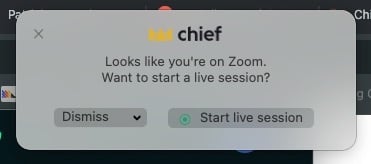
Automatic meeting detection is meant to save you from remembering to hit record: the Chief desktop app notices a supported meeting on Mac or Windows and prompts you to capture it as a Live Session.What to expect
- Keep the Chief desktop app running on your Mac or Windows PC so it can detect a meeting.
- When a meeting is detected, respond to the app’s prompt to start capturing.
- The captured session then appears under Live Sessions in the web app, the same as any Live Session.
If you’d rather start manually
You can always start a Live Session yourself from the desktop app at the start of a call — see “Starting a Live Session.” Manual start doesn’t depend on detection.FAQ
Chief didn't prompt me when my meeting started. Why?
Chief didn't prompt me when my meeting started. Why?
Detection runs in the desktop app, so the app has to be running, paired, and have the permissions required by your operating system. If you weren’t prompted, start the Live Session manually from the app.
Does detection record without asking me?
Does detection record without asking me?
No. Capture is something you confirm — when Chief detects a meeting, it shows a prompt with a Start live session button, and nothing records until you click it. A Live Session then shows a Live badge while it records.