

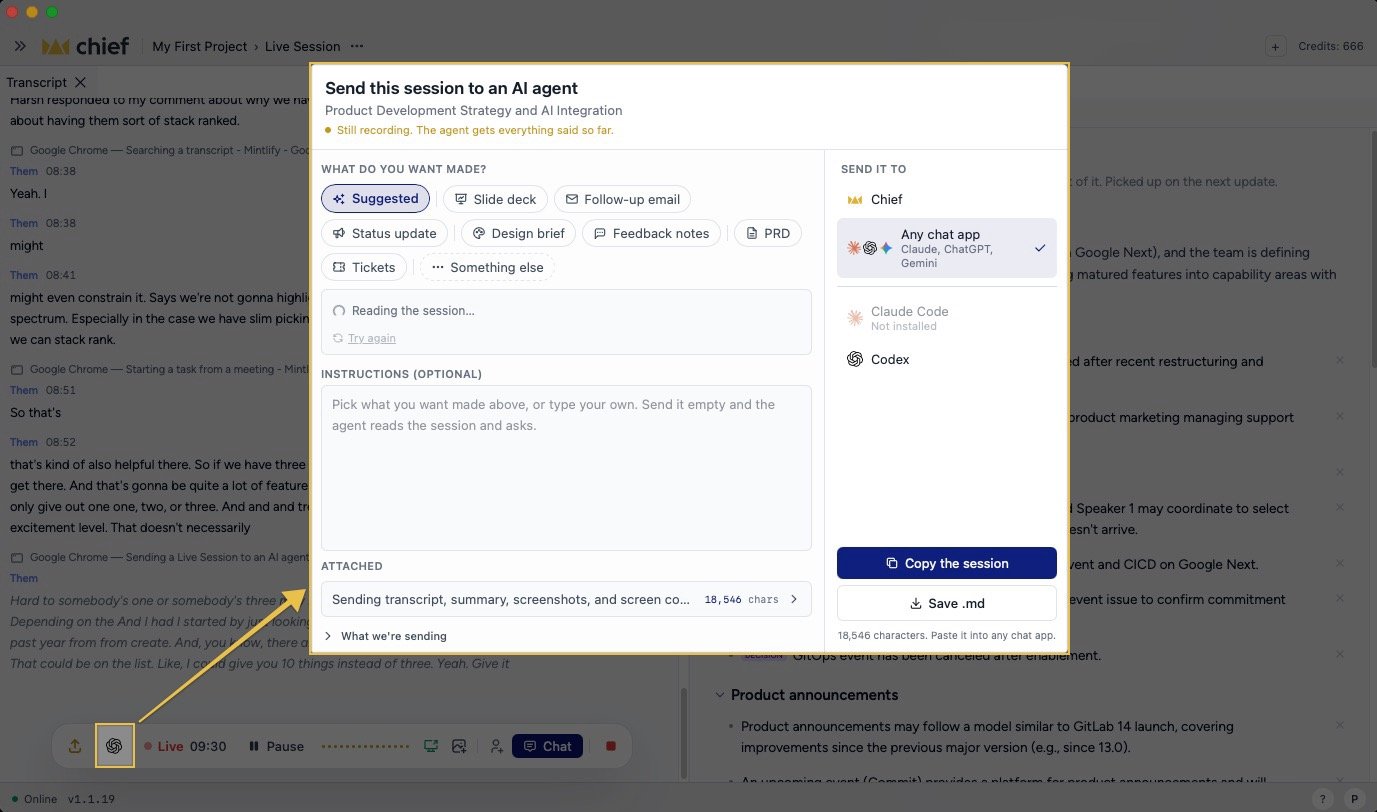
Ask an agent during a Live Session
You can also address Chief or a command-line agent while the session is still running. This starts a conversation about the live session; it does not create the session handoff described below. To ask Chief or one of your own agents:- Click Chat in the floating session control.
- Click the @Chief addressee chip, or type
@at the start of the message. - Choose Chief or an available command-line agent. The menu also shows agents that are not installed and Where agents run when setup is needed.
- Enter your request and send it. A local command-line agent starts on your computer and answers in a new chat. If the selected agent supports it, you can choose Run it in my terminal instead.
- Open the panel picker (+) and choose People & agents. If that panel is already open, select its tab.
- Find the participant. Click Ask beside an agent they made available, or beside Ask or delegate to [name] when you want the person to choose an agent or handle the request themselves.
- Enter the request and click Send ask.
Send from the desktop app
After a session ends:- Click Use this session in the floating session control.
- Choose Send to AI agent. For a folder destination, the row reads Save context folder.
- Choose a saved Handoff destination, or click Set up another destination….
Send from the web app
On a finished session, click Send to AI agent. Under What do you want made?, choose a suggested or fixed shape, add Instructions, then choose Chief or Any chat app under Send it to. Use Copy bundle or Save .md when you want a portable handoff. The session’s ⋯ menu also offers Download agent .md. The handoff can include the transcript, images, Live Notes, and documents or canvases.Let the agent retrieve more context
The exported file identifies the Live Session and explains how an agent can use Chief’s MCP server or REST API for current or additional Project context. The export never embeds your Personal Access Token. If the agent needs access, create and provide credentials securely for the correct Project.FAQ
Why don't I see Send to AI agent while the meeting is running?
Why don't I see Send to AI agent while the meeting is running?
During recording, the action is an icon in the floating control with the tooltip Send the session so far to an AI agent. It is hidden for guests and Collaborator-link participants because the handoff reads the stored Project session.
Do I need a local agent to use the session elsewhere?
Do I need a local agent to use the session elsewhere?
No. For a whole Live Session, use Ask Chief or Download session (.zip) under No setup needed. The downloaded bundle contains the transcript, notes, and session files you can upload to another AI chat.
Can I change the transcript before sending it?
Can I change the transcript before sending it?
The handoff does not edit the stored transcript. Use the setup instruction or the web app’s Instructions field to tell the destination what to make.
Does the export include screenshots?
Does the export include screenshots?
Yes, after Chief publishes durable image links. Images still uploading are omitted until their upload finishes.