

Keep a copy of every run
Besides emailing results, an Action can save each run’s output to your Library as a file. Saved runs are tagged with a Label so you can find them together, compare them over time, and even feed them back into future runs.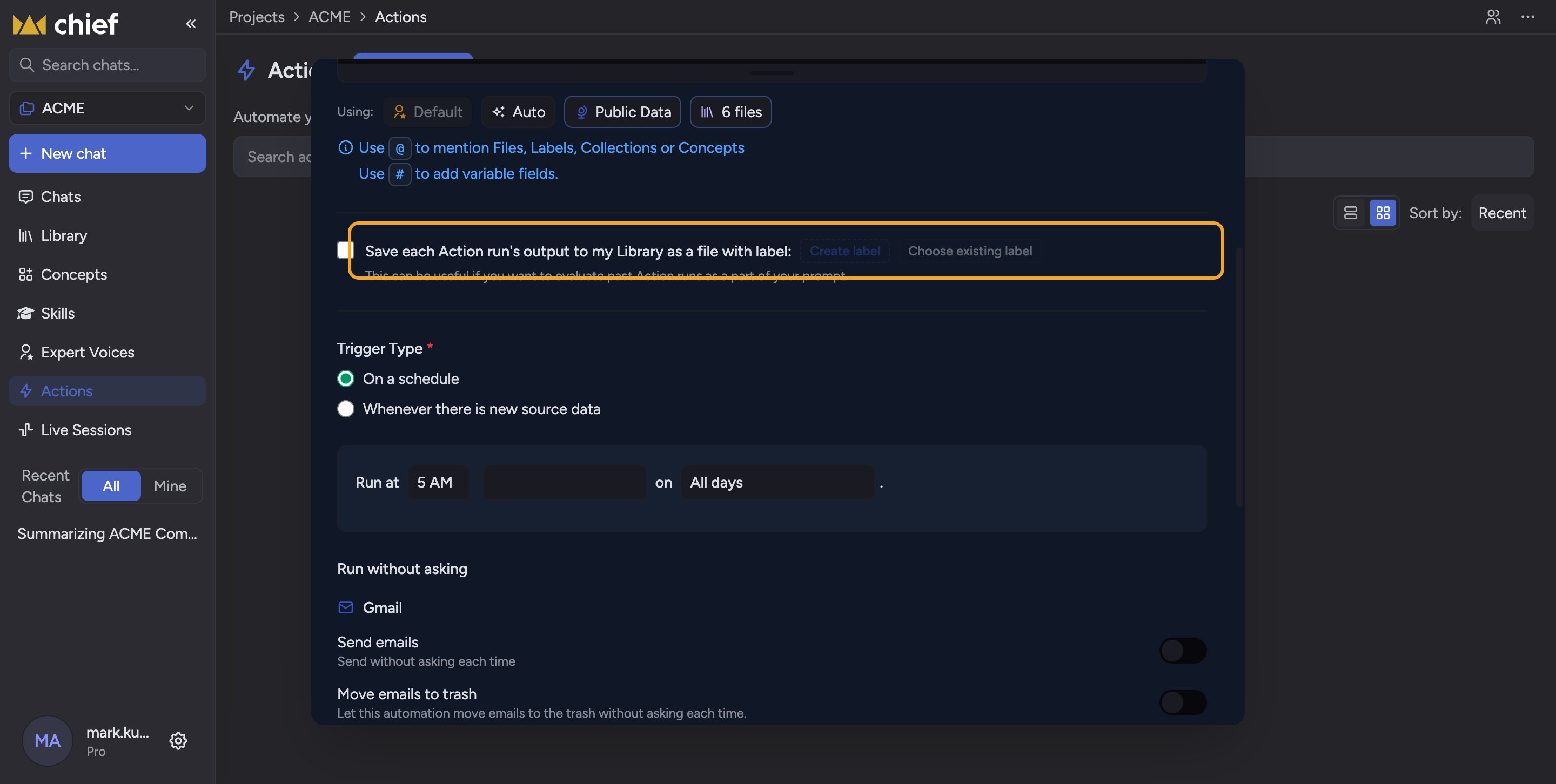
- In the create or edit dialog, check Save each Action run’s output to my Library as a file with label.
- Click Create label to make a new Label (Chief pre-fills a name like “Action Output: [your Action name]”), or click Choose existing label to pick one you already have.
- The selected Label appears as a chip. Remove it with its X, or add more by repeating the step.
ℹ️ Good to know: Tagging saved runs with a Label is what makes deduplication possible — Chief can read past runs under that Label to avoid repeating itself.
FAQ
Where do saved runs show up?
Where do saved runs show up?
In your Library as files, carrying the Label you chose. Filter by that Label to see the full history of the Action’s output.
My run completed but nothing was saved — what happened?
My run completed but nothing was saved — what happened?
Saving to Library can fail independently of the run itself (you may see “Saving to Library failed”). Confirm the Action still has Save to Library checked with a valid Label, and that the run actually produced output. Re-run it manually to retry.
Can I use more than one Label?
Can I use more than one Label?
Yes. Add several Labels and each saved run will carry all of them.