

Delete a File
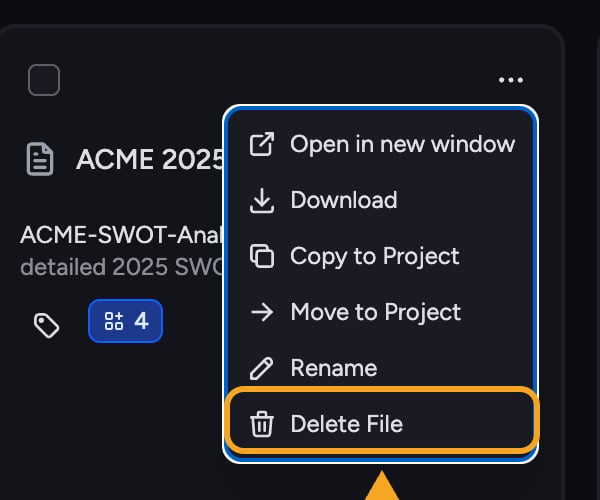
- Select the File you want to remove.
- Click Delete File.
- Confirm. The File is deleted from the project and cannot be recovered.
Delete a task thread
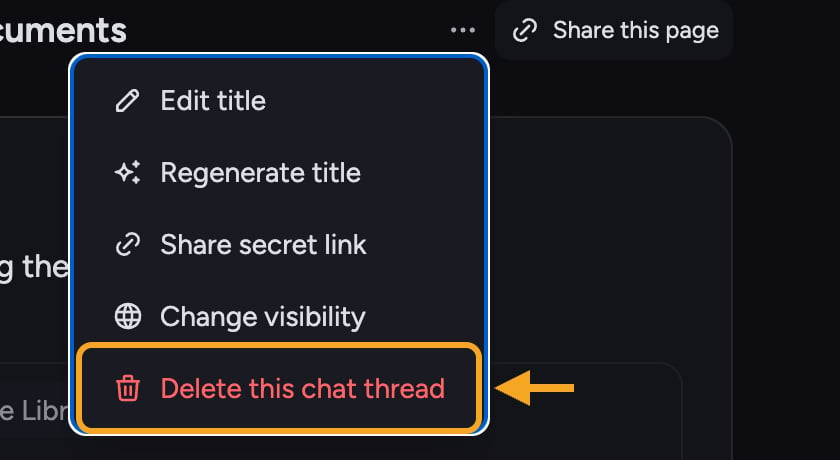
- Open the task menu and click Delete this task.
- Confirm with Yes, Delete Task.
Delete a project
- Open the project’s settings.
- Click Delete Project.
- Under Type the project name to confirm deletion:, enter the project name exactly. Yes, Delete Project stays unavailable until the name matches.
- Click Yes, Delete Project.
How long is data kept?
Deleted items are removed and cannot be recovered through the app. Chief doesn’t publish specific backend retention windows — how long deleted data persists in backups before it’s purged, for example. If you need those details for a security or compliance review, email support@chief.bot and the team will help.FAQ
I deleted a File by accident — can I get it back?
I deleted a File by accident — can I get it back?
No. Deleted Files cannot be recovered. You’d need to upload the File again.
Why can’t I delete this task right now?
Why can’t I delete this task right now?
You can’t delete a task thread while a response is being generated. Wait for the response to complete, then delete.
Does deleting my account erase everything immediately?
Does deleting my account erase everything immediately?
Yes. Account deletion is handled by the Chief team — email support@chief.bot to request it. Once the team processes the request, your account and all its data are deleted immediately, in one pass.