

See what’s new in Chief
Chief ships updates often. The Latest Changes changelog is where you can read about new features, improvements, and fixes as they go live, so you always know what changed. Have an idea for what should ship next? Send feedback.Open Latest Changes
- Find the Latest Changes gift icon in the navigation bar.
- Click it. A What’s new popover opens next to the icon.
- Review the two newest updates. Each shows its title and date, a link for each highlight, and a count of fixes when that update included any.
- Click a title or highlight to jump to that part of the changelog entry, or click See all updates → to open the full changelog.
Open Latest Changes from your account menu
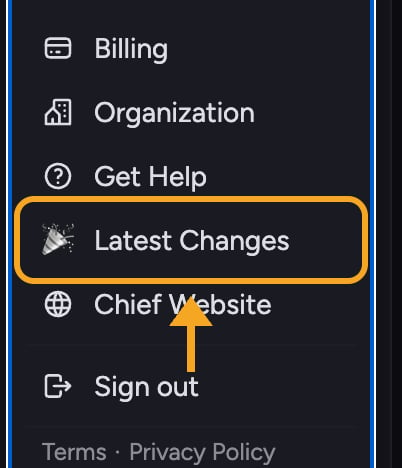
- Click your account avatar in the navigation bar to open the account menu.
- Click Latest Changes in the menu.
- Chief opens
chief.bot/changelogin a new browser tab.
Follow the changelog outside Chief
The changelog is a public publication, so you can follow releases without opening the app:- Subscribe to the changelog RSS feed in your feed reader. The feed includes new entries as they are published.
- Open an individual entry from the changelog index to get a stable permalink, such as
https://chief.bot/changelog/public-changelog-page. Share that URL when you want someone to read one update directly. - Open the Markdown changelog to read the complete index as plain Markdown or provide it to a text-based tool.
FAQ
Does Latest Changes show an unread badge?
Does Latest Changes show an unread badge?
Yes, on the gift icon in the navigation bar. A red dot appears when an update has shipped since you last opened What’s new on this device, and opening the popover clears it. The Latest Changes entry in your account menu has no badge.
I clicked Latest Changes but nothing opened. What should I do?
I clicked Latest Changes but nothing opened. What should I do?
The What’s new popover has nothing to load, so it should open right away. The gift icon is available in both the expanded and collapsed navigation. Click it again, and if it still doesn’t open, reload the page and try once more.