

Revoke a shared task’s secret link
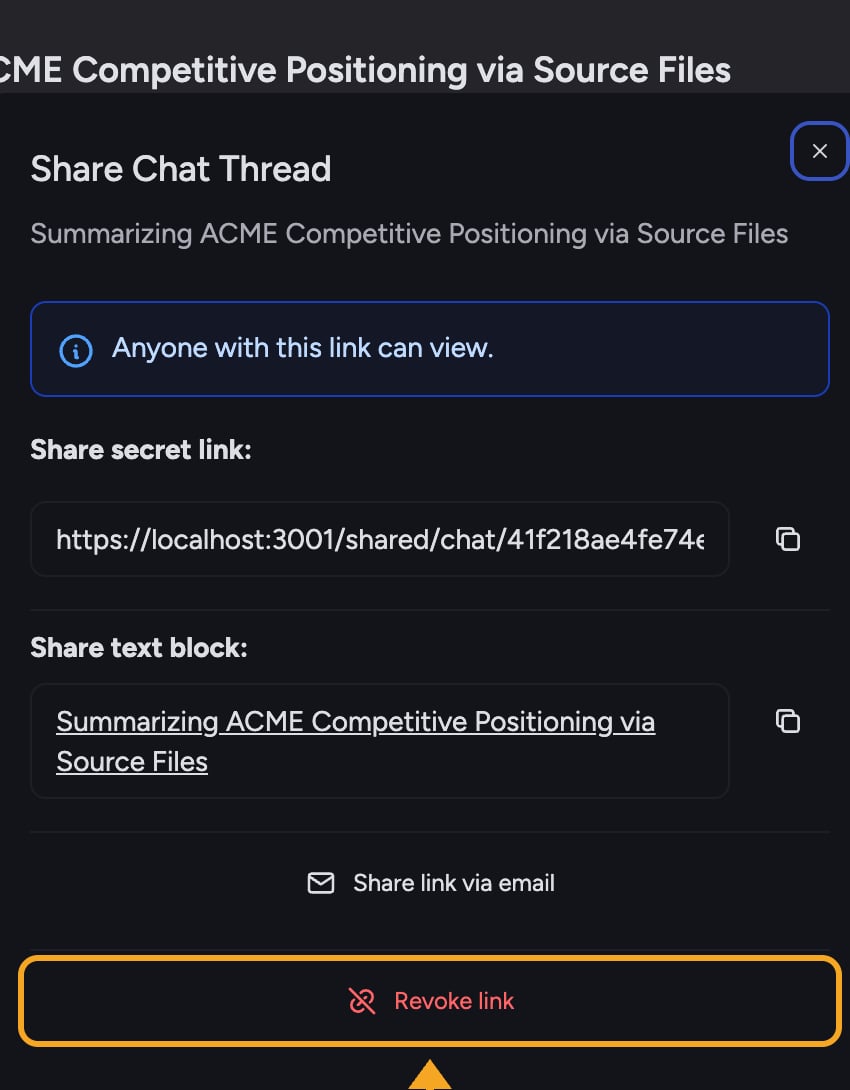
- Open the task that is currently shared.
- Select Share this page beside the task title to open the Share Task dialog. On a narrow screen, select the link icon instead. You can also open the task’s ⋯ menu and select Share secret link. Because the task is shared, you will see the secret link and its options.
- Select Revoke link at the bottom of the dialog.
- The link is disabled. The dialog returns to “This task is not currently shared,” confirming the task is no longer public.
What revoking does and does not change
- Disables the link entirely — there is no per-person revoke. One secret link serves the whole thread, so revoking it cuts off all recipients at once.
- Does not change in-Project access — members of your Project who could already see the task (based on its visibility) keep their access. Revoking only affects the external secret link.
- You can re-share later — selecting Create secret link again generates a new link. Previously shared links stay dead.
FAQ
If I revoke, then create a new link, does the old one work again?
If I revoke, then create a new link, does the old one work again?
No. Creating a new secret link produces a fresh link. Anyone holding the old, revoked link still cannot open the task.
Does revoking delete the task?
Does revoking delete the task?
No. The task stays in your Project exactly as it was. Revoking only removes outside access via the secret link.