

Match the depth of thinking to the job
Every prompt you send Chief runs in a response mode that decides how much reasoning to spend on your answer. Quick questions should come back fast. Hard, multi-step questions deserve deeper thinking. Response modes let you tune that trade-off — or hand the decision to Chief.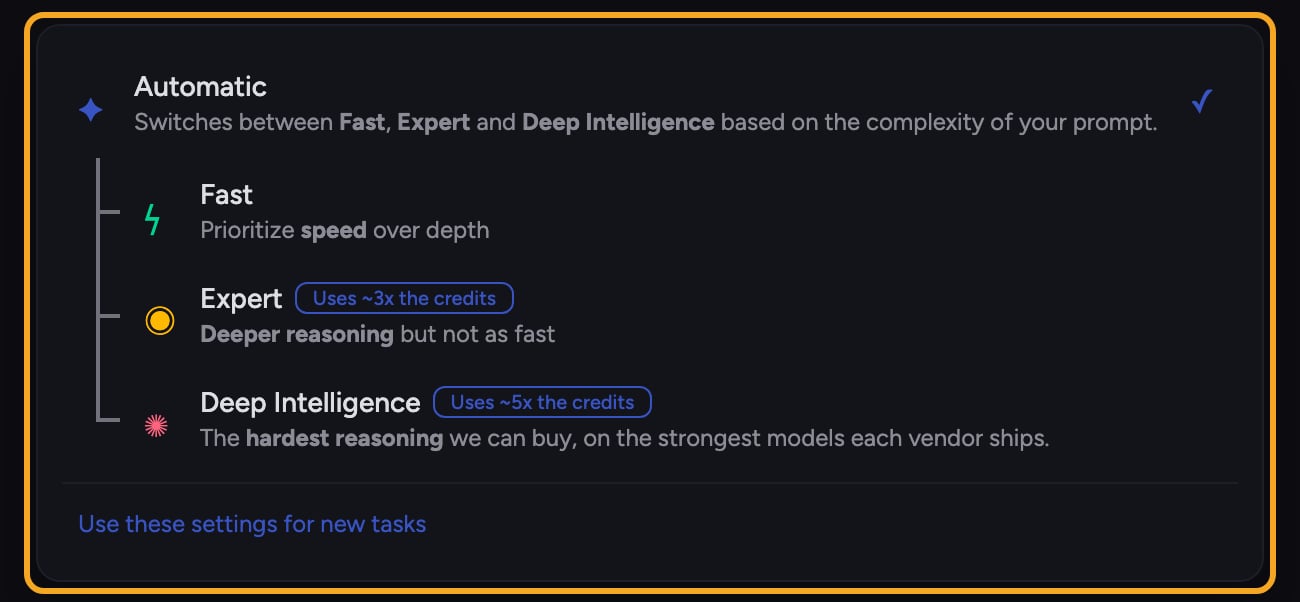
- Automatic — Chief routes the prompt to Fast, Expert, or Deep Intelligence based on its complexity. This is the default.
- Fast — prioritizes speed over depth. Best for quick lookups, simple rewrites, and short follow-ups where you want an answer immediately.
- Expert — deeper reasoning, but not as fast. Best for analysis, comparisons, drafting, and anything where you’d rather wait a moment for a stronger answer.
Good to Know: Automatic can route a difficult prompt to Deep Intelligence, which uses roughly 5x standard credits. If your plan or credit balance does not allow Deep Intelligence, Chief runs the answer on Expert and shows an option to upgrade or top up. Choose a fixed mode when you want to control depth and cost yourself.
How to choose a mode

- In the prompt bar, click the Intelligence chip. When Automatic is selected, the chip shows Chief’s guess for your draft as you type, for example Auto · Expert. Chief makes the final choice when you send.
- Click it to open the list of modes.
- Select Automatic, Fast, or Expert.
- Type your prompt and send it. The mode stays selected for later prompts in the same task.
- Optional: choose Use these settings for new tasks to make the current intelligence settings your default. To return the current task to Automatic, use the Reset control in the Intelligence chip.
Which mode should I use?
- Not sure? Leave it on Automatic.
- Want the answer back as quickly as possible? Use Fast.
- Want the most thorough single-model answer? Use Expert.
FAQ
What's the difference between Automatic and just picking Fast or Expert myself?
What's the difference between Automatic and just picking Fast or Expert myself?
Automatic lets Chief decide among Fast, Expert, and Deep Intelligence for each prompt. Picking a mode yourself locks that depth in, which is useful when you want predictable speed or credit use.
Does the mode I pick stay selected for my next prompt?
Does the mode I pick stay selected for my next prompt?
Yes. The task keeps the settings used by its most recent prompt. Change the mode before sending when you want a different depth. To use the same settings when you start other tasks, choose Use these settings for new tasks.
I picked Expert but my answer still came back quickly — did it work?
I picked Expert but my answer still came back quickly — did it work?
Expert prioritizes depth of reasoning, not a fixed wait time. For a simple question it may still answer quickly. If you need the heaviest, multi-agent analysis, use Deep Intelligence mode instead.