

Choose an AI Provider
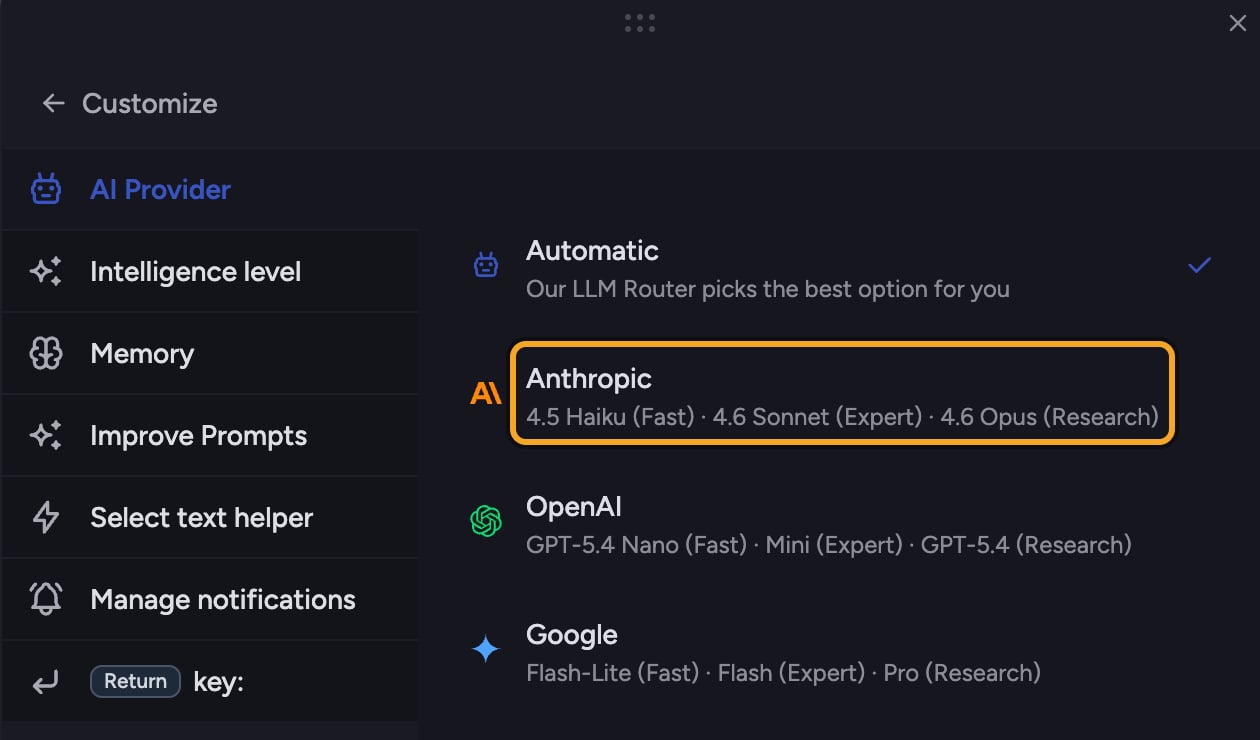
- Click the + button in the prompt bar. The command menu opens.
- Choose AI Provider under Configure. The Customize view opens with AI Provider selected.
- Pick a provider:
- Automatic — Chief’s router picks the best option for you (the default).
- Anthropic — Claude models.
- OpenAI — GPT models.
- Google — Gemini models.
- When you pick a specific provider, a Strategy choice appears:
- Prefer — use the preferred provider when possible, fall back to others if needed.
- Only — exclusively use the selected provider, never fall back.
Good to know: AI Provider and the Intelligence: level are independent. Intelligence (Automatic, Fast, Expert, Deep Intelligence) sets how much reasoning to apply; AI Provider sets whose models do the work. Within each provider, Chief still maps your Intelligence level to that provider’s Fast, Expert, or Deep Intelligence model.
Switch back to Automatic
Open AI Provider again and choose Automatic to hand model selection back to the router.FAQ
My answer came back from a different provider than I picked.
My answer came back from a different provider than I picked.
That happens with the Prefer strategy: if your provider is momentarily unavailable, Chief falls back to another so your prompt still runs. Choose Only if you never want a fallback — though prompts may fail when that provider is unavailable.
Which provider should I choose?
Which provider should I choose?
Leave it on Automatic unless you have a specific reason to prefer one — the router is built to pick the best model for each prompt.