

Stay in control of what Chief does
When an integration can change something in your accounts — send an email, create a calendar event, move messages to Trash — Chief asks before it acts. This article covers how those approvals work, how to let trusted operations run without asking, and how to read connection status.Approving an action
When Chief wants to take an action, it shows a confirmation card with the details and Approve and Reject choices. Eligible write actions also offer Always allow. This approves the current action and saves that operation as a permission, so matching actions can run without a card later. Always allow is not available for deletes, actions started by an automation, or actions proposed to someone else. Some cards also offer Edit so you can adjust the details first, and a Notify attendees option for calendar changes. Nothing happens until you approve. Examples include Send this email?, Create this event?, and Move to Trash?ℹ️ Good to know: If you reload and reopen a task, an already-handled action shows its outcome (for example, “Email sent” or “This action has already been handled”) rather than asking you to approve it again.
Let operations run without asking
You can let specific operations run automatically once their integration is connected. Choose Always allow on an eligible confirmation card, or manage saved permissions from either of these places:- Open Settings › Tool permissions. This page controls what Chief does without asking across the web app, Slack, and the desktop app. After you use Always allow, the confirmation card shows Manage, which opens this page.
- Open Command Center and choose Tools & integrations, or expand Using: in the prompt bar and click an integration icon. Under Connected, click a tool’s row to reveal its operation toggles — for example, Gmail’s Send emails and Move emails to trash, and Google Calendar’s Create & edit events. A collapsed row summarizes how many operations run automatically, such as None of 2 auto or 1 of 2 auto. Use Manage in settings to open the dedicated permissions page.
Reading connection status
- In Settings › Connected accounts, each Slack workspace deployed to a Project you’re in shows Connect Slack, or Connected with a Disconnect button. Personal connections to MCP servers deployed to your Project appear here too, with Reconnect needed when one has lapsed. If no workspace is listed, an organization owner hasn’t deployed one to your Projects yet.
- In Settings › Tool permissions, you can review or turn off operations that Chief may run without asking. These permissions apply across the web app, Slack, and the desktop app; the integration rows shown depend on the current Project’s connections.
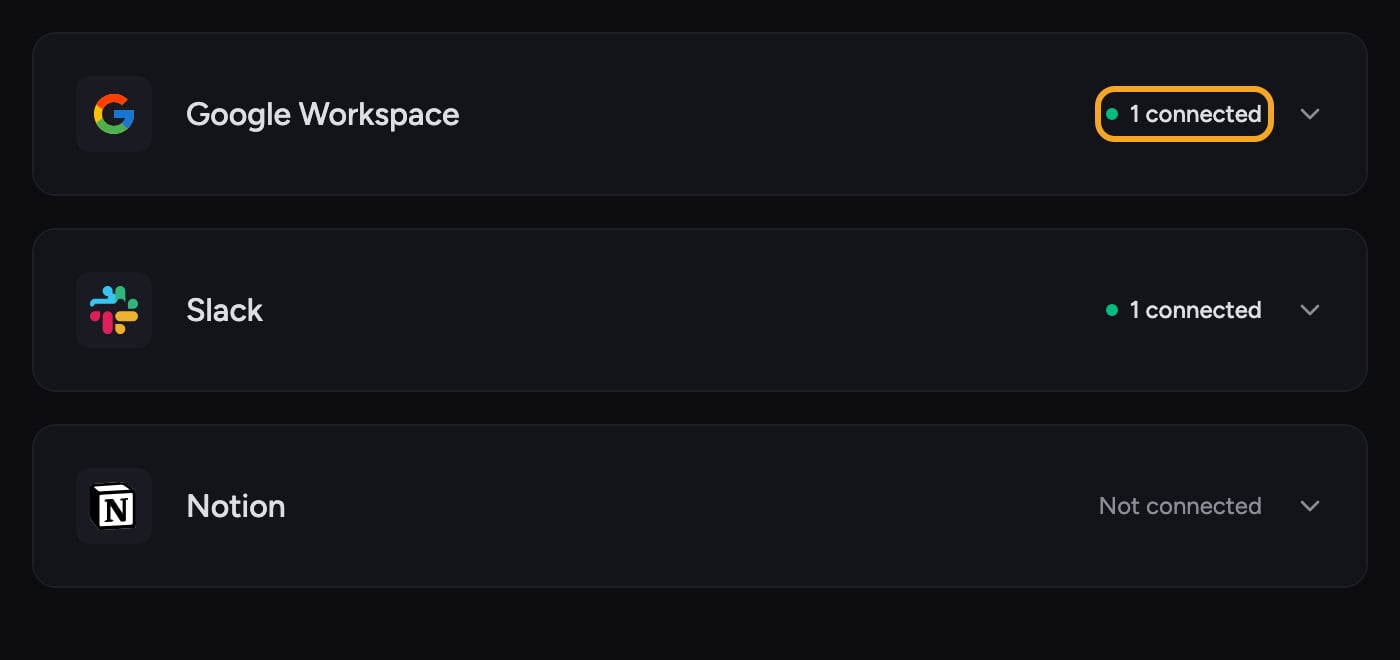
- In Organization › Integrations (owners only), each integration’s header shows how many workspaces are connected (for example 1 connected), Not connected, or an amber Reconnect required — the last outranks the count when a Notion or Google Workspace credential has stopped working, and the card explains what to do (for Google Workspace: check the service account key and subject email, then reconnect).
- In Tools & integrations, operation toggles appear under Connected. Google and custom integrations that need your personal connection appear separately under Needs your connection.
- In task, if a Google capability isn’t connected or is missing a permission, Chief shows a Connect Google card; if your org’s Google Workspace can’t serve it, it shows a Google Workspace setup required card.
FAQ
An action I approved came back as "Action failed."
An action I approved came back as "Action failed."
Chief accepted your approval but the operation failed on the connected service’s side. Try the request again. If it keeps failing, the integration may have lost its connection or permission — reconnect it, then retry. For your own Google account, click Connect Google on the card Chief shows in the task; for an organization integration, an owner uses Reconnect or Update secret on its card under Organization › Integrations.
I turned off a "run without asking" toggle — will past automatic actions be undone?
I turned off a "run without asking" toggle — will past automatic actions be undone?
No. The toggle only affects future actions. Turning it off means Chief will ask for approval again the next time; it doesn’t reverse anything already done.
A tool is missing from the tools panel even though I thought it was connected.
A tool is missing from the tools panel even though I thought it was connected.
First check Needs your connection and use Connect if the tool is there. If it is absent, the organization integration may not be deployed to the current Project. Check Organization › Integrations (or ask an owner to), reconnect or deploy it, then return to set your operation toggles.